










X-T1: Tethering with Adobe Lightroom and Fujifilm HS-V5
Talk to Rico (open forum for questions & feedback)
Rico’s Books at Rocky Nook – Fuji X Secrets Workshops – Rico’s Flickr Sets
Istanbul Calling – Fuji X Secrets X30 Workshop in Nuremberg
—
My new book featuring 111 X-Pert tipps for X-T1 users will be available as an eBook this month, with a printed version following in March. Let’s have a quick look at USB tethering options for the X-T1 that are available after Fujifilm’s press announcement from earlier today.
Tethering requires you to connect your X-T1 to a computer with a USB cable. To make it work, select SET-UP > USB MODE > PC SHOOT AUTO. This makes sure that your tethering software (Adobe Lightroom or Fuji’s HS-V5) will recognize the camera.
A tethered X-T1 operates in single shot mode only, so the setting of the DRIVE dial has no significance. There are two basic tethering modes: camera mode and PC mode.
- Camera mode means that the camera is still operated by the photographer. In this mode, tethering transfers the recorded images directly to the computer for review and further processing. The only remote control capability is a remote shutter release.
- PC mode means that the camera can be located elsewhere (like a remote location). It can be remotely configured and controlled from the PC running the tethering software. There’s also a live view image on the computer, so the person operating the computer can see what the camera is seeing.
Lightroom Tethering
Adobe Lightroom supports tethering in camera mode only. To make it work, you have to first install a plug-in that’s available from Fujifilm (beginning February, 26). This plug-in requires Lightroom version 5.7 or newer. There are different plug-in versions for Windows and Mac OS. You can select the “Tethered Capture” function in Lightroom’s “File” menu to access a simple control panel that allows you to remotely release the shutter. And that’s about it. Images are immediately sent to the computer; they aren’t recorded on the camera’s SD memory card. Of course, this also means that you don’t have to insert a memory card into your camera to use it for tethered shooting.

Adobe Lightroom offers tethering with the X-T1. The interface is rather basic and only supports camera mode. This means that all settings and configurations have to be performed on the camera.
HS-V5 Tethering
Fuji’s HS-V5 software supports camera mode and PC mode, so you can control your X-T1 while you are sitting in front of your laptop or PC. You can choose whether to save image files on your computer or in the camera’s SD memory card (or both).
HS-V5 only runs on Windows, so Mac OS users will have to install a (virtual) Windows machine on their computer. Personally, I was using Parallels Desktop and Windows 8.1 to check out a pre-release version of HS-V5 on my MacBook Pro.
HS-V5 sports a pretty hideous user interface—it’s based on Fujifilm’s ancient Hyper-Utility software. However, this doesn’t prevent Fuji from charging for it.
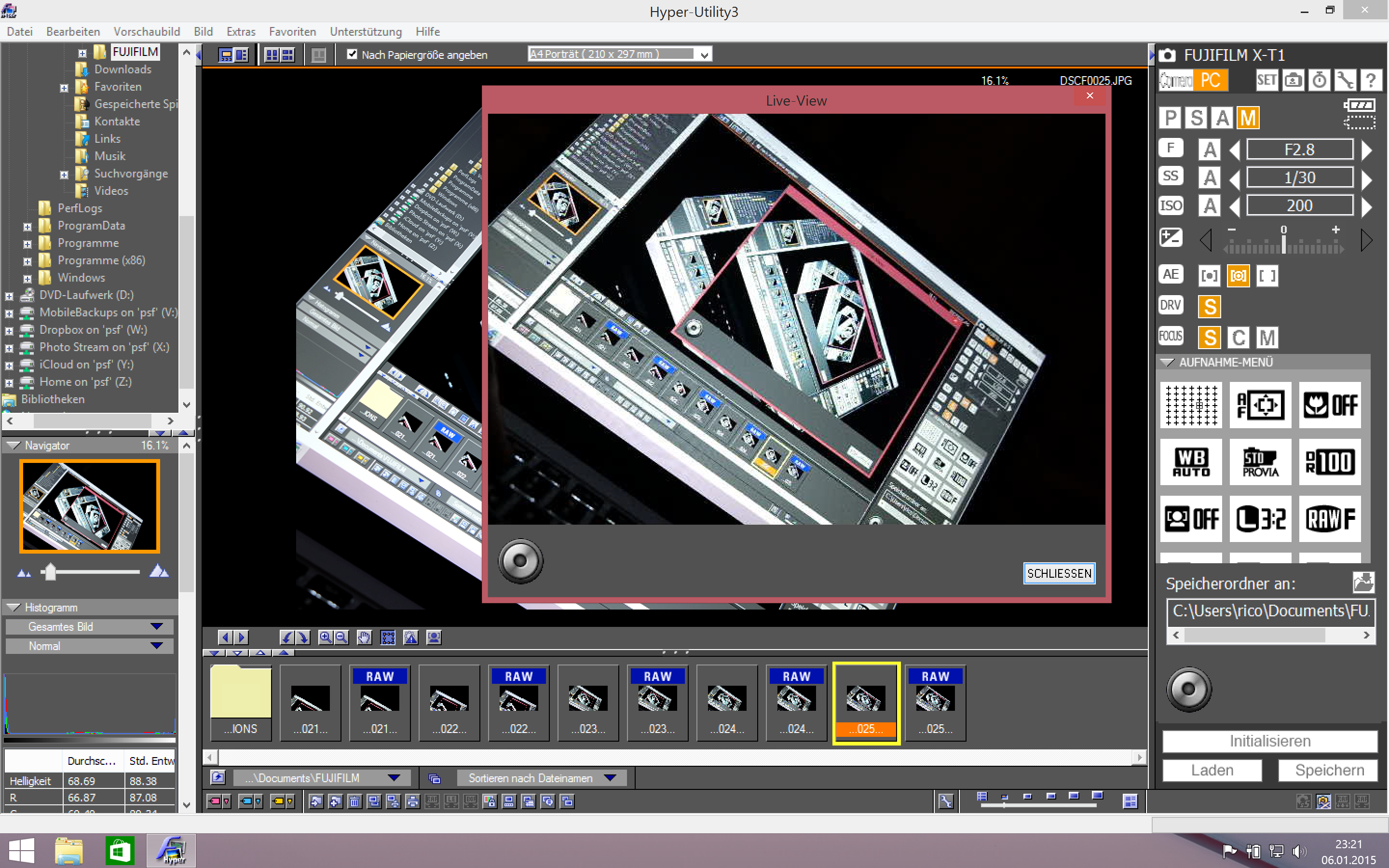
Fuji’s HS-V5 software supports USB tethering in camera mode and PC mode. The latter allows you to remotely control almost all camera settings. The software also features a live view window that can be used to select the focus area and release the shutter by clicking in it. However, with its ancient user interface, HS-V5 is far from elegant. Even worse, it isn’t free.
For your convenience, here’s a TOC with links to my previous X-PERT CORNER articles:
- First Look: Fujinon XF16-55mmF2.8 R LM WR
- XF 56mm APD vs. XF 56mm
- New Firmware Features (3): X-T1 Firmware Version 3.00
- New Firmware Features (2): Using Camera Remote
- New Firmware Features (1): Using AF+MF
- First Look: Fujinon XF 50-140mm F2.8 R LM OIS WR
- Using the Fujifilm X100T
- First Look: Fujifilm X30
- First Look: XF18-135mmF3.5-5.6 R LM OIS WR
- X-E2: Behind Firmware 2.00
- First Look: Fujifilm TCL-X100 Teleconverter for X100(S) Cameras
- First Look: Fujinon XF10-24mmF4 R OIS
- First Look: Fujifilm X-T1
- First Look: Fujinon XF56mmF1.2 R
- Exposing Right
- Using Auto-ISO
- Using Face Detection
- First Look: Fujifilm XQ1
- PDAF & LMO Lens Firmware Updates Coming in November
- First Look: Fujifilm X-E2
- How Fuji could save the X-M1
- X-A1 vs. X-M1: Photo Ninja Edition
- X-A1 vs. X-M1: the Shootout
- Using the Fujifilm X-A1 [& X-M1]
- First Look: Fujinon XF23mmF1.4 R
- RAW Converter Shootout Results
- Ultimate RAW Converter Shootout
- First Look: X-M1 with New Kit Zoom and Pancake Lens
- Zeiss Touit vs. Fujinon XF
- Remote Shutter Control for X Series Cameras
- Apple Camera RAW, X-Trans and EXR
- First Look: XF55-200mmF3.5-4.8 R LM OIS
- Studio X
- Using the X100S
- Using the X20
- X100S vs. X100
- X20 vs. X10
- RAW, JPEG, Silkypix and “Fuji Colors”
- Adapting Third-Party Lenses (updated with Speed Booster)
- RAW for JPEG Shooters…
- Tips for Updating your Firmware
- How to Clean the X-Trans Sensor
- Using the XF14mmF2.8 R
- Decoding XF18-55mmF2.8-4 R LM OIS
- Comparing RAW converters: JPEG vs. Lightroom, Capture One, Silkypix & RPP
- XF14mmF2.8 R appears to be almost distortion free
- How to Expand Dynamic Range
- How to Use Extended ISO
- EXR, anyone?
- Capture One – When the Going Gets Tough…
- Using Shooting Profiles and the Quick Menu
Rico Pfirstinger studied communications and has been working as journalist, publicist, and photographer since the mid-80s. He has written a number of books on topics as diverse as Adobe PageMaker and sled dogs, and produced a beautiful book of photographs titled Huskies in Action (German version). He has spent time working as the head of a department with the German Burda-Publishing Company and served as chief editor for a winter sports website. After eight years as a freelance film critic and entertainment writer in Los Angeles, Rico now lives in Germany and devotes his time to digital photography and compact camera systems. His new ebook The Fujifilm X-E2: Beyond the Manual is available at Rocky Nook.
27 Responses
Looks good! Excited to try it out.
Do i understand correctly that the plugin even for Mac requires that you buy the Wlndows software??
If Fuji does release a Mac (and PC) Lightroom plug-in, then even better you could tether directly to Lightroom, and it should be free. After reading the article again, apparently the Fuji software would allow you to control the camera from the software, but if we can control the camera ourselves, and get the images straight into Lightroom on my Mac, I’m a happy camper.
Unless the tethering plugin for Lightroom somehow relies on the drivers from the HS-V5 software
Well, I have since learned that the plug-in, PC only, will only be given to those that purchase the PC software. Bummer 🙁
Aaargh! So not only will we have to buy a Windows license, but also a Windows version of Lightroom ????
Legally, Adobe will let you install Lightroom on 2 machines, so you could download a copy of Lightroom for Windows. Parallels will let you run Windows on a Mac, but I would wait until they have a Mac version, or better yet, until Adobe adds tethering support for Fuji to Lightroom, like they have for Nikon, Canon, and I don’t know who else.
http://www.fujifilm.com/support/digital_cameras/software/hsv5/win_mac/
downloadable Fuji plugins after you have purchased Sounds like Adobe and Fuji have an agreement in place.
I just don’t get it, so where the heck can I get the HS-V5 software from?
You can download Lightroom on 2 computers, so you could download it for Windows for free if you have the Mac version, but hopefully Fuji will make a Mac version, or better, Adobe will add Fuji tethering to Lightroom.
Downloadable Fuji plugins for Adobe. If that’s all you need then everyone will be happy.
http://www.fujifilm.com/support/digital_cameras/software/hsv5/win_mac/
This is the way Adobe and Fuji are going with this.
That’s Fuji’s current plan. Hilarious. I doubt they’ll pull it off.
Let me summarize: Their raw converter is free and cross-platform, but does not match the in-camera conversion and has a clumsy UI. Their tether utility/plugin is essentially driver software, but costs quite a bit of money and the styling of the UI is more retro than any X series camera ever. There is no Mac version of the tether software, the Windows Lightroom plugin requires an additional program to be bought and installed, and it is completely unclear how the Mac version of the tether plugin is supposed to work because it apparently requires windows software — whether it is just a license or if it actually requires it for the camera interaction or if it relies on Auto Import and a shared folder with a Windows VM is not apparent, thoug it does not matter much since neither is acceptable from a user’s perspective. There is no support for Capture One, which has better raw conversion quality with Fuji raw files than LR and is the choice of many professionals as well as amateurs who migrated because they were not satisfied with LR’s X-Trans demosaicing. Fujifilm’s tether solution forces you to choose between PC and Camera mode, though this is probably due to them using physical dials, but still, on Nikon cameras we can do both at the same time. The Fuji smartphone/tablet apps can access and control the cameras via WiFi, but the tether software supports cables only instead of both. The camera WiFi function does not support FTP transfer.
Somebody please conclusively tell me that this is not a mess of a situation as far as software goes.
Just for reference: Hasselblad Phocus does both tethering and raw conversion, is free (free stuff from bloody Hasselblad, imagine that!), has a modern native interface, interacts with the corresponding smartphone/tablet application and it can work with raw files from other manufacturers.
Fuji makes great cameras and lenses, but the software side definitely still leaves some room for improvement.
I’m confused. There’s a native Mac version of the LR plugin, yet the Fuji tethering software, which is PC only, is required to tether.
In the article it mentions that there are Mac LR plug-ins, for tethering to like Nikon or Canon cameras, for example. But the Fuji software is PC only. IF, however, Fuji does release a Mac (and PC) Lightroom plug-in, then even better you could tether directly to Lightroom, and it should be free. After reading the article again, apparently the Fuji software would allow you to control the camera from the software, but if we can control the camera ourselves, and get the images straight into Lightroom on my Mac, I’m a happy camper.
I have since learned that the plug-in, PC only, will only be given to those that purchase the PC software. Bummer 🙁
No significance?! What happened to the usual “set it right or it won’t work”? And let me ask you, what features are disabled by tethering? Flash? Face detection? Raw+JPEG shooting?…
Ah c’mon Fuji … ! Some of your quirkiness I’m prepared to swallow for the X goodness but jeez how simple is it to build a Mac Lightroom tethering plug-in that you distribute for FREE … to ‘the faithful’ (i.e. registered X-T1 users) ??
Besides their Mac phobia, looking at the screen shots it seems like Fuji
just isn’t good at software design. This is the least slick looking app
I’ve ever seen. It looks extremely dated, like it belongs on Windows
3.1 or neXt. I would hope that Windows users don’t find this acceptable. I know it wouldn’t pass on the Mac.
Personally, I really don’t care about “slick” looking. This app is fully functional for its purpose and works great. I am running it on a Microsoft Surface Pro 3 windows 8.1. It works great and doesn’t hog up my drive with tons of waste. Functionality. They have taken an old program HS-V3 which did run the MAC incidentally, and added HS-V5. It works great for me, I have used it during two portraits shoots and some product shooting.
It’s not about slick. It’s about giving a crap, which Fuji doesn’t seem to. It’s a lack of professionalism and care. I don’t understand how you could buy a camera 50% for its looks and then accept a piece of software that looks and operates like it’s 20 years old.
I’ve used the wifi sync software for mac and it also looks like a Win16 app. It behaves like one too with confusing functionality and poor translation. Caring about software is caring about every part of the software.
Why doesn’t Fuji open up their SDK on how to access the WiFi functionality?
USB cables are cumbersome for thethered shoots and all you need is the JPG to be transferred as a review.
That way people could develop for Mac OS X themselves. Especially now Fuji let Mac users in the cold.
They’ve already done that, you’re about a month late.
no you can’t do that from a PC (WIndows or Mac) only from a smartphone or a tablet
Where can I get the HS-V5 software? I can´t find a darn place to dowload it in Fuji´s website where there´s an option to buy it
Any news about when we can purchase HS-V5 or the Lightroom plugin from Adobe Exchange? I really dont care about HS-V5 – but wouldn’t mind purchase it if I that way got my hands on the LR plugin earlier…
So I purchase a Mac not to use Windows and Fuji wants me to buy Windows, Parallels and HS-V5 (software for Windows) so that I can tether? Yeah, that makes sense.