







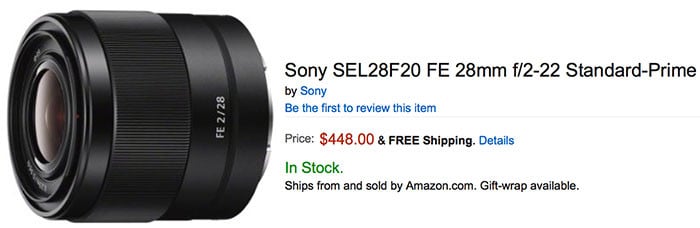
FOr the very first time the new Sony FE 28mm lens is in Stock at Amazon, Adorama, BHphoto, FocusCamera, Sony US. Also the converters are in Stock. Here are the full links:
28mm FE:
US at Amazon, Adorama, BHphoto, FocusCamera, Sony US.
Europe at Sony Germany, UK, FR, IT, ES, NL, BE, AT, CH, SE, FI, NO, PT.
Asia at Digitalrev, Sony Australia.
Converters:
Sony Fisheye Converter for E 16mm F/2.8 and E 20mm F/2.8 at Amazon, Adorama, BHphoto.
Sony Ultra-Wide Converter for E 16mm F2.8 and E 20mm F2.8 at Amazon, Adorama, BHphoto.
Wide angle converter for 16 and 20mm lenses at Sony DE, UK, FR, IT, ES, NL, BE, AT, CH, SE, FI, NO, PT.
Fisheye converter for 16 and 20mm lenses at Sony DE, UK, FR, IT, ES, NL, BE, AT, CH, SE, FI, NO, PT.
Wide angle converter for 16 and 20mm lenses at Digitalrev, Sony Australia.
Fisheye converter for 16 and 20mm lenses at Digitalrev, Sony Australia.
17 Responses
no way!!! really???
❖❖✔❖✔GET Profit Sitting h0me with Google Finance@ne28::
➨➨➨➨http://IntactNetRace.com/daystar/easy…
Admin : Zeiss, Loxia, Sony…. I think it would be great to have a list of all the FE lenses available so far (or already announced)
(Not counting adapted lenses even though some Voigtländers are specifically designed for FE. Not counting the converters for the 28/2.)
Primes:
– Zeiss Batis 25/2
– Sony 28/2
– Sony Zeiss 35/1.4
– Zeiss Loxia 35/2
– Sony Zeiss 35/2.8
– Mitakon 50/0.95
– Zeiss Loxia 50/2
– Sony Zeiss 55/1.8
– Zeiss Batis 85/1.8
– Sony 90/2.8 macro
Zooms:
– Sony Zeiss 16-35/4
– Sony Zeiss 24-70/4
– Sony 70-200/4
– Sony 28-70/3.5-5.6
– Sony 28-135/4
– Sony 24-240/3.5-6.3
Did I miss any?
Perfect, exactly what I was looking for !
Thanks a lot Mike !
Might I also add a few 3rd party fe lenses:
Mitakon 85 1.2
Rokibowyang series of lenses including the 14, 24, 35, 50, 85, 135mm, and the 100mm macro.
May not change too many minds. All the lenses that I’m interested in have already been mentioned in your excellent list.
I am really disappointed at the low level of SR4(5) rumors concerning the upcoming A7RII (or whatever it will be called). It’s time to put your spooks and spies to work, grease some palms and get us some juice! We need some leaked pics and specs! MAKE IT SO! …please 🙂
Serious question. What is the purpose of this lens. I own the FE 35mm 2.8
Lets in one more stop of light. Slightly wider. Compatible with their UWA/fisheye adapters.
It is the cheap prime people have been crying about.
The 35/2.8 is smaller, is better built, has a genius lens hood, and renders nicer images IMO. But people wanted a cheap prime and Sony delivered. And it’s quite decent for the price.
Like Mike said, I bought it because I was curious (have the 55/ 1.8 and 35/ 2.8) and to be honest I will be ditching it soon. The barrel distortion is really horrible, if you shoot JPEG files then it’s no issue because the camera corrects for that. I was testing it again last night and noticed that once attached to the A7ii that it will not allow you to disable the Lens Compensation/distortion, checked on my 35 and it allows it, again on the 55 it will not allow it.
No profile for it in your raw processing tool?
If you are using an older version of PS (CS5 for me), and even if you update to the latest Camera Raw/DNG converter (which is 9.0) you won’t get all of the extra bits like Lens profiles etc. The only way i have been able to get the Lens profile for Lightroom etc.. is to either get LR 6 or have a new version of PS. There are no stand alone profiles that you can download and put into LR. I was wanting to find someone with the new LR 6 for Mac and have them go into their profiles.. copy the 28mm F/2 and send it to me, and let me put it in my LR 5.7.1 version and see if it would wok. Iv yet to find someone with LR 6 for mac yet.
I feel its a bit strange than you need to update two pieces of software just for a lens profile. I spent 2 days researching this, and this is the best i have found so far
Actually, Adobe allows you to download their lens profile creator and test charts, and you can use these to create your own profiles. Are you sure the profiles are different for Mac and Windows?
I saw the lens profile creator, i read through it.. but i don’t have enough space to set up all the charts etc here in my room (small tiny room in Vietnam), but i did download it. I had someone send me a profile from windows.. and it wouldn’t work.. completely different looking file, but yea we did try that.
There is optional app you can download to your camera for lens compensation in raw.
Finally Sony has something under $500