







[shoplink 40657 ebay]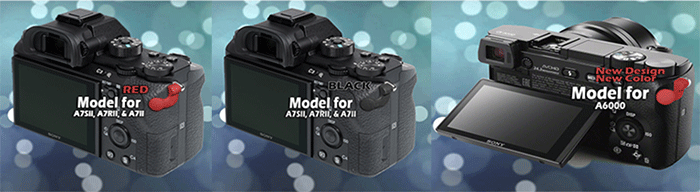 [/shoplink]
Cineasy sent me that press text for their new Video Button Enhancement product for the new Sony A7rII, As7II and A7II cameras. You can buy the button on eBay in [shoplink 40657 ebay]Black color (Click here)[/shoplink] or [shoplink 40658 ebay]Red color (Click here)[/shoplink].
PRESS TEXT:
We now have new models for the Sony A7SII/A7RII/A7II Cameras. We have two colors for this new model, Red & Black. It also has a more sleek, stylish design.
The Sony A7S is one of the best video cameras in the market. The Sony A6000 is one of the best selling crop sensor cameras in the market. The new line of A7SII/RII models promise even better video quality and more features. But all of these cameras have a challenge when using the video feature. The video record button is too small, awkwardly placed and slightly recessed. This makes it very difficult to activate without much fumbling around. You usually have to remove your eyes from the viewfinder to even locate the button. All this searching and fumbling around can cause shaky footage or missing the action all together.
Cineasy have come up with a low cost solution called the Cineasy Touch Button Enhancement. The Cineasy Touch installs in just minutes and offers a much more intuitive and responsive experience. It provides a larger point of contact which can easily be found without removing your eye from the view finder. It simply attaches to the neck strap eyelet nearest the video button with the included screw. The nylon resin material is resistant to vibration which minimizes the risk of bumping and accidentally engaging the video button.
Current models for the A7S, A7R, A7, A7SII, A7RII, A7II and A6000 can be purchased directly from http://www.cineasytouch.com or on [shoplink 40657 ebay]Ebay (search for cineasy touch)[/shoplink]. For more info please watch the video at: https://vimeo.com/128038653.
See it used here on BBC Project
https://www.cinema5d.com/working-with-the-sony-a7s-for-broadcast-part-ii/
EBAY Listings
A7S/A7R/A7 Black
[shoplink 40659 ebay]http://www.ebay.com/itm/221835783050[/shoplink]
A6000 Black
[shoplink 40660 ebay]http://www.ebay.com/itm/221826479708[/shoplink]
A6000 Red
[shoplink 40661 ebay]http://www.ebay.com/itm/221891445969[/shoplink]
A7SII/A7RII/A7II Black
[shoplink 40657 ebay]http://www.ebay.com/itm/221891456541[/shoplink]
A7SII/A7RII/A7II Red
[shoplink 40658 ebay]http://www.ebay.com/itm/221891453043[/shoplink]
16 Responses
Mechanical cludges, like we are in 19th century…
I have a much better video button enhancement for my A7S, it’s called PIX-E5. 😉
Nice, thinking about getting one, the only thing I’m not too keen on is the minijack audio. AndI’m not sure what the XLR module is going to cost, but the size is much better then the massive Atomos. Now if someone makes a EVF extension module you snap on…
I had the Shogun, and I can say the E5 is a step up in almost every regard. If you don’t need 4K through SDI, the PIX is a smarter buy. Smaller, sturdier, quieter and the USB3 drives are so smooth to use when transferring photage. The Atomos SSD caddies/reader are pretty awful. The bad things with the E5 is I wished the ports were on the back side and the USB drive sticks up a little bit over the top. But it is understandable since there is very little real estate on the small unit.
The PIX-LR with the XLR ports and VU meter will be $350 at introduction. A fair price IMHO. And yeah, the E5 comes pretty bare from the start, so you have to add pretty much everything to be able to start using it. Worth having in mind when comparing unit prices from Atomos and Video Devices.
From what I have read the PIX is smart, compact and from my experience with sound devices / video devices, build like a tank. The USB drive is very clever and one of those things that help with the workflow, not add to it. $350 is a good price. I will probably get a SDI version for my other camera’s, and to be honest I think it’s still great value.
Yep that hood, I love it, it makes it not just a great recorder but very multi functional. I was going to get a SmallHD, but this should give me what I want. I think this is one of those pieces of kit, like the Sound Devices mixer I bought years ago, that is going to last for a long time.
And yes the Sony video record button s stupid, Canon did it right on the 7D /5DIII
You know what sucks? The original button is perfect. The firmware sucks. Turn that “record” button into a MODE SWITCH (photo/video mode). Split all menues. Split configuration. Now, in video mode the sutter button would work as start/stop – finished. And for most people then the mode switch button is quite nicely done.
Great, so now we have a mode dial and mode switch? I like it the way it is, I can put the camera into whatever Photo mode I want and press video record and shoot video, press shutter and shoot a picture. The only reason people find it annoying is because you need to be a thumb contortionist to use it while holding the camera.
“All this searching and fumbling around can cause shaky footage or missing the action all together.”
Wow. Do they sell adult diapers with this gadget too? Might as well fully exploit the targeted demographic.
“Cineasy have come up with a low cost solution called the Cineasy Touch Button Enhancement”
Wow, $19.95 it’s a bargain. 😉
https://sugru.com/great-for/photography
As Thomas is saying: Make the shutter button act as a record button in video mode.
That should be an incredibly simple software fix.
Come on Sony, be smarter!
“You will not be able to attach a neck strap while the Cineasy is attached.”
I did order the Sugru button, we’ll see how that works.
That is a bit odd, the only time the button is not so easy to push is when you are shooting handheld, which, for me anyway, means you want to use the strap + cage.
Never use a strap so no problem there. speaking of straps, I want a camera strap with a zip chord that sits on my back. I can reach around with one hand and pull it down like an arrow- then the zip chord brings it back and out of my way.
On the A7R2 i simply placed the Movie Record function to the C2 button, and that will work much better than any enhancement of this side button. With the right programming of the Custom Key Settings, this camera can be used much easier and faster than anything else. Here is my setup after lots of tests, which works great to do photo and video at the same time:
Control Wheel: ISO
Custom Button 1: Peaking Level
Custom Button 2: MOVIE (REC)
Custom Button 3: Focus Settings
Custom Button 4: White Balance
Center Button: Focus Settings
Left Button: Focus Mode
Right Button: Zebra
Down Button: Focus Area
AEL Button: Eye AF
AF/MF Button: Eye AF
Focus Hold Button (on Lens): unchanged, Focus Hold
MENU: I try to leave “APS-C/Super 35mm” selected at any time, so there is easy access to switch between full frame and crop mode (which unfortunately is the only thing you can not do from a free configuration button).
For anyone who is interested, this is my recommended Function Menu Setup:
Function Upper 1: Aspect Ratio
Function Upper 2: Steady Shot Adjust
Function Upper 3: Silent Shooting
Function Upper 4: Picture Profile
Function Upper 5: Picture Effect
Function Upper 6: Flash Comp
Function Lower 1: Drive Mode
Function Lower 2: Steady S. Focal Length
Function Lower 3: Audio Rec Level
Function Lower 4: Creative Style
Function Lower 5: DRO/Auto HDR
Function Lower 6: Selftimer during Brkt
This is ridiculous. Sony placed the button on an odd angle, because of all the complaints of how video mode was accidentally activated on the NEX-7. I feel like this is a solution looking for a problem.