







Today Phase One has announced the XF 101 megapixel back. The CMOS sensor was developed by Sony and uses a similar [shoplink 43671 ebay]Sony A7RII[/shoplink] sensor design. Phase One says this is a “Full Frame” sensor. What they mean is that it has the real field-of view size of 53.7 x 40.4mm. It means unlike previous Phase One backs there is no crop.
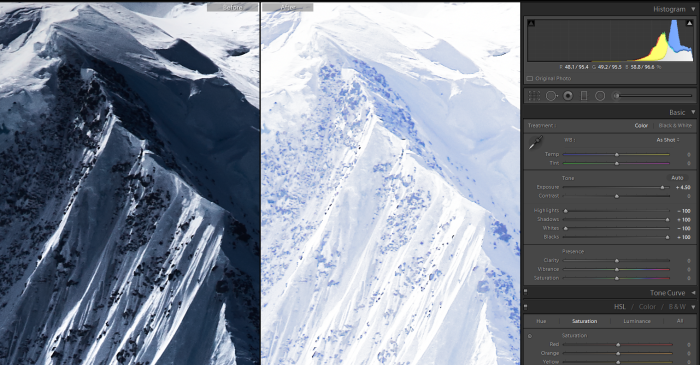
Original Phase One 101 MP file (left) and 4.5 stop overexposure (right). Image courtesy by Ori Cohen
Our reader Ori Cohen made a short test with the files available for download at Phase One’s website:
“The XF 100MP boasts at being the “ultimate camera system”, powered by the world’s first 100MP sony sensor. Phase One generously gave us a few TIF sample files to inspect, and they are simply stunning. This much detail is every photographer’s dream, but it comes at a high cost of not just money, but also processing power. My system can handle huge files, but editing a 500MB TIF demands more than an I7 and 32GB of memory. I was excited to see that one of the files was under-exposed. The image in question is the dramatic mountain that was shot at ISO100, and its histogram is leaning to the left, with the help of LR I recovered the shadows and blacks in order to see if there was any noise in the shadows. In fact, the majority of the image’s pixels are dark blue\gray. Recovery of the shadows and blacks to 100% did not show any noisy pixels. In a second attempt to force the noise to appear, I pushed the “exposure” slider by +4.5 stops, and there was still no noise! obviously the highlights and whites were blown, but with a small amount of highlights and whites recovery they stayed within the histogram. The only reason I did not add +5 FULL stops of exposure was because the highlights and whites recovery sliders’ range is too narrow for this 16 bit file and can’t push the over exposed pixels to the left of the histogram. Although this observation was done at the optimal ISO, as a comparison I could not recover a similarly under-exposed A99 RAW file without seeing noise at ISO 100. I believe that this camera can recover shadows by more than 4.5 stops without showing noise artifacts, but in order to do that Adobe needs to give us the ability to dial in more than 5 stops in each direction, and extend the shadow/darks/highlights/whites recovery range.”
44 Responses
It’s time to ditch Lightroom and go Capture One…
Did that a long time ago!!! Life is good 🙂
Are there any benefits if one wasn’t using such a crazy camera?
generally better output quality is the main one, like for like.
Interesting!
CMOS full medium format is very interesting, but the price is insane, I hope PENTAX gets their hands on this sensor to and greats a serious competitor for a fraction of the costs.
Now I want a Sony 45mp 6×6 or 6×4 digitalback for my 500 series hasselblad (in hasselblad chrome or black style) and 60% cheaper plus peaking mode.
Oh well either if sony will make this… I guess we still pay 10k for a digital back.
“I believe that this camera can recover shadows by more than 4.5 stops without showing noise artifacts, but in order to do that Adobe needs to give us the ability to dial in more than 5 stops in each direction, and extend the shadow/darks/highlights/whites recovery range.””
Or just use Capture One 😉 It’s the software that comes with this camera and is designed to get the most out of these sensors. By creating layers prior to RAW conversion you can pretty much dial in any exposure compensation prior to demosaic that you want.
Mind explaining the part about creating layers?
I use C1 Pro 9 btw
Go to local adjustment tab, create a new adjustment layer, fill for the full picture, and add some extra exposure. I use an A7S and sometimes I have to resort to this.
Sorry, your answer hadn’t posted yet when i started to write pretty much the same thing 🙂
np, happens all the time. 🙂
lol do they really use np in the English world? Or is this actually a Japanese thing?
I think it is a geek thing. Not that I’d ever pronounce it as “np”, as opposed to e.g.: ASAP, more like e.g.
If you go into the local adjustment tool and just make an adjustment layer and mask of the entire frame you have the whole exposure range adjustment available to you again, add another layer, do it again. You can do that 16 times before running out of layers.
I think you could do the exact same in LR, only it sort of doesn’t work anymore after 2 or 3 layers, you could move a slider further (like shadow/highlight) and there would be almost no change in the picture. I never had the need to try this with exposure though.
Thanks guys! You only have to resort to this if the original adjustment isn’t sufficient am I right??
Yep, only if you want more than the max allowed.
Can this be done in LR or Adobe DNG converter?
Sony could make this one…
+-36mp
Tri-navi
Leaf-shutter
http://i.imgur.com/3GWcMtv.jpg
I agree. Tri-navi makes much more sense than first gen a7’s controls. I don’t know about the second gen’s but I’m finally getting mine in a month.
How is tri navi any better than A7???? Really? Did you try A7?
It is evolution of tri-navi and is quad-navi….you get same as tri-navi 3 customizable dials and you get fixed exposure compensation dial. This makes things much faster and more practical. I am yet to see camera as good as A7.
In particular A7 work very well with auto ISO in M mode. This cannot be said of the crippled NEX-7 ergonomics. Bare A7 has more than 50 improvements ot the ergonomics that I have spotted moving from NEX-7. It is just marvelous experience
Add the Joystick from the A77 and a custom menue and you are done.
lmao I tried a7 many times. I hate those buttons where they put just above the ledge, the ledge digs into my finger every time I reach for those buttons. The buttons set for zooming in and out during playback are ridiculous. I only needed the center button to zoom in and out on NEX-7 yet they set it so that the center button, easily reachable and very close to the scroll wheel/buttons, does nothing, and both buttons used in its stead are high up making you waste time reaching for it every time you zoom. The shutter button placement is also ridiculous, a definite downgrade from NEX-7, good thing they fixed it in gen 2. Auto ISO in M is a firmware problem and has nothing to do with the ergonomics. Fixed exposure comp dial is meaningless and just adds to the possibility of it being dialed accidentally while in stow.
Hi Sibuzaru! Can I post your image on SAR? WIll make a poll to see if people would consider to buy a medium format RX 🙂
No problem.
Please also do a poll asking if SAR readers would like to spend a night with a supermodel!
The distance between the upper dials and the lower dial is very big and I will not be able to cover this with my thumb.
Yeah, maybe I could put the dial on the top (in place of menu button) and simple arrow keys on the bottom.
It still have room for a front dial, I’ll give it a try later.
http://aspect-ratios.net/rangefinder-cameras/wp-content/uploads/2011/08/Bronica-RF645_02.jpg
Ok Thanks! I will wait for your “final” draw 🙂
It’s cropped! The actual 645 format is 6×4.5 cm which has actual image size of 56mm x 42mm.
https://www.alliedvision.com/en/news/detail/news/interview-sony-announces-end-of-ccd-sensor-production.html
“02/25/2015
Sony has announced that it will stop production of all CCD-sensors as of March 2017”
Everything makes sense now. I thought things were fishy back then with no replacement in sight.
But now they finally managed to create a CMOS at this size. That’s amazing in itself, since as far as I know Medium Format CCD sensors are small pieces glued together whereas CMOS is forged in 1 piece. Sony’s production capabilities just keeps pushing the bar.
If you divide 100mp by the square of the diagonal you arrive to roughly 42mp..
The resolution is spectacular. On a side note: does it look like tonal bandig on the edges of the shadows around the nose? I was surprised to see this artifact at ISO 100 … (examine the PhaseOne_XF100MP_Alexander-Flemming.tif at 100%)
Looks fine to me.
I don’t see banding, but there is some dodgy makeup…and I bet the model will be horrified to see what a hairy nose she has!
The bottom line is that this is almost too good…
still deeply retouched.
You don’t need a supercomputer to handle these files! Not by a long shot…
The problem is not the file size, but Lightroom extremely inefficient engine. I have no problem editing 250 Megapixel (stitched) files in Photoshop CS 6, even using tons of layers, while Lightroom 6 already struggles a fair bit with the Sony A7r files. When I edit the 250Mp files in Lightroom is slow, but it is still feasible if you edit just a few images this large once in a while and if you don’t need to spot them or reduce noise (the 2 most processor-intensive tasks).
And I’m using a mid-2011 iMac with an 2.7 i5 core processor, 24GB of Ram and an SSD as the main disk. Not exactly a supercomputer as you can see, but it does the job perfectly.
You can easily build a $1000 computer that handles files from this camera with ease nowadays, my teacher used to say that the PC is the cheapest tool you can buy.
Things only get complicated for 4k video.
Well may be one ought to try Capture One Pro with a Phase One back if they seriously want to get the maximum out of the camera…..
I just wonder. How deeply retouched (thats for sure) portrait can represent such a system?
What does “deeply retouched” mean? They’re only trying to show you detail, color depth and dynamic range. Nothing you can do to an image increases those things, editing only reduces them.
@SAR_Admin:disqus Remember, this is advertising. The stunning TIFF samples, Phase One gave you/us so generously, are not beautiful because of the camera that was used. They are breathtaking because of perfect and beautifully creative (and hard) studio work, and incredible skilled landscape photographers.
Just my opinion.
Tried assigning AdobeRGB to samples,awsome quality.