










Silkypix
Thanks Justin for sharing the following news with Fujirumors (facebook – twitter).
“Hello Patrick, I have just spotted that a new version of Silkypix RAW File Converter for Windows and Mac has been posted by Fuji, under the Application Software tab on the Download Drivers & Software page. The new version is 3.2.17.0. This is a further update from the version supplied (on CD) with the X100S, 3.2.15.0, which has never, to my knowledge, been offered as an online download. Best regards, Justin“. You can download Mac / Windows version. From the Fuji Global site:
The firmware update Ver.3.2.17.0 incorporates the following issues:
Image quality is improved for models in which “X-Trans CMOS sensor” or “X-Trans CMOS Ⅱ sensor” is incorporated.
Applicable models for the raw file converter are added as follows
FUJIFILM X-M1 / X100S / X20
FinePix F900EXR / HS50EXR / SL1000
X-M1
(XF 27mm pre-order available at AmazonDE)
X-M1 (body only or with 16-50mm) – USA: AmazonUS / BHphoto / Adorama / DigitalRev / Pictureline EUROPE: DigitalRev / WexUK / PCHstore / AmazonITA / AmazonDE
XF 27mm – USA: AmazonUS / BHphoto / Adorama / DigitalRev / Pictureline EUROPE: AmazonDE / DigitalRev / WexUK / PCHstore / AmazonITA XC 16-50: WexUK / PCHstore
_ _ _
– Rico Pfirstinger updated his X-M1 flickr set with a lot of new images. Click here to see them!
– The French site focusnumerique posted the following ISO comparison: [shoplink 13828]X-M1[/shoplink] vs [shoplink 12882]X-PRO1[/shoplink] vs [shoplink 12881]X-E1[/shoplink] vs [shoplink 13800]Olympus PEN E-P5[/shoplink] at their website here.
– Dave Kai Piper does not agree with the statement that the X-M1 lost the X-series soul. He is testing it with the Zeiss lenses: “There are some interesting elements to this camera, which you can read all about after I have finished the Review.” Check out Dave’s post here. Oh, and as usual, Dave will spoil you with beautiful images!
– Randall Cipriano posted his first impressions (and samples) of the X-M1 with 27mm lens here. His conclusions: “The X-M1 and the XF27mm F2.8 are great additions to the Fujifilm X Series ecosystem. With these, Fujifilm has addressed not only the entry level market but also for those who already own an X series camera who may want a second (or third or fourth) smaller and lighter body especially when paired with the XF27mm that does not compromise image quality from the top of the line models. The XF27mm F2.8 is very sharp even wide open. And despite being tiny it’s also fast and quiet. It’s the first XF lens to not have an R designation which signifies that it doesn’t have an aperture ring. My guess is it’s the same with the X-M1, to make it smaller and make it even more affordable. It’s a great walk around lens and anyone with an X series wanting to add more stealth to their already inconspicuous cameras will enjoy this lens a lot.”
– The Japanese site camera.itmedia posted its X-M1 review here (translation)
– The Spanish quesabesde X-M1 hands on and samples can be checked out here (translation)
– X-M1 shooting report at yodobashi.com (translation).
X100S
[shopcountry 12883]
– Documentary Photographer Jack Picone was in Myanmar and he chose the X100S as his travel companion. See how the X100S works on the field here at vimeo.
– “YES” That’s the unequivocal answer of fujix-files to the question if it’s worth to sell the X100 and get the X100S (click here). From the conclusions:
“After using this camera daily for more than 3 month with roughly 5000 photos taken, I can answer this question with a big “YES!” for myself. […] And it is also worth a second look for people who had operating issues with the classic X100. But I must also add that this does not make the classic X100 an obsolete camera. If you don’t want to spend the new price on a X100S and don’t mind the minor operating issues that I had with the classic X100 (mainly close focus distance before having to switch to Macro, MF in low light and two handed AF point selection) it is still a camera with wonderful image quality at a very interesting used price. […] Only the difference in image quality from the new sensor would not have been my reason to upgrade…”
– Is the X100S the best manual focus camera ever made? Yes, according to Neil! Read why here.
– FR-reader Justin sent me his X100S review and I’m glad to share it with you here. It feels good, it’s fast and WOW, these image quality. According to Justin the battery life could be better and, well, it’s not weather sealed!
X20
[shopcountry 12884]
– Matt Golowczynski published his comprehensive X20 review here. From the verdict: “[…]. Although it may be difficult to distinguish any extra detail in real-world images from those of other enthusiast compacts, lab testing confirms the sensor’s ability to record detail beyond what would ordinarily be expected for a 12-million-pixel compact. Furthermore, the inclusion of a viewfinder immediately heightens its appeal, with the addition of the Digital Trans Panel making it considerably more useful in low-light. […]. Naturally, the X20 is not perfect. Its noise-reduction system illustrates why shooting and manually processing raw images is often the best approach in terms of image quality, and it’s a shame that the LCD screen’s resolution hasn’t improved since the X10. […].”
X-PRO1
[shopcountry 12882]
– Fun & Frustrating Fuji X Pro-1 at foto-gizmo: “The “Q” button, a great idea, but in the wrong place. It is too easy to hit the button with the lower part of one’s thumb when gripping the camera for an shot, bringing up the quick menu instead of an image on the LCD or within the hybrid viewfinder. […]” Read more here.
– Here is another one who moved from the DSLR to the Fuji X-system. Read thebigpicturegallery’s post here. “I usually see the grumbles about autofocus speed to be the main gripe, and one that leads folk to stay with the DSLR. However if you persevere and learn how to use the camera, learn how to overcome its focus issues, you will be so pleased with the image results. Once focus is found its totally bang on. I have always loved Fuji for their approach to applying their knowledge gained in film development, and applying this to their digital camera systems.”
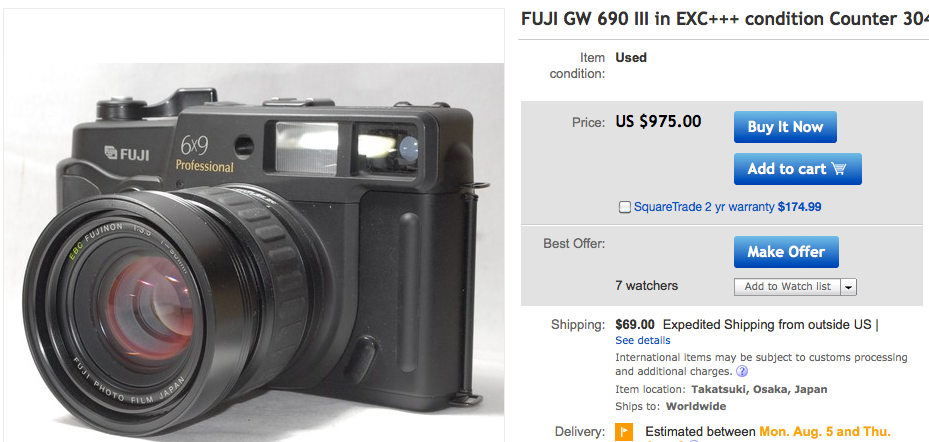
[shoplink 15181 ebay]Fuji GW 690 III[/shoplink]
Daniel Stocker from stockografie (nice X shots on his blog!) told me via email:
“Many people think that Fuji was inspired by the Leica cameras at the time they designed the [shoplink 12882]X-PRO1[/shoplink]. I think differntly. Take a look at [shoplink 15182 ebay]this ebay.de auction[/shoplink]. Well if that´s not our beloved [shoplink 12882]X-PRO1[/shoplink] then I don´t know what is. www.stockografie.blogspot.com. Thanks, Daniel”
see the Fuji GW 690 III available at [shoplink 15181 ebay]your ebay here[/shoplink]
13 Responses
High price of the 27mm is disappointing. 🙁
In the French site focusnumerique, the IO of X-E1 is the worst in Fuji X series, and seems out of focus in any ISO level.
BTW: The site use different lenses in the test. (X-Pro1 35mm prime, X-E1 18-55, X-M1 16-50).
I just compare the SONY NEX 5N and Fuji X E1 using the ISO6400 pictures from this site, and IMO the winner is 5N.
There’s something weird about this comparison which I guess is related to optical resolution or just different noise and compression settings, as all X bodies have essentially the same sensor, not even the X100S looks that much different. Just take a look at the output with the DPReview RAW comparison tool and judge for yourself.
U r right, the result between X-E1 and X-Pro1 at ISO6400 is quite similar in DPReview.
Maybe it is just me, but the updated silkypix renders X100s files much better now…
Just installed the new Silkypix and tried it on the stock download of the X-Pro1 RAW file from DP Review’s image comparison scene. (the ISO 200 file) When exporting TIF files, the detail is MUCH better than LR4 on default settings. (I don’t have LR5 to try) Adjustments to sharpening and noise control on LR still don’t bring out detail that is present in Silkypix. It’s just not there in LR.
I found the result being much better if I turn off any noise reduction and sharpness and export the DNG using Silkypix and then sharpen it using ACR. Much finer detail and no smudges in the textures. Silkypix still sucks with sharpening, but renders RAF’s pretty well.
The file looks dull exported with zero sharpness out of Silkypix, but it is them much more manageable using LR or ACR, including the highlight recovery.
Note that LR 4.4 and 5.0 have the same RAF profile…so they should be virtually identical.
Ok…I give up. How do you export a DNG from Silkypix?
Sorry, not DNG, but TIFF… 🙂 just select the file type in the development menu.
Here is the result of a flat TIFF processed in LR 4.4…it looks OK for me, I picked up some shitty random shot using something that comes close to the optimal (ISO200, 1/400s @ f8 without strong back light). The stone texture could be slightly better…but all the fine detail is fine: https://www.dropbox.com/s/te7q7zp0erl1wk5/20130508-DSCF1361.jpg
Aside from the high jpg compression, looks good. 🙂
Thanks! There is an option for original file download, dropbox automatically resizes in the viewer but then the jpeg downloads as original. 😉