










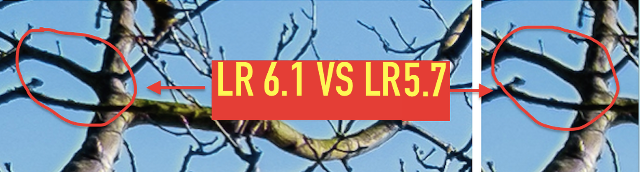
LR 5.7 Vs. LR 6.1 100% Crop Comparison
_ _ _
It seems that Adobe is about to unlock the Full Potential of the X-TRANS sensor… and yesterday they made the first important step.
As demonstrated by FXF Member BarwickGreen in this FXF thread, the annoying halo effect has been significantly improved! He shared & compared some 100% crops here processed in LR5.7 and LR6… and I definitely like the results 🙂 .
And this is just the beginning. In fact, Adobe is also working to “improve fine detail rendering and overall edge definition.”
So Adobe’s poor X-TRANS demosaicing was not just a placebo or pixel peeper problem ;)… and I’m happy to see them finally sorting out this issue.
Feel Free to Share your own tests in this thread here.
54 Responses
hmm… I’m bit confused, does this x-trans rendering change get to 6.1 standalone version or is it only in CC?
Both version get the improved X-Trans support
I’m not so sure, Barwick Green posted this link,
http://blogs.adobe.c…357725226688774
In this case it actually is a ‘bug’ and not a feature, meaning they all get the fix, even good ‘ol Photoshop ACR (for CS6 users) get it with ACR 9.1
But it really is just a fix to edge halos caused by a bug in the blue channel, the promise of improved xtrans rendering in general ‘in collaboration with Fuji’ is still to come !
So NO version has the real xtrans improvement yet at all. This really should be clarified somewhere because it seems most people have misunderstood, and so did i at first.
This is the little bugger that was fixed: http://feedback.photoshop.com/photoshop_family/topics/lightroom_and_fujifilm_x_trans_cameras_halo_around_blue_areas
Thank you for taking the time to clarify this misleading point. I think that we’re all got a bit too excited that Adobe had finally got their act together, that we all read what we wanted to read on the first look.
I’m not sure why this is so hard. PhotoNinja renders much more detail and it’s developed by one guy. Adobe should seriously consider licensing from or buying out Picture Code.
Nothing good ever came out of such acquisitions by Adobe.
Macromedia Freehand… RIP
DxO doesn’t play along with Fuji as well. Back in the stage something is working against users.
Don’t get carried away. I don’t think Adobe has ever unlocked the full potential of any sensor.
Yet it keeps improving, just like the Budweiser (which tastes less and less like urine with each new generation).
Haha – you are hilarious
important to say, that you are talking about Budweiser American Lager and NOT the czech Budweiser Budvar!
Budweiser is getting closer to carbonated water 🙂 I think my love for a good marzen or stout has destroyed my ability to fully enjoy other beers though.
I’m okay with Lightroom. Too bad it runs so slowly on my i7 at 4.6 GHz, and my 780 Ti isn’t really giving me any noticeable performance boost.
No SSD drive I assume?
I have an SSD drive and fast 1866 speed RAM. I don’t store my photos on the SSD drive, but I keep the catalog there (and back it up on another HDD). Something is up… the last version was so fast and smooth for me, and every other program on my system is snappy, unlike Lightroom.
Strange. I have an i7 2.30 Ghz with 16 GB ram and an hybrid drive and Lightroom is really snappy.
Maybe I need to just re-install.
Maybe. No clue. But it should run fine on your specs..
Try Heineken, world’s best !
No, I’m a Warsteiner type.
Happy I finally subscribed to CC..
Why is it so difficult to find the link where you can download LR 6.1 (standalone version)? Still searching…
3rd link on Google :/ http://www.lightroomfanatic.com/getting-started/buy-standalone-version-lightroom/
Thanks, but what if I already have LR6 and want to upgrade to 6.1?
Good question. Doesn’t it just update to .1?
Yesterday I checked for updates through LR itself, but it said everything was up to date. I may have been too early. Will try again soon. Thanks again!
I would imagine you should get updates untill LR 7..
I would hope so. Still, I get the impression that LR6 (non-CC) users are regarded as second-class customers by Adobe. I came from Aperture 3 and until it was discontinued I was really satisfied with how Apple communicated about updates. For some reason, Adobe is so inaccessible and unintuitive.
I started using LR and PS many years ago so I’m used to it. I recently decided to subscribe. The Photographic suite is quite affordable for the tools you get.
Well, I guess I need to get used to it as well (maybe I will switch to CC in the future, but first Adobe should deserve it…). Working on it… 😉
mine updated to LR 6.1 without issue ( from 6.0)
Great to hear! I’m sure it will work for me as well if I try again tonight.
Have you tried using silkypix to convert .RAF to .TIFF before putting them into Adobe?
Don’t look for a link. In Lightroom, click Help > Updates.
Thanks, will try that later on (again, because yesterday it said that everything was up to date already).
That’s how I updated mine. It found the update and the adobe app manager downloaded and installed the update for me. I didn’t have to go to the web site like in the old days and download it manually.
This is weird. Just clicked Help > Updates… again and it still says that everything’s up to date (but the current version is 6.0). I don’t get it…. Any more tips?
Solved it! For some reason, clicking Help > Updates doesn’t work for everybody, but I found this link on the Lightroom Journal: http://blogs.adobe.com/lightroomjournal/2013/06/keeping-lightroom-up-to-date.html#lrcc2015
It provides a downloadable patch of version 6.1. This works fine (I only had to enter the serial number again).
I’m not sure what’s going on. The new CC arrangement makes it a little more confusing to troubleshoot…even for standalone users.
You’re right, but I solved the problem in the meantime. See below… Thanks again for your suggestions!
Also having trouble finding the update. Typing in ‘Updates” in the Help menu in Lightroom gives 5 items, the second of which is ‘Find software and updates online’ but that pop up deals only with Apple updates and software and directs you to Apple sites. What am I doing wrong?
What about Camera Raw, for Photoshop users?
The Camera RAW module of Lightroom and Photoshop CC are always the same and they updated almost at the same time. The Camera RAW version for Photoshop CC is now 9.1
Yeah. And does it change the way Adobe DNG converter handles its conversion? If adobe makes a good algorithm and we use it to convert our files to dng will this help in other software?
In theory these updates should apply to all versions of Lightroom, since the updates just bring in the new camera raw engine. Manually updating camera raw in Lightroom 5.X should see the same improvement, or at least that’s my assumption.
Yea thats what I think too. I hope someone confirms it.
I updated last night to camera raw 9.1 but saw no difference on a photo I processed. I’ll have to find one with blue sky, since it seems the only improvement really is with halo on blue backgrounds, everything else stays much the same.
Thanks for checking Victor. Please update us when you check a pic with blue skies
Sounds good but how does one manually update camera raw in LR 5.x?
I agree. I shouldn’t have to upgrade to 6 to just get this feature. I really hope 5 gets it.
I think it’s totally different with Lightroom 6 and I don’t know what if any updates have been out for LR 5, but this is a page that shows some LR updates (Mac or Windows). http://www.adobe.com/downloads/updates.html I don’t have LR 5 anymore so I really don’t know if there’s a new update for LR 5 related to the new Fuji improvements.
Maybe a dumb question, but do I have to re-import the RAW photos to take advantage of the update or will it be applied automatically to my Library?
Guys this is almost definitely the “remove chromatic aberrations” feature, which the LR release notes said was now on-by-default for Fuji raw files. It already worked great before (I had an import preset that enabled it along with Astia and Lens corrections) but now it’s automatic.
I bet if the guy tried clicking the checkbox in 5.7 he’d get the same result.