










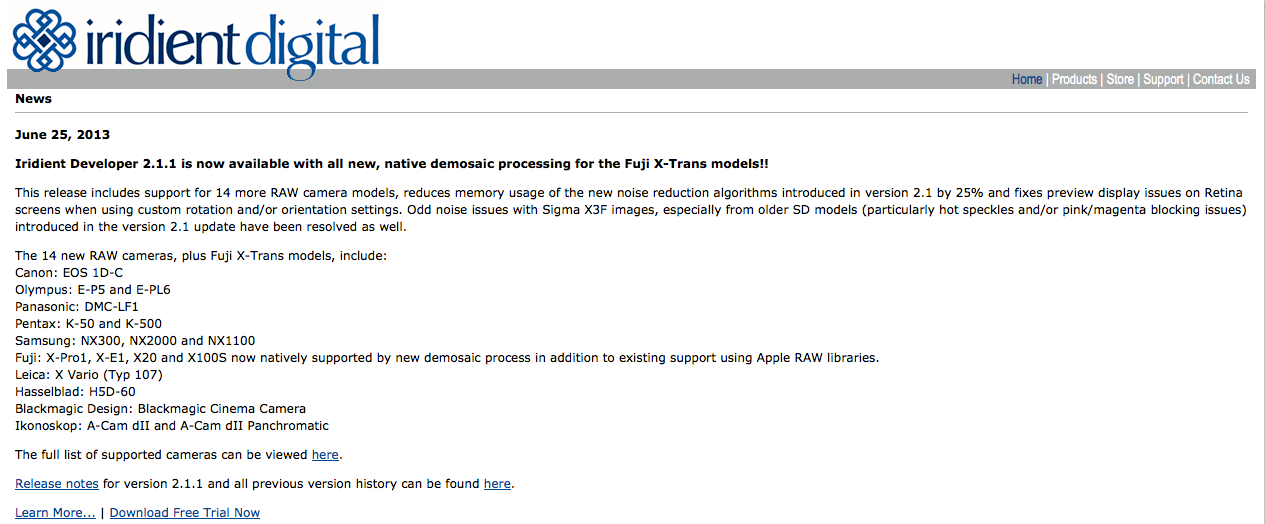
I’ve already told you that Iridient Developer (MAC only) now supports X-Trans RAW files here. The latest 2.1.1 version is now available with all “new, native demosaic processing for the Fuji X-Trans models!” Check it here and download the free trial here! “Fuji: X-Pro1, X-E1, X20 and X100S now natively supported by new demosaic process in addition to existing support using Apple RAW libraries“.
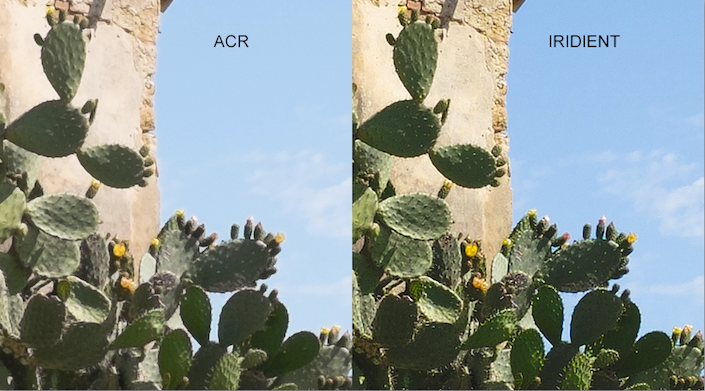
Iridient Developer vs ACR
thevisualexperience made a comparison between ACR and Iridient (2.1). The question here: “is it worth in a Lightroom based workflow, to add this other piece of software or not?”
Here are some of his findings: “White balances are different. Many differences in color rendering btw the two RAW processors […] The IRIDIENT output, in the same conditions as ACR, give a darker and more contrasty image. […] There is some “vignetting” in the IRIDIENT output. […] The details extracted from the RAW by IRIDIENT blow out ACR”
Now, it’s worth to add Iridient in your workflow? You can find the answer in part1 and part2 of his review (includes also a nice video comparison).
enjoy your day
Patrick
image courtesy: thevisualexperience (part 2)
14 Responses
Had a play and it really does seem very good for getting maximum detail, I’m loathed to mess up my nice straightforward Lightroom workflow though. Been through enough of that bother already trying to use TIFF files from various RAW converters in Aperture etc. before LR 4.4 brought some sanity to the table. Probably one to have in reserve for that odd troublesome file that Lightroom chokes on.
Adobe needs to get this sorted out or I will be switching from Lightroom
This just looks like the default development has a couple of sliders already shifter (sharpness and some contrast). Why not just create an import profile in LR. I don’t see any truly added detail here.
Did you look at the linked review? The difference on the chain link fence in the background was pretty huge between Camera RAW and Iridient.
Also seriously Admin, fix the mobile site it’s a nightmare to use on my iPhone!
Agreed. Seems many don’t fully understand how RAW works. Sure some software may have a better algorithm than others, but it still has to default at something. Which is totally up to taste of the software developer, not a proof of performance. Comparison often act like this is what you get with that software and that’s it. But really it’s no more than a suggested starting point, which can be adjusted to personal preference. A proper comparison i guess would be to show the maximum one could get out of it (to taste), and asses how much trouble it was to get there.
Disclaimer: To be honest, i didn’t read it yet, so they may even have done that. 🙂
Yah, I tried it out. I am not impressed. I threw at it some really dark pictures, it did not handle the details all that well.
For one pic, In LR, I raised exposure to 2.1, in IR, I had to raise exposure to 2.5, 2.8, to get the same details. Even then, it’s full of blue dots. LR with Luma NR turned off, Color NR@25, looks better than all sorts of NR settings in IR.
The color depth and color definitions were horrible in IR, while I was able to get usable colors from LR.
I am sticking with my LR pipeline. I really don’t see anything in IR that’s worth switching.
That’s just mho.
I tried and with no tweaks was outperforming Adobe hands down – no comparison. Colors were bit flatter than capture one but would adjust easily. Detail/sharpness bested both.
I didn’t experience the darkness and noise reduction issues that are cited – but horses for courses. To me, best out there.
I tried it out with x100s raf file
IMHO I confirm other opions:
– very dark image (I don’t know the reasons) every images are underexposure by 2/3 stop.
– very good the detail extract
my first raw elaboration is good, no?
http://farm8.staticflickr.com/7380/9154729932_470f4b81a5_k.jpg
x100s
Exposure Program Shutter speed priority AE
Metering Mode Spot
Exposure 0,008 sec (1/125)
Aperture f/8.0
Software Iridient Developer 2.1.1
Detail looks good, nothing weird. Only some blown out highlights.
Don’t worry, blown out highlights are x trans sensor trademarks.
Gorgeous detail, and he’s chosen a very nice default setting for everything except the exposure level on file opening – is it a calibration issue?? . I prefer the default look to both LR and Capture One, though. Especially WRT sharpening and NR.
I have a bigger issue with it, but. There’s a bug on my version, or with my it and my MacBook Pro. After I make a few basic adjustments to exposure, contrast and WB, then go to the ‘Detail’ tab to play with sharpening, NR etc.. If I check any of the NR option boxes,just to play around with the many options, the green channel appears to drop out- nearly completely, and it can’t be recovered using ‘undo edit’ commands. It ‘saves as’ this way, too. It cannot be reverted, so I have to do the whole edit process again from scratch- only to have it happen once or twice again! Anyone have a similar experience?
Ya, thought it was just me, but was diddling on the noise controls and wham-o magenta hell.
I will say that I am very impressed with the lack of halo with IR, I worked with an image with lots of foliage and a bedded doe, the difference was amazing and at 400% it was really obvious. The workflow seems easy enough to learn, but I wish it could save as DNG with adj file as LR does. It would make them a seamless pair. I thin IR is better as advertised, but it really takes some serious pixel peeping to see it, and a big shift in color, saturation, contrast, and exposure tweaking.
I don’t know if there is value for at the 8×10 and web printers out there, but if you need max detail for large printing, then you need to check Iridient out.
I contacted Iridient re. these posts, and my specific problem. None other than the developer, Brian Griffith, responded within hours (on a weekend!) and provided these thoughts on under-exposure and a warning for X-Trans users NOT to use the Enable Soft Look option in the NR section- it’s an algorithm designed only for Bayer sensors.
Here’s Brian’s response to generic concerns about dark images on opening:
My previous versions of Iridient Developer used Apple’s RAW processing libraries as a default starting point and with the latest 2.1.1 release I’ve tried as best as possible to match the overall exposure and tonal rendering of Apple’s processing to give a similar look. Every RAW processor has a slightly different idea of what a “normal or default” exposure and contrast curve is. Often even with in-camera JPEGs and even within the same manufacturers lineup there may be camera to camera variances as to what the default exposure/brightness levels should be and the default contrast too…
I generally try to match up with the default camera JPEG levels, but with the X-Trans cameras I’ve instead adjusted to closely match the earlier (v2.1) results I was getting from Apple’s RAW output. This may be the root cause of a slightly darker default rendering. 1/3 or 1/2 stop of variance in exposure between RAW converters is not terribly unusual. That said I’ll take another look at my default exposure and contrast curve and see if it needs some fine tuning for these cameras.
The default camera tone curve is fully editable in Iridient Developer and can be accessed by clicking the “Edit” button next to the Camera Curve text at the top of the In tab pane in the Settings window. Of course simply pushing exposure up a bit is a perfectly reasonable solution as well.
Best regards,
Brian Griffith
Iridient Digital
And this was my specific problem:
After I make a few basic adjustments to exposure, contrast and WB, then go to the ‘Detail’ tab to play with sharpening, NR etc.. If I check any of the NR option boxes,just to play around with the many options, the green channel appears to drop out- nearly completely, and it can’t be recovered using ‘undo edit’ commands. It ‘saves as’ this way, too. It cannot be reverted, so I have to do the whole edit process again from scratch- only to have it happen once or twice again! Anyone have a similar experience?
Brian’s response:
Hi Fred
I think I know what the root of your problem is! In the Noise Reduction section there is a checkbox labeled “Enable Soft Look”, this option enables an alternate, lower noise, softer demosaic process which is Bayer specific. This option should be disabled for the X-Trans cameras as they do not use the traditional Bayer pattern.
If you turn on the “Soft Look” option it will switch to a Bayer specific processing pipeline that will give terrible results (looks very magenta) with the X-Trans sensor.
In the next update I will disable this option for the X-Trans or possibly introduce an alternate, lower noise demosaic option for the X-Trans models as well.
Avoid this checkbox with X-Trans cameras for now. If you do click it you should be able to just uncheck the “Enable Soft Look” checkbox and it should return to the normal color appearance without any other changes or without closing and re-opening the image. Perhaps in fiddling with other settings try to get the color to go back to normal this checkbox was overlooked?
Anyway hope this resolves your issue, let me know if it is something else.
Best regards,
Brian Griffith
Iridient Digital
I’m really happy with this software, and even more so now that I know the support is there if I need it. I’m totally impressed with Brian’s work and his commitment to customer service. It’s a great alternative to the LRs and Capture One’s et al…