







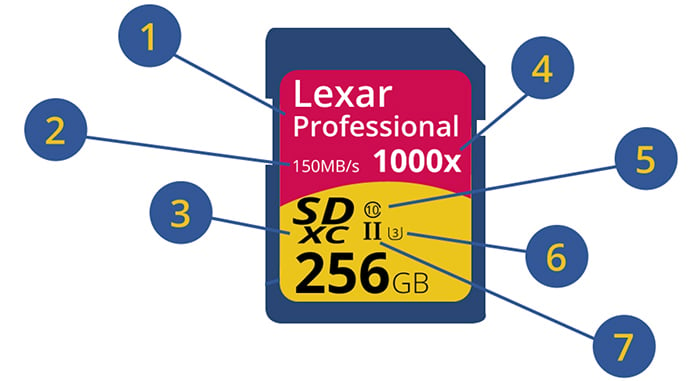
As you know SD cards to display many information on their front side. But what do they actually mean? Explora (Click here) posted a detailed tutorial where you can learn how to understand the info on SD cards.
In very short:
- Name: some card manufacturers identify their card by the targeted user; in this case, the Lexar Professional series is aimed at photographers and videographers.
- Read Speed: the speed at which data is read from the card.
- Type: as mentioned above, this will either be SD, SDHC or SDXC. Differences in capacity or speed are shown elsewhere on the card.
- Another speed rating, which can be calculated into MB/s with this formula: x rating/6.6666 = MB/s. 1000 ÷ 6.666 = 150 MB/s
- Class rating: this is the minimum sustained data writing speed, and class 10 is the highest right now, capable of 10 MB/s. The slowest rating is Class 2, which has sustained data writing speeds of 2 MB/s.
- UHS Rating: The UHS rating and the Class rating are closely intertwined. UHS rating of 1 means that the minimum sustained data writing speed is 10 MB/s, and UHS 3 is 30 MB/s. However, the UHS rating is more important for shooting 4K video, as the minimum data rate must be higher so frames are not dropped. For photographers, a UHS 1 and a Speed Class 10 is basically the same thing; however, the UHS cards are more effective in a device that supports UHS bus architecture, and not all devices do. So conceivably, you could have a Speed Class of 10 and a UHS 3 rating, but without a UHS device, it defaults to the speed class rating of 10.
- This number shows what UHS standard this card conforms to—I or II. There are four bus speeds for memory cards: Normal, High, UHS I (Ultra High Speed), and UHS II. This number shows what the bus architecture of the card is. These classifications were designed for theoretical jumps in speed, and added as the cards got bigger. There is no difference to the end user between a UHS I or UHS II card.
Now you know what card you need for the Sony A7rII 🙂
19 Responses
This is so fxxked up… so basically they are just using so much different ways to show us the same result
Agreed ! All this should be much more simple.
The A7/A7II camera series all have UHS-1 Standard.
Write speeds are maximum 30-35 MB/s with any card, no matter how fast. This has been testet before, I’ll try to find the link.
So don’t waste money on the fastest card if you can’t use it at the moment! Maybe it will copy faster to your computer but also just with new card reader. Check!
I really hope Sony will adress this issue in the 3rd generation A7 cameras to allow longer bursts and shorter blackout times.
Here is the link to the test. Maybe you can spread this information Andrea?
http://alikgriffin.com/best-sd-memory-card-sony-a7rii
7. is wrong, there is a difference between UHS-I and UHS-II. UHS-II has more pins for burst write/read modes. However currently there is no camera that uses these pins so all Sony cameras effectively work in UHS-I mode.
Fuji X-T1 can use UHS-II cards. Alik Griffen calculated an 84MB/s write speed with a Lexar 2000x UHS-II card in an X-T1. It would have been nice if the A7RII could take advantage of UHS-II cards.
Yeah it would, but not going to happen. AFAIK, the internal card bus and slot is UHS-I in the A7RII and tops out at about 36MB/s write (measured, not calculated). Simply put, buying a UHS-II card for presently available Sony cameras is utterly pointless. Let’s just hope they beef this up in coming models.
Not completely pointless.
For usage inside the camera I agree.
But transferring to the PC is far faster with a UHS-II card in an appropriate reader. However, whether that little advantage is worth the additional price tag is another question.
Sure, that is an advantage, if your computer has USB3, your reader has USB3 and the card reader is really good and support UHS-II fully. I recently read a test of card readers and the performance was very different between them even though they were all supposed to be USB3 and UHS-II compliant. A cheapo Chinese brand was actually the fastest. Now the big bottleneck of SD cards is write speed, read speeds are generally pretty decent, even on UHS-I cards.
Correct for the pins.
If I remeber correctly the new Leica SL has UHSII support in slot 1.
And as “tetrode” mentions – the Fuji X-T1 also.
And what does the 256 GB means?
so messy
and, some speed difference only matters for a card reader. The camera is almost always slower.
Regarding 4)
Dividing by 6 2/3 is incorrect.
The 1000x is related to CD wreite speed of the early years (150kB/s).
Eversince then write speeds of any medium has been indicated as a multiple of this speed.
So 1000x speed is a theoretical 146,48 MB/s. (150*1000/1024 MB/s)
I’m presuming that Admin was being sarcastic with his last comment (although I’ve just noticed this article is 3 months old, so a bit late in the day!)
Unfortunately, even when you ‘think’ you know which card, some defy all the nomenclature and remain stubbornly incompatible for some tasks in various cameras for unknown reasons (although I feel that is becoming much rarer, thankfully). I suspect much of that was down to rapidly developing standards and everyone, card and camera manufacturer, struggled to keep everything backward compatible (of course, it could be owing to counterfeit cards!).
As to the article, the one phrase that leapt out at me was “A 128GB card would be a nightmare to manage…”. Excuse me? That is amongst the most patronising, nonsensical drivel I’ve seen in a while!
3 things should be displayed :
Trademark
Size
Read / — Write —
Does USB key says that they are USB1 compatible… + USB 2 compatible sur under… + USB 3 compatible … + USB 3.1 ? ? ? No !
Like this :
Am I right if I claim that the writing speed of 150MB means 1200Mb/sec?
In the next few years they’re going to have to make the cards physically bigger to fit all the ratings info, classes, icons, etc….
All it needs is brand name, size, format, sustained write speed, and sustained read speed, and maybe what video resolution & bit-rate it can handle(4K @100mb/s)
1 is useless, 3 is useless, 4 is useless, 5 is useless, 6 meh, 7 is useless