







Images and text by Jörg Haag.
As you know Sony relies a lot on in camera lens compensation. And SAR reader Jörg Haag made that big test to show you the advantages-disadvantages of Sony’s approach. Please note that text and images are propriety of Jörg Haag. So please do not reproduce it without permission from Jörg.
In-camera lens compensation
by Jörg Haag
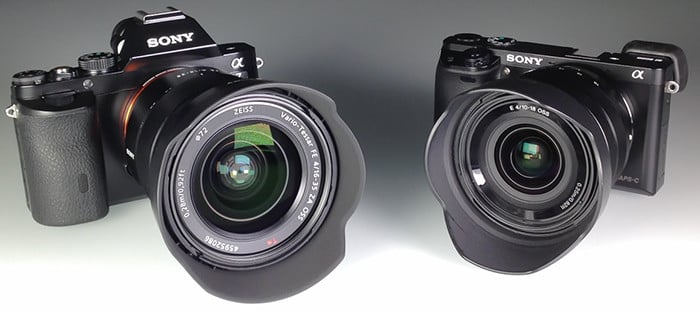
High resolution sensor are quiet demanding when it comes to the resolution of the lens as well as to shading, chromatic aberration and distortion which are more important on DSLMs like the Sony A7 and the Sony A6000 due to the shorter flange (distance between sensor and lens mount). Most of these optical errors can already be corrected in the construction of the lens for a higher price (see Zeiss Otus). In-camera lens compensation is one mean to reduce the costs of lens construction. This article shows the effects of the three different correction parameters of the in-camera lens compensation on JPG and RAW based on pictures taken with the combinations of Sony Vario-Tessar® T* FE 16-35mm F4 ZA OSS on the Sony A7 and Sony E 10 – 18mm F4 OSS on the A6000.
Trade-Off
Many DSLR (Digital Single-Lens Reflex) and DSLM (Digital Single-Lens Mirrorless) user want more and more megapixel; be it the professional photographer who wants the best possible quality for large prints or be it the ambitious hobby photographer who simply wants the best gear for his hobby or the beginner who thinks that more resolution is equal to better pictures.
The trade-off between lens price and quality called “in-camera lens correction” is fed by the ambitions of the manufacturer who wants to build the best product possible and the photographer who wants to use the best possible lens for the lowest price. The most uncomprising lenses currently available which deliver outstanding image quality on mainly all availble sensors are surely the Otus lenses build by Zeiss. Image quality which one can expect at a price level far above the level of $ 3.000. This lens are surely made for the enthusiasts which have the money and the willingness to pay the price and less interesting for the professionals that think in economic dimensions or the hobbyist with smaller budget. The later are rather interested in those lenses found at mid-range price levels which deliver the best performance in combination with the internal lens corrections – as far as available in the camera firmware.
A note to the image material
Cameras and lenses
Using a full-frame lens on a camera with APS-C sensor would not really show the real amount of distortion and shading because the APS-C sensor is only using the good center part of the full-frame lens. The following drawing shows the relationship of image circle and sensor size of full-frame and APC-C sensors:

The in-camera lens correction is best shown when using wide-angle focal length and surely in the outer image areas and corners of the picture. The following combinations of camera and lens have been used to create as much lens errors as possible:
- Sony A7 with Sony Vario-Tessar® T* FE 16-35 mm F4 ZA OSS
- Sony A6000 with Sony E 10 – 18 mm F4 OSS
 RAW and JPG

There is an ongoing discussion whether the in-camera lens correction is applied to RAW images. All pictures have been made in RAW and JPG each with activated and deactivated lens correction to find out whether lens correction is applied to RAWs.
All comparable pictures have been taken with the same event of simultaneous shutter release in Sony A7 and Sony A6000 to create the highest rate of comparability and to avoid difference in images caused by e.g. cloud moving into sunlight. The cameras have been mounted as shown in below picture and the shutter was released by a radio trigger.

Analysis of images
Shortly after Sony started selling the lens I wrote a first Hands-on about the Sony Vario-Tessar® T* FE 16-35mm F4 ZA OSS. In one of the comments of the German version of the hands-on I was asked about my opinion on the in-camera lens correction – here it is.
Frame 1 – Chromatic aberration


SEL 10-18mm F4 OSS, JPG and RAW, mit und ohne Korrektur / with and without correction
 The red marked area is used for comparison of JPGs and RAWs:

Looking at the crops the JPGs shot with deactivated lens corrections there are green and purple lines next to the tree branches – as expected. Surprisingly, these chromatic aberrations are not visible in the RAWs even with deactivated lens correction. Hardly believable, but I checked all RAWs one by one and this looks like the proof that the correction of CAs can’t be disabled for RAWs. As a comparison below the the crops from the images shot with the FE 16-35 mm F4 ZA OSS at 16 mm and at F5.6, because I made a focussing mistake taking the pictures at F4 which I realised to late, but this does not influence the assessment of chromatic aberrations.

Obviously the FE 16-35mm F4 ZA OSS mounted on alpha 7 shows the same results like the SEL 10-18mm F4 OSS mounted on alpha 6000 regarding the correction of chromatic aberrations on RAWs.
Frame 2 and 3 – Shading and distortion


The following pictures show the effect of in-camera lens correction regarding corner shading and distortion. Please move the mouse pointer over the image to toggle the view between activated and deactivated correction:
SEL 10-18mm F4 OSS @ F4 – JPG:
ausgeblendeter Text: mouseover JPG 10-18mm F4
SEL 10-18mm F4 OSS @ F4 – RAW:
ausgeblendeter Text: mouseover RAW 10-18mm F4
It is easily visible that the correction of shading is applied to the RAWs as well, whereas the activation or deactivation of the correction of distortion has no effect on the RAWs. The following comparison between JPG and RAW with deactivated correction of distortion shows, that JPG and RAW are the same. The small differences in shading are caused by the selected creative style “Neutral” and are not related to any lens correction.
ausgeblendeter Text: mouseover RAW+JPG Aus 10-18mm F4
Let’s have a look on the same images shot with FE 16-35mm F4 ZA OSS mounted on the alpha 7. Again, please mouse over to toggle view::
FE 16-35mm F4 ZA OSS @ F4 – JPG:
ausgeblendeter Text: mouseover JPG 16-35mm F4
FE 16-35mm F4 ZA OSS @ F4 – RAW:
ausgeblendeter Text: mouseover RAW 16-35mm F4
FE 16-35mm F4 ZA OSS @ F4 – JPG+RAW deactivated correction:
ausgeblendeter Text: mouseover RAW+JPG Aus 16-35mm F4
There is a lot more image material taken from other subjects and with different apertures and focal lengths and lens correction activated or deactivated which I did not include in this article but which I provide as zip-files for download at the end of this post and which can be used for your own analysis. If you use this material for your own publications I only require being listed as reference with a link to this post.
Verdict
Pictures are worth more than a thousand words and following this motto the diagramm below provides an overview on which correction parameter is applied to JPG and RAW when the lens correction is activated or deactivated (black means that this particular corrections shows in the pictures).
 Two results are quiet suprising: First is that the correction of chromatic aberrations can be deactivated for RAWs when there is a lens corrections profile for the used lens contained in the installed firmware and second, that that there is no correction of distortion in RAWs, no matter whether this parameter is activated. Lens-correction profiles can only be added to the camera with a new firmware.
The alternative is to use the Sony PlayMemories Camera App “Lens Compensation” to create your own profile for lenses not yet supported or that will never be supported (legacy lenses) by the firmware and automatically apply the lens correction – but this is a different and very interesting subject.
Now it is up to you to find the conclusion on which lens delivers satisfying results on which camera and taking the price into consideration by using the provided download links to the RAWs and JPGs.
22 Responses
that´s news to somne… that in camera lens correction does not work with raw?
maybe they should read the manual….
saves them time to test such things and being “suprised”. rotfl….
Thanks for the information
IMHO, nothing new, sorry, nothing important up to me. The weakness of 4 strongly different sensors in a7x cameras cannot allow generalization and comparison. Each camera/sensor should have its own behavior. CA, Magenta shift and other issues are almost terrible effects for wide angles that make them unusable on a7x cameras, specially on a7r. Then, the best wide angle lenses made for e-mount, that I do not have, seem to be a compromise in sharpness again they cannot fit all the a7x sensors. The strategy of sony is quite confusing and embarassing when we should choose the final solution fitting wide angle lens and camera/sensor solving the big issues.
I’m really not sure what this article is saying, to be honest!
There are mentions of a trade-off and pointing out that a raw file is just that: raw. But, given that each series of pictures just shows apparently identical results until you zoom in very close, I’m at a loss to draw any conclusion other than the manufacturers are doing a great job and giving us quality without having to spend at ‘Otus’ levels.
So what was the reason for the article again?
Interesting but practically meaningless. Some lenses require correction regardless of automatic correction and some lenses are so good they can’t be meaningfully corrected anyways.
You have to determine case by case. Just because the a7 auto-corrects CA in RAWs regardless of setting, it doesn’t mean that you don’t have to correct any of the native Sony lenses.
What happens if I turn CA comp to Auto and also check “remove CA” in Lightroom (raw), will it shift colors in the wrong way? I guess Lightroom just applies a standard procedure according to its own profile, so no intelligence there.
I don’t know about Lightroom, but DXO seems to do it intelligently. I left my compensations on whatever the default settings are in camera and it doesn’t have any problems correcting them.
In my experience, checking the Remove CA box doesn’t do much when CA compensation is set to Auto in-camera. It doesn’t shift colours the wrong way, either.
I just leave the box blank on the assumption that CA is already corrected as much as possible by the camera.
I found the article a bit confusing. Personally I would have not expected in-camera RAW to perform any compensation as that is surely better done in the RAW converter (with the compensation parameters passed through with the meta-data).
My preference is always to use dxo for distortion compensation. I
Thank you Jorg for writing this, I found it very useful and I appreciate it.
This show again that Sonys raw are not raw are something cooked by sony engineers. This is proof that you have no control over the photo.
11 bit s**t was not enough, poor ISO quality over Fuji apsc was not enough. Only miniaturisation it’s not enough.
All RAW are cooked by every lens manufacturer. There is no such thing as “neutral readout from the sensor” as many believe. Image IQ is more down to processor program code than about the physical sensor.
Why do you think every camera, at every camera iteration, also has a new RAW format?
Interesting article, thank you, but I am left wondering about shading compensation in RAWs.
Adobe Camera RAW makes a point of telling you that CA is already corrected, but it doesn’t mention shading or distortion – all my compensation settings are set to Auto. When I apply the lens profile in ACR, it will correct distortion obviously, but it also corrects shading, giving the image an entirely even exposure across the frame.
When the ACR profile is NOT applied to the FE 35/2.8, for example, there is still very clear vignetting in images. So, even if the Auto shading compensation setting does apply correction to RAWs, as Jörg says, it does not go the whole way.
I have never tried switching off compensation in camera, but it seems the Auto shading compensation setting in-camera is deliberately only partly correcting shading. Adobe Camera RAW seems to go further and does it properly when a lens profile is applied.
The Photozone review of the FE 35/2.8 seems to backup my experiences – http://www.photozone.de/sonyalphaff/865-zeiss35f28ff?start=1
same experience with the SEL35F18. In RAW I still need to apply CA and vignetting correction.
I don’t expect, Jörg figured this out by looking to the RAW file with a Hex-Viewer!
So the results are meaningless if I don’t know:
– which RAW-converter has been used?
– and what settings?
Exactly! He compared the camera-processed JPG to unknown-software-processed RAW and we still don’t know anything about what data was present in RAW before processing.
huh?
It was an ironic post that turned hilarious when you mentioned Fujifilm when complaining about Sony’s RAW “cooking”.
I guess you prefer tons of built in NR at all ISO’s instead.
First, the authors could have chosen a better target (studio).
Second, their conclusions look a bit strange.
“the correction of chromatic aberrations can be deactivated for RAWs when there is a lens corrections profile for the used lens contained in the installed firmware”
Suppose that is right. Then how can the camera correct the LENS CA if it does not have the lens profile??? What is being corrected actually? Does it mean that not the LENS CA are being corrected but rather the in-camera sensor stack aberrations? And if the profile (in this case, combined in-camera and lens CA) is available then the user is allowed to turn the in-camera RAW correction off so she can correct in he post?
I am using Sony in camera software ( A6000 and A7s plus A7r ) for correction on RAW files and it works like magic.
What nonsense! Learn something before you spew!
Like what everybody has mentioned, all RAW from the sensor is tweaked at the sensor hardware signal processing level. Why is that a bad thing? The manufacturer knows the sensor specs better than anybody else, lest of all you or Adobe!
Light fall off, vignetting, CA are all measurable and determinable at the factory. You just apply it uniformly across to all images captured. I’d rather that be done than at the sensor level than to manually guestimate subjectively on a pic to pic basis.ally. Only a fool would wanna do that.