







Sony is giving us a nice Christmas present today! They just released a new firmware update for the A7rII and A7sII which improves the 4K recording time when using the vertical grip. And it also adds a mysterious” Picture quality improvement”. UPDATE: It seems like they improved the automatic chromatic aberration correction.
A7rII download page at Sony.com (Click here).
A7sII download page at Sony.com (Click here).
163 Responses
the logical answer to the Canon EOS 5DS(R) review on dpreview. 🙂
Unless you need a flash system with sturdy metal sleds for bracket mount and major third part support for HSS/TTL with best quality speedlights and studio strobes. Sony flash system and support is inexcusable… especially after killing the widely supported Minolta iISO system. Just ridiculous.
It looks like you answered to the wrong comment or using too much drugs. Maybe both.
Nah. He just signed up to antagonise you.
Even with physical presence and heavy defamation this is nearly impossible. 😉
Sony is getting there…Customer Service that is I call…
Just one FWupdate for a99 please… just one… Pah-Lease Sony! Just please allow the quick menus like on a77II and a7 EMount cams… along with magnified playback to focus point. Took that away from a900, then give it to EMount… but deny a99 users the same?
Just sucks how Sony abandons those who bought their best.
_____
Now give us Settings Effect ON/OFF and APS-C options in the quick menu. Hate the big menu dive just to get those. Hard to switch between studio and location without it. Hard to switch between FF stills and APS-C video without it. Commonly used pro settings need to be accessible.
I wonder when Sony will add lossless RAW Compression. 80+ MB files are too big.
Unfortunately a number of loud mouth idiots don’t know the difference between lossless and lossy compression. This is what we get when idiots who have absolutely no idea about technical details are listened to.
You messed up the topic. 🙂
The “loud-mouth-idiots” will surely know that difference.
I assume you meant “difference between lossless compression and uncompressed”
Nah, my experiences in dpreview forums show exactly as I said. They don’t know that compression can be lossless, and say that compression cannot mean lossless. Even when presented with evidence on the contrary.
But your hateful comment was in response to the OP, who wants to see a lossless RAW compression option added. Which is a good thing, technically correct. He obviously knows exactly what he is talking about. Just wondering, who’s the idiot here.
Oh, no, I wasn’t trying to be hateful at all. I simply lamented the ignorance of the masses. If my comment appeared to be hateful, (I wasn’t referring to the OP with the idiots comment, but to a wholly other set of people) I’m sorry, I’m not a native English-speaker.
Ok, it sounded a bit like calling the OP a loud mouth idiot. 😉
You know the diference between compressed and compacted?
Perhaps in the next generation of cameras since uncompressed raw was an afterthought. It might need a specialized hardware which is different or missing in current gen.
Just shoot compressed.
IF NOT
Shoot uncompressed with a bigger card
ie, Up until now, I’ve been using 64GB cards, but recently, I upgraded to a 128GB card to test if I could cover a figure skating event in uncompressed RAW. Many people stated that the A7R II was all but useless to cover events, but I’m happy to report that it did exceptionally well. I was able to shoot aprox 2200 images without interruptions(buffer or battery change etc) with the grip and 128GB Sandisk card. A+
is there a hack out there to overcome the 30′ time-limit in video ?
No, and it is doubtful there ever will be. (Simply not enough users). Use an external recording device.
What does the number of “users” have to do with it? Are there enough users to justify the other FW updates?
Really don’t get the correlation.
True, thanks for the advice,
any low-budget recommendation?
Simultaneous recording whereas the camera’s start/stop button only affects internal recording I suppose
Frankly, there isn’t. Especially if you are looking for 4K. The cheapest would be to get an HDMI recording USB device if you have a laptop and space for it available. That is, of course, if you don’t have to move around…
(I use an internal one on my desktop PC, but I don’t have to move the camera around one bit. You can get an 1080p HDMI one for ~$200)
you’re full of ideas.
How would that be called in ebay? HDMI to USB converter? or maybe video-in add-in card ?
If it’s also working on my Android tablet, problem solved
USB HDMI capture card. I don’t know of any that would work with an android tablet, or an Apple one for that matter. There are two types: one that will present you with a uncompressed video stream and one that will handle some compression itself. Please note that many don’t offer 1080p60/50, just i60/50, and it is quite hard to find out which one does.
Edit: e.g.: BlackMagic Intensity Pro can be used for this. It has 3 versions (USB, PCI express, 4K PCI express), and the 1080p ones do not handle 60p video, and the 4K one handles only 30p 4K. Still, it gives uncompressed hdmi video, which is simply gorgeous.
The NEX hack did not stop because of not enough users, but rather because the encryption in Sony’s firmware was too tough to break and too hard to repack modified firmware into new cameras.
“Improved picture quality” – wow, that must be huge. Cant wait. I will delete all of the pictures and videos ive recorded so far, cause now were really gonna get the best quality out of these cameras. Until the next update of course. Than it will be improved even more. Thanks Sony
Improves image quality in video? Stills? And if stills: jpegs? Effects? Raw?
Specify people!
…or, is the improvement in my mind? Maybe it means that if I buy that camera, I’ll be an amazing photographer. That may just be where this improvement happens…Sony will be using their WiFi antena to improve my skills.
It improves picture quality on a massive scale. You wont believe your eyes after the update. Images, that looked really bad before, will now look amazing 🙂 #marketing
I just read that if I print photos from either of these two with this firmware, my photos will glow in the dark. Is that true?
Marketing didn’t go on about it so let’s not act like they did. What do you expect them to say?
I just want them to tell me exactly what has been improved. Is it sharpness, noise, dynamic range, tone reproduction, contrast, color, moire, rolling shutter, file compression. Has it been improved in photo or video mode. Sony telling me they have improved image quality is like a fastfood resaurant telling me that their food now tastes even better. Was it bad before? Both of these cameras are superb allready – I just dont understand why companies are putting out messages, that dont actually mean anything.
Have you already compared the IQ before and after the update?
It’s downplayed and must be minor. If they say what’s improved, next thing people will be comparing and saying it’s not a big improvement. This way, they saved the time wasted on typing a few more words.
Maybe the added “Raw and Xtra fine”
Improved Image Quality – what is improved?
the Video? nice!
the Jpgs? about time?!!
the raws? no, please don’t. Please don’t fk with the Raws
i’m not surprised.
What with A7? Not even uncompressed raw?
we are long forgotten…
What??? You are still using that old crap? This camera is 2 years old!!!! Unbelievable!
Sorry for my astonishment, but according to SAR, I had the impression that every Sony shooter desperately yells for an new Mark X version 12 month after the current model has been released. And after 1.5 years without replacing the “old” model, they are almost certain their system is dead and abandoned by Sony.
haha! Mine is 3 month old 😉
Mine is even younger! It is a fine MF camera with AF capability if needed.
I have learned to never install FW update on a sony camera. NEX7 FW update killed such a nice noise pattern it had in RAW´s. They became blotchy. With each FW update Sony starts messing with RAW´s just a bit more.
My A7RII will stay v1.0 forever.
I doubt you’ve learned anything.
If it weren’t for fw updates, the original E mount Nex 5 and 3 wouldn’t have set the trend that brought us all to where mirrorless cameras are today.
Doesn’t matter. The fact is, with each new “image enhancement” Sony is cooking raw more and more.
No thanks.
I presume you have some evidence for this claim, that you can present?
Of course, just google it. Dpreview has a study comparing noise reduction (cooked in RAW) between v1.0 y v2.0.
There are many other examples of RAW file cooking for NEX7 FW updates.
So, whenever they say “better image” I read it “we cooked again the RAW”
I agree with everything you said, for example before the last update RAW files were compressed, then after FW 2.0 they are now uncompressed. Someone tell Sony to stop cooking, they are not chefs!!!
Cool, install 3.0 🙂 Enjoy it. Be warned, there is no rolling back.
lol I’m sorry I just couldn’t resist, going to wait to see what other say before I update.
Whoa. Hold on. I can’t speak for older sony. They just caught my eye recently.
Sony took a lot of flak because their 1.0 FW was utilizing “lossy compression”. So some information on the image in this case in the shadows and highlights was lost. Most people including me were unhappy about that because raw should be an exact representation of what the sensor sees.
Sony gave in to the outrage, and while 2.0 firmware is still compressed, it is now utilizing “lodsless” compression. So no information is lost.
Hope this clears things up.
You don´t really get it. Lossless uncompressed files are just part of the story. The data going into those lossless uncompressed files is modified in v2.0 so noise is now in blotchy patches instead of a nice random noise pattern. Got it?
Google: sony raw cooking
Actually that’s not what the DPreview article you referred to says. In fact the images in the Nov. 20 article seems to fly in the face of your assertions.
I think you’ll find every digital capture device manufacture does the same.
why not shooting RAW… using a a7RII in jpg only is a shame….and RAW is definitely as less uncooked as one could desire…
I really do not expect to enhance RAW IQ (when already having uncompressed RAW) since this would require some hardware (sensor/DAQ chain) updates….
It is RAW that Sony keeps cooking more and more with each FW update.
Which instance are you referring to?
This isn’t a Nex7, the improvements are real. Staying on 1.0 is silly, you get completely uncompressed raws, there’s no cooking at all. But keep your head buried in the sand. 3.0 is fantastic.
Dude, they cooked the raw to reduce noise on long exposure. In trying to do so, they converted random noise into blotched patches of noise. Stay away from FW updates. Or not, your choice.
Just know, there is no rollback.
Already updated, thanks.
Not trying to offend, but that is the stupidest thing I have read today. Really.
Go ahead, google it: sony camera raw cooking
Everyone’s talking about it and saying how it’s marketing this and that… all because of a three letter sentence at the bottom of a list. Marketing deserves a prize, if anything.
Too bad that if you want to take a benefit of it, you have to own a A7Rii. That leaves me kind of sad after opening my christmas present. 🙁
What? Is it Christmas in your country already?
http://www.androidauthority.com/sony-sulfur-smartphone-battery-663156/
It seems like Sony is working on a new battery tech based on sulfur, 40% isn’t the miracle we expected, but it is a great improvement none the less, if compatible with quick charge we could see more powerful devices.
*magnesium-sulfur, so it can be cheaper since it’s not a rare earth material like lithium.
Currently on the a7rII when using the battery grip, as soon as the record button is pressed, one of the batteries will turn red and has a line through it as if it were dead. Stop recording, and the battery indicator returns to normal. I will see if this issue is fixed with the update.
For only two improvements that’s a big bump on the version number!
Maybe that’s because Sony updates (and updates in general) rarely improve picture quality.
Hmmm, you’ve got a point.
because maybe there are a lot of hidden incremental updates as well for fixing problem that we don’t even know there at first place.
Then obviously they should’ve listed them all.
nope, electronic manufacturers never list something like that, i never know why.
Deleted, it didn’t show up initially so I thought something went wrong and I reposted my comment.
May be sensor shift?
so no Christmas present for the a7/r/s mark 1
Bloody hell – only on here could a camera manufacturer give us a FW update to improve certain features and everyone gets on their case like its a bad thing. Not much of an incentive for Sony to adopt Fuji’s Kaizen approach, is it?
I think the problem isn’t that they are giving us a FW update but that they aren’t forthcoming on exactly what they changed. There’s a lot of bellyaching about stupid things on SAR but this seems like a valid complaint.
Its on the website
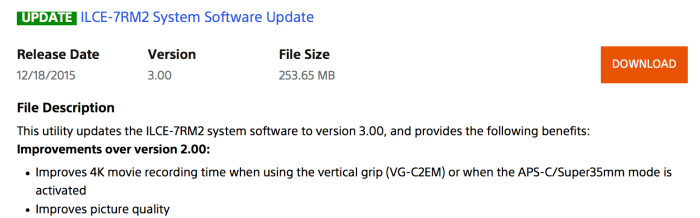
Improvements over version 2.00:
Improves 4K movie recording time when using the vertical grip (VG-C2EM) or when the APS-C/Super35mm mode is activated
Improves picture quality
Benefits provided by previous updates and included in version 3.00:
Adds the selectable feature for uncompressed 14-Bit RAW image capture
Adds support to output video via HDMI during use of the Remote Camera Control software (still mode only)
Reduces the chance of the camera changing to front focus when shooting certain scenes.
Note: This symptom rarely occurs.
Decreases chroma noise when Long Exposure NR (Noise Reduction) is set to Off.
Note: The noise does not occur when Long Exposure NR is set to On.
Improves continuous shooting at Hi speed so that it can be used just as long when using the flash as without the flash.
We already know what it says on the website
Do you think “Improves picture quality” is descriptive enough for you?
In what way does it improve picture quality?
This is like the Christmas present that you are excited to open, unwrap it, look at it and then quizzically ask “what is it?”
In my experience, the Sony FW updates always do what they claim (and pretty often they also contain a few other tweaks not even mentioned). So if it says it will improve image quality, I am pretty sure it will. Good enough for me.
Probably just a tweak to the JPEG engine, there’s very little you can do in firmware to improve the quality of a RAW file…
I’m pretty sure some measurebator will shoot a brick wall with both firmwares soon. Then we will actually know. Until then, I will happily snap away with the new firmware and not worry too much about anything.
In the dark no doubt.
Yes but in what way?
Does this update improve the start up time?
I never updated the last time with the RAW compression issue, by choice, because I don’t need the large files. Granted you can choose which level od RAW to record at, which was a nice touch in the firmware upgrade, I just don’t want to be tempted. Lightroom already stalls with a pixelated view as it initially loads (or later zoom view) the RAW files. (Core I7 computer with 16mb Ram, Lightroom on SSD but data harddrive 75% full.)
I wonder if this v3.0 upgrades those who didn’t take advantage of previous upgrades to include those functions they skipped.
Yes it does.
maybe it’s related to the 16 MB RAM 😉
or the rubber gasket
Larry. Hopefully you got your Lr workflow sorted, but just in case… a few points to consider:
1) Large catalogs. A colleague used to have 1 master catalog for everything. His jobs were not new catalogs, but new folders inside this master catalog. Lr is unable to cope with too many thousands of photographs, or any MP dimension (my colleague’s catalog had 75K photos in about 30 folders) I hope you’re making new catalogs with every “shoot” or at least organising on a per-month basis catalogs.
2) Lr is also badly written when it comes to RAM management and use. I have 32GB or RAM and what not, but Lr never took more than 6GB, although I had a catalog with 2-3k pictures. Ps on the other hand, easily took all the RAM it needed and it worked fast and efficiently even with a a few dozen images open at the same time with layers on top. Lr just does not work well once catalogs become large.
3) Use C1.
i’ll have to think about that – i have about 150k images in my LR catalog, it seems fine. maybe revisit how I manage the catalog(s)
The cache increase helps but If your using Win 10 OS you can ‘force’ LR to be the top ‘priority’ app for most PC resources. Win 10 will allocate most resources to LR when active if you do this:
Open LR
Open task Manager
Highlight LR line in Task manager
Click ‘Details Tab’
Right click on highlighted LR row
Click ‘Set Priority’
Choose “Realtime”
Voila…. LR is now the top priority app for all resources used by PC…. I have an Intel Xeon 6 Core 3.9 GHZ CPU and 32 GB DDR4 2800 RAM… When I set LR as priority the CPU now uses all 6 cores (12 threads) when I process complex mule GB pano’s or other complex rendering tasks. I tested a 80+GB 93 image pano (A7rII 14bit RAW) .PSB with and without the ‘priority’ set to ‘realtime’ versus the default setting of ‘Normal’… the results were a 200+% increase in processing / rendering time. ~ 110min. for ‘Priority’ vs 330 min. for ‘normal’ setting. Also the CPU only used a max of 5 threads in ‘normal’ and up to all 12 threads in ‘priority’… Note you need to remember to close LR or set it back to ‘normal’ or restart Win if you switch to another demanding CPU app. Pain in the ass but worth it for very large files… Wish I could figure out how to create a ‘hot key’ to switch back and forth as needed …
JJ
Maybe just use C1?
The priority task facility has been available in Windows since I least Vista as far as I remember. Maybe even XP.
Thanks for the tip, although I stopped using Lr for almost a year now.
Process priority has been in Windows NT since forever. It was in NT4 and that came out in 1996. It probably was in 3.1 and 3.51 too but I used these too little to remember.
Setting a userspace application to realtime priority is a super stupid thing to do by the way. A hang there might make the system completely unusable. Don’t do it, people!
Then…. use C1!!
Damn Sony for trying to tempt you shoot uncompressed RAW. How dare they!
To speed up Lr rendering just increase your cache. Preferences >> File Handling >> Camera RAW Cache Settings.
Minimum should be 50GB. I set mine to 80GB and it’s much faster.
My first tests of the new firmware are telling me that startup is much faster!. Can anyone see that too or I am wrong?.
you’re absolutely right, it is faster!
Still slow with a new battery, but really, really fast after that. Love it.
Yes, much faster!
Some guy in youtube made a review about top 5 problems from A7s2 and discovered that the battery heat is one of the causes of overheating after some time he discovered that is possible to extend the time using the vertical grip and or using an external battery with dumb battery adapter.
Or just use something like this, works great: http://www.amazon.com/Indipro-Universal-Power-Pod-System/dp/B0156XQ2N4/ref=sr_1_1?ie=UTF8&qid=1450455864&sr=8-1&keywords=a7rII+dummy+battery
Not sure if you are being sarcastic…but it all depends on what you do with it…
Not sarcastic at all, the battery generates a lot of heat, the dummy battery solution takes that out of the equation. Otherwise change the batteries more frequently when shooting video, I rotate between 6 batteries to keep heat down.
Rather than everyone complaining about not enough details on the changes, or the file is so big for two changes, or “I don’t need this stuff, but would love this, this, and this”, maybe everyone should thank Sony for actually showing they listen to their customers and want to support their products, considering I know my history with other manufacturers showed they didn’t, and then go and actually use your cameras! And please, I don’t mean go use your camera to waste your day shooting pictures of walls and pixel peeping, or shooting more pictures of all your camera lense and bodies, actually go take pictures!
I’ve been thanking Sony by buying their products.
That’s good, so have I, and you should thank them again when they release FW that actually improves what you already purchased. It’s something I never expected when buying all my Sony bodies. Canon/Nikon never made these type of updates in the years I used them.
IQ enhancement is about chromatic abberations. Info on the download site
great, both A7rII bodies updated. Improved start up time: I would love to see the following improvements in a future update:
1)small raw option (around 20mp) in full frame mode
2)assignable custom button to choose between APSC/FF
3)continuous shooting in silent mode, even if it can only handle 9 frames, which it can – when in bracketing mode.
Small raw and FF/APS-c mode are at the top of my list too. Maybe in 4.0?
yes, but I think we need a lot more shooters to be vocal about this, maybe Andrea can do a poll on essential features that are missing and can easily be added via firmware
That would be nice.
It has compressed RAW (which everyone complained about) and APS-C modes already no?
Smaller raws in FF mode – like a Nikon.
You mean lossless compressed?
Specify custom CROP mode or have several choices e.g. 1.5, 1.33 etc.
Also, make the stills crop work like the video crop, simply use a key-line rather than blacking out the EVF.
yes, that would be awesome
That would definitely be an incredibly handy shortcut to have.
I think #2 will be addressed soon, with it’s clear zoom tech from the RX100 and FS5, maybe they’ll allow you to zoom-in in video as if you’re using a zoom lens.
I appreciate that Sony is putting some effort into this. It’s more than CaNikon ever did for me. Like everyone, I have my own complex request list, but the one very simple thing that would really make this camera work great for me is a choice of aspect ratios (4:3, 1:1, etc). Even my little RX-100 can do this, so I don’t think it’s too much to ask of a flagship camera. I find it very hard to compose these ratios when forced into 3:2 (and of course it’s wasteful of recording time, card space, backup time and backup space).
Startup time is noticeably much faster. Great. I have no idea yet what other features this firmware update brings, but totally worth it just for that alone. I would love to see the actual list of tweaks this firmware brings.
yeah, same here.
Just posted the list of updates a couple posts above…
Yes, startup time improvement alone is very welcome, especially on a mirrorless, maybe now the sleep-mode will become a little more user friendly, and we get better battery-life!
Cool! More time this weekend due to faster startup time and less focus hunting! 🙂
So concise. I like it.
Improvements over version 2.00:
Improves 4K movie recording time when using the vertical grip (VG-C2EM) or when the APS-C/Super35mm mode is activated
Improves picture quality
Benefits provided by previous updates and included in version 3.00:
Adds the selectable feature for uncompressed 14-Bit RAW image capture
Adds support to output video via HDMI during use of the Remote Camera Control software (still mode only)
Reduces the chance of the camera changing to front focus when shooting certain scenes.
Note: This symptom rarely occurs.
Decreases chroma noise when Long Exposure NR (Noise Reduction) is set to Off.
Note: The noise does not occur when Long Exposure NR is set to On.
Improves continuous shooting at Hi speed so that it can be used just as long when using the flash as without the flash.
Weird that DPReview didn’t talk about the Lensrentals article about the 35mm teardown and not a word about that new firmware….
Is that me or am I seeing a lot more moiré / down scaled resolution from both viewfinder and the screen?
What about uncompressed RAW on the Sony A7R I .
Need that urgently!!!
Me too. Of course they must start with current models.
But Mk I:s should follow shortly.
I don’t think that the processor is physically capable of doing it…nor is Sony willing to support the previous generation so enthusiastically.
https://www.youtube.com/watch?v=c6BzQsbJAng
Great!
Woah, that would be huge if Overheating is really fixed as your video suggests!!
What’s the final verdict? Did it ever overheat eventually? Also, can you test it with the LCD against the camera and see how long it lasts? Also, it would help noting about how long your camera would last BEFORE the update. THANKS!
Not my test. The guy recorded up to 2 hours and 50 minutes before he stopped.
Why don’t YOU do test it?
I can’t. I have 3 Sony A7s cameras but I use mostly crop mode and shoot primary video so the A7Rii was appealing minus the overheating issue. But if it’s gone now, that’s big, for me.
100% fair. Apologies for snapping! haha
The A7SII is much better for film. Whats the reason you want to shoot the A7RII for film?
Video… not film 😀
Video/Film. Same thing!
You can’t be on a photography website in 2015 and not know the difference. Not because film is still around in 2015 but because search engines have never been easier to use.
Here, educate yourself:
https://en.wikipedia.org/wiki/Photographic_film
My friend, I make video/films for some of the biggest brands in the world. You really shouldn’t try to belittle anyone. Especially if you don’t do this as a profession.
Britney Spears used to sing some of the world’s most popular songs. Does anyone care?
Learn the correct terminology.
I could call it animated pictures, moving stills, or whatever the hell I wanted to call it…… When you make money doing anything involving cameras *being a sales assistant doesn’t count*, then come back to me. Don’t correct people on terminology that you have no right to have an opinion about.
Terminology isn’t based on someone’s opinion. Stick to making your clients happy. No one cares. Clowns make money satisfying people too. If you’re going to talk about the subject, learn it first or be prepared to be taught.
make some money and come back to me, amateur.
Rofl!! You don’t know what “film” means in the context of photography but you call others amateurs? What a N00bert.
And your qualification is making money? Street walkers make money too LOL
Learn the subject.
Anyone who says ROFL and N00bert are clearly single, unemployed (or work in a supermarket). I really don’t want to continue this. I make Videos/Films for a living and I make a lot of money from it… I’m glad you know the correct terminology for it, I will continue to make money while you correct people like me. Good day.
You really haven’t figured out how to use the internet have you? I’m a scientist. You are a guy who makes videos.
lol and I make money. Do you?
No… we are a charitable bunch.
Seriously, you give the intelligence of people in art a bad name. Go hang out at mcdonalds with other video editing wannabe teenagers lol. Just don’t call it film when film can only be film.
Adding my two cents…The A7SII is a great camera, but dont discredit the RII’s video capabilies. It shoots clean video well beyond 10000 iso (full frame… Even better in “super 35”) which, for most of what I do is more than enough.
I have a wedding videography company so long record times are common. I use the 3 A7s cameras with only crop lenses (with an occasional FF lens for some specific stuff). It’s more important to me to be able to keep using those lenses than anything else. We never really go over 8000 ISO and most of the time it’s much less. It appears the A7Rii would do just fine in APS-C mode at that ISO. I’d currently choose A7Rii over the A7sII because of the crop mode in 4K capability. Plus, it would have better AF. Couple that with the shared advantages (color, IBIS, EVF, etc) and it’s enticing.
Hopefully the AF doesn’t front focus anymore ? cross fingers
I don’t know why but every time I do a firmware update, I have a “new camera” feeling and I want to test out everything lol
My A7r2 was very fast to switch on from new, now it may be very slightly slower, but chimping with uncompressed raw is noticably faster, hoorah.
First shoots today after the A7RII firmware upgrade, and no visible iQ improvements. Reviewing uncrompressed raw images seems a bit faster. The biggest improvement is when using the battery grip, one of the batteries doesnt shut off. It reads both batteries now.
People……You NEED to call Sony CS like I did and verbalize your complaints to THEM not only here! I told them as a professional, I need to switch between FF and APS-C modes, NO EXCUSES. Its a glaring omission and needs to be corrected with a simple code rewrite making it an option on a button.