


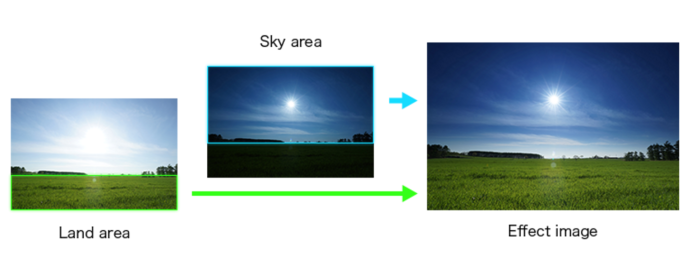
Sony released a new APP named “Sky HDR”. You can download it through Playmemories. That vidoe shows how it works:
And Spencer Pablo at Alphauniverse introduces you to the new APP.







Sony released a new APP named “Sky HDR”. You can download it through Playmemories. That vidoe shows how it works:
And Spencer Pablo at Alphauniverse introduces you to the new APP.
71 Responses
Buying this
and is this JPEG only, not ARW?
Surprise, you can choose RAW, see my post below, or follow the link.
https://www.playmemoriescameraapps.com/portal/usbdetail.php?eid=IS9104-NPIA09014_00-000017
From the link:
“This application lets you optimize the exposure when you shoot scenes containing vastly different brightness levels, such as dark landscapes with the sun in a clear blue sky.
By capturing the scene twice at different exposure and shutter speed settings, then combining the best of both images in a single image, this feature expresses a wide dynamic range without using a graduated ND filter.
Moreover, when you want to highlight hues such as those in a sunset, you can depict them with even greater expressive power by individually adjusting the White Balance setting of the sky and ground.
The resulting HDR images can be saved in the RAW or JPEG format.”
Well color me amazed, there is the option of RAW output.
But do we really need a $9 app to do this?
Holy shit~ It saves to RAW too~!!!
hmm… judging from the video it looks like a digital GND
Does it work on A-mount DSLR or one have to buy any of these crappy E-mount toy cameras to use it?
Compatible Cameras
NEX-5R NEX-5T NEX-6 ILCE-7 ILCE-7R ILCE-6000 DSC-RX100M3 ILCE-7S ILCE-5100 ILCE-7M2 DSC-RX100M4 DSC-RX10M2 ILCE-7RM2 ILCE-7SM2 DSC-RX1RM2
Just E-mount, unfortunately. Even though their app ecosystem was well established by the time the A77II came out, Sony opted to only give the camera wireless functionality, but not the ability to use apps. They’re saving all those goods for E-mount, trying to make A-mount look as unattractive as possible.
Well, it’s not a big problem. To make a good use of it, you need a tripod. When you have tripod, one can do it much better using bracketing on any camera and then post processing, but it takes some time. Without tripod DRO is more effective. Very similar results were achieved using DRO+5 on A700 or A900 cameras, combined with ZONE +2 parameter and ISO 100, setting exposition on highlights – their dynamic range was superb. But later Sony abondoned many good things in DSLT cameras (zoning, double memory slot etc.)
True… DRO only yields JPG, though. So yeah, you can do same thing with bracketing and post-processing, but if you can avoid that, why not? I’m not sure I’d use this much, but I can see where many would find it useful.
I doubt anyone would need this $10 app for their everyday photography…
well it certainly saves hundreds on buying into the Lee system…
consider this $10 against the need for photoshop to blend 2 different exposures together 😀
Pretty neat. I’d still do mine manually, as I always feel weird entering an app rather than using the normal controls. I like the idea, thought. Would be even better if you could preset a digital GND, and it would just stop exposing the brightest area while keeping to expose the darker one for longer.
“Would be even better if you could preset a digital GND, and it would just stop exposing the brightest area while keeping to expose the darker one for longer”
I have been thinking the same thing for few years now. Some pointed out that it is not possible with current Sony sensors for some reason but there is a camera that can do something like that. I don’t remember what the camera is called but Animals by Barry told me about it so he should remember.
Yeah, I remember reading about it in some comments. Just thought it wouldn’t hurt to mention it again.
Yes! We need more peopple talking about this and maybe Sony will make it happen. They have given us uncompressed RAWs and many other things because there has been peopple shouting about those in rewievs and forums.
Yes, they gave us shutter limits setting in auto iso as well after much complains. So they are listening.
They are listening indeed, and their cameras have gotten much more useful from it.
Now I’m going to repeat something else: please Sony, let us set specific times for use with bulb mode. Add extended times for long exposures, it would be super useful if you could make it go up to one minute then have an option to dial in a specific time.
I believe Fuji did some various stuff like that on a few point and shoots.
I was sorely tempted to give it a go and compare the cameras processing with blending myself or using the Lee ND grads that I have, but I’m not going to wast $10 to play with it
I don’t think it would be wasting money if someone who buys it does not have Lee filters or does not want to spend hundreds of dollar on them. And seriously $10 is drop in the ocean when you start calculating how much money you have to spend to even use this app effectively. You need at least camera, smart phone or tablet, lens and decent tripod. That comes around $800 if you buy used camera gear and cheap crappy smart phone or tablet.
I meant a waste of money for me.
I know. I just wanted to make a point that $10 for an app is not that big of a waste even if person really does not need it but does not know it yet.
Little bit oftopic but another point about app prices is that some people expect to get all the apps for free or pay like $1 for them wich is kind of silly because the developper probably spent hundrets of hours making the app (if its a good one) and should get payd accordingly. The work does not stop when the app is “ready” either. There needs to be updates and bug fixes and so on.
My comments are nothing personal about you hamishniven. I’m just thinking out loud 🙂
Absolutely agree about the prices and the cost. $10 is not much considering the work. No worries, not taking them personal
That’s pretty slick…
bying…..
Now all we need is to see the differences of digital filters vs real filters IQ.
Obviously the difference is in the number of exposures needed.
Did I understand it right – it makes 2 exposures and combine them in post? In that case it’s actually not to compare with a grey filter (digital or analog) but with bracketing – no use without tripod, no use for moving objects or in windy days. It would be more useful if such app could access camera’s own raw from one single shot – enough dynamic range for digital gradients in landscapes. Nice for jpeg-only shooters or for fotografers who don’t like to spend extra time in front of PC for post.
You spend extra time with the app with less freedom.
Does it combine multiple images, or is it just some post processing applied to a single RAW file? If the latter, I’ll continue to apply some ND stuff in Capture One.
I was stupid enough to buy it. USELESS. It’s a weak analog of Auto HDR feature from A77-2. Totally uncomfortable to use, tripod only, you tell it where is sky and where is ground. It’s faster and easier to get similar result from one RAW file. I don’t recommend it.
But you would get more noise in the lifted shadows by using one instead of two, like the app does
That’s what I was thinking watching the laborious demonstration.
I’m wondering if this would work to get better dynamic range in camera rather than blending to HDR in post. Can you test this?
it not useless if use for strobist on outdoor
Oh and it CANNOT be used with manual lens. It just closes aperture to darken the sky, nothing you cannot do manually, really.
That’s lame. I thought it would be better to adjust shutterspeed.
Wrong information, you can use combo of exposure compensation and iso aswell.
What? Huge bumper!
In the example gallery, all images have the same f-stop for both areas and just change the shutter speed (exposure compensation).
I’m still hoping Sony does an automatic focus stacking app for macro shooting.
exellent idea…
3 party app planned
http://psafs.pixub.com/#
we can’t buy apps in Ukraine. very clever of sony to do so (((
I hope SONY updates the Playmemories app to work with OSX El Capitan
They need to update it to work with android 6.0
Works just fine. Siddload it
I did, it doesn’t let you transfer images that are already taken in RAW only. My workaround has been taking RAW+JPG.
Sony’s really aiming sky high on this one.
I see what you did there…
Can you just do all of this in Lightroom with a well exposed RAW file?
Yeah, pretty much.
if the dynamic range of the scene is within the dynamic range of the camera sensor: Yes.
Been doing this in PS with 2 exposures and layers for years. And would still rather do it in post – by thr time you messed around with that app the fleeting light you’ve been waiting for will have passed.
Yeah, the problem with the Sony apps are that they all seem to fail to understand that opening an app just to do something that seems basic (and should be) is very cumbersome while on location.
Something like this would be much better:
1. Press C2 (if bound to that button)
2. Choose exposure 1 (full scene) + click ok
3. Choose exposure 2 (full scene) + click ok
4. Press shutter and let the camera take the shots
To be able to set each exposure exactly before execution would actually be helpful since bracketing is quite fiddly and a +/-2 EV is really not what one actually want (if one know what one’s doing) but one rather want ETTR + DARKS + BRIGHTS. Often ETTR + DARKS will do fine for most situations though.
Very interesting filter if it isn’t to difficult and tedious to use. I noticed that it has a save feature, I wonder if this lets you reapply the same settings easily in the future
In case you guys are interested in seeing it in use (I apologize for the quality–only thing I had on me was my cell phone to record this video):
https://www.youtube.com/watch?v=P1Uew5pX0FI
it’s just a gimmick
When are they going to learn to open up development in these cameras? This app looks like enough of a pain to make it useless. They could have spent the time making this better by making an sdk.
You obviously don’t know about the 3rd party camera apps. Google is your friend, but it sounds like you are too stupid to use it.
Sony Camera Remote API beta SDK
I’d seen this, and there are a couple of people working on it, which is great. There’s a big difference between an sdk for a remote app, and opening up the actual hardware. I’m more thinking something like magic lantern, but made easier by Sony just releasing source code, and a kit for it.
They could make and app that does “bokerama” (brenizer tecnique)…
Or at least allow anyone to build those apps.
I have purchased ti and test it and I like it. Special grads are great.
P.s. I used word “great” <<>> correction: PHENOMENAL.
Imagine, if you have Zeiss lens for the price of $3000.00 and up, yo can remove the Skylight-Filter and no need for expensive “SINAR” grad-Filters on the front of a lens. This way you are shooting on ZEISS glass and no distortion. to lens quality.
I just test it and results are fantastic.
Will the Sky HDR app also work with landscape astrophotography, exposing the night sky properly while also exposing the landscape properly? With the newer sensors that can perform admirably at high ISO, this would be great!
I did not try it, however, from what I have experienced so far my guess is, that it may work pretty well.
BTW does anyone know how to contact those in charge of PlayMemories apps. Or how to send feedback to them? I want to suggest new feature for the timelapse app but there is no links that enable us to contact anyone. I hate when companies are so cut off from their consumers.
… there is a number of ways to contact them …