







SAR note: This is a guest post from Carbon Studio. If you want to write for SAR contact me (Andrea) at sonyalpharumors@gmail.com. Thanks!
—–
“Perspective”
The Sony A7s has proven to be one powerful little camera. After our previous video, “Moonlight” https://vimeo.com/105690274
we showed the high ISO capability and how well it did filming in complete moonlit situations. We wanted to explore the option of recording 4K with it.
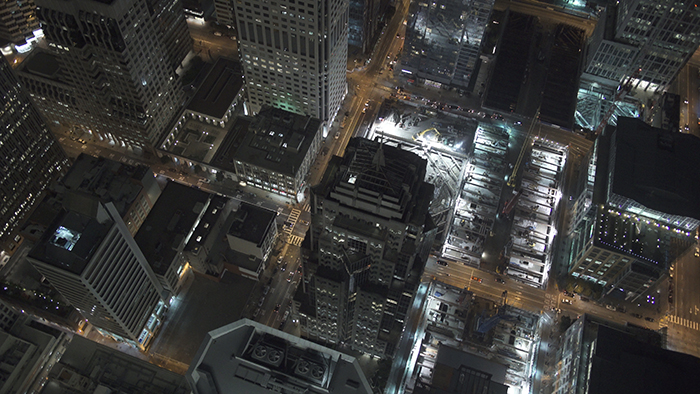
We were given the opportunity of flying around San Francisco, CA at night and film the city. So we got ahold of an Atoms Shogun and started our plan of attack.
On the day of filming got our gear packed and headed to the airport. We used the Movi M5, Sony A7s, and the Atomos Shogun. Such a light set up and a guaranteed powerful combination.
The Sony A7s has an amazing dynamic range when filming. I have been noticing that it picks up a lot of ambient light.
It made the buildings seem fake, sort of CGI, with the amount of light it was able to bring in.
As you can see in the photos below, these are ungraded frame grabs from the 4K.
I’m am really impressed with the amount of resolution this little camera can output in video. We filled up about one 480gb San disk SSD during the flight which is a manageable size for the amount of footage we collected.
The light form factor mixed with the powerful images it produces, makes this my favorite camera to shoot with on just about any shoot. It makes filming with a Movi or a Ronin effortless with its weight.
Here is the video:
Perspective | 4K from Carbon Studios on Vimeo.
Sony A7s store links:
Sony A7s in USA/CA at Amazon, Adorama, BHphoto, Sony USA, Sony Canada.
Sony A7s in Eu at Sony DE, UK, ES, FR, IT, NL, BE, AT, CH, SE, NO, FI, PL. And Wex UK.
A7s Gariz leather case in [shoplink 27569 ebay]Black (Click here)[/shoplink], [shoplink 27570 ebay]Brown (Click here)[/shoplink], [shoplink 27571 ebay]Red (Click here)[/shoplink] and [shoplink 27572 ebay]Orange (Click here)[/shoplink].
20 Responses
Amazing video and quality! How come the video still hangs (jitters?) a little when it’s moving sideways? Is it just me? vimeo? the codec?
This looks absolutely amazing! Great Blade Runner atmosphere. 🙂
What NLE did you use and what software did you use to grade s-log2 (assuming you used log)?
Thanks for sharing.
So tempting. Add…to…cart…
Samsung release NX500 with internal 4k h265 (new compressed video with prores 422 quality)
Sony move MOVE! With new A7000 and a A7S firmware upgrade to allow h265 internal 4k recording!
Canon reserve the 4K go commercial sales pro rigs now was already gg. Even the smartphone now did 4K and very soon, Mediatek chip going to kick on slomotion imaging industry ass with 1080P 480fps feature under $10 chip 🙂
Not possible. These cameras use hardware codecs.
H265 may be a step in the right direction but it’s nowhere near the quality of Prores 422. Plus 8bit is still just 8bit.
SONY Please! launch new A7SII in April 2015 with following features:
Higher Resolution
Internal 4K Recording
Touch Screen & Brighter Monitor
Built-in GPS
Faster Auto Focus (Faster than A6000)
In-Body Stabilisation
Less Noise on Higher ISO
The Same Weight
I believe there are lots of demand for these features.
Thank you very much in advance SONY!
This is speculation or is there some kind of confirmation? For three months I think to buy A7S or wait for the mythical A7SII
I’m sorry, I did not at first understand that it is your request.
That’s OK. I hope SONY will launch A7SII soon!
I want to replace my A7.
Have a great day! 🙂
smh
I really hope they won’t increase the resolution
Since the read out is 1:1 I don’t think increasing pixel count would help 4K. It might lower high ISO performance and introduce zoom in video mode.
Motion skew! It’s random but why suffer image quality loss because of panning. This kind of shit pisses me off. My fs100 does this on simple pans sometimes but if I’m running through brush and moving the camera violently it looks amazing. I don’t get it
This has nothing to do with the camera, well it does but it’s on all cameras. Panning jutter is down to what frame rate and shutter angle you use. If you have 60fps you can pan faster with less jutter. There is a formula for how fast you can pan at a certain shutter speed and at a certain frame rates. It’s just how it is and any experienced DP is going to have these memorized. This link right here should become your new best friend. Whenever you see panning jutter in a video it’s because the DP didn’t set the camera up for the speed of pan they needed. http://www.red.com/learn/red-101/camera-panning-speed
liked their both video Moonlight and Perspective.. Thanks
GTA 6’s graphic is amazing, I cannot wait for it to be released. I know it is a game because the helicopter is flying so close to the airport which I thought was restricted airspace.
We had permission from the tower to fly over at the time.
is that noise i see? maybe its just my $10 display not working properly