







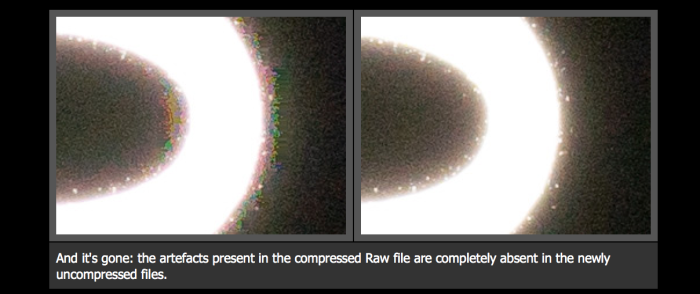
Image from DPreview showing the absent artifacts on the new 14 Bit RAW file (on the right)
DPreview is the first site having access to Sony’s new 14 Bit uncompressed RAW files. They tested it and those are the benefits they noticed:
1) No Artifacts on high contrast edges: “no longer introduce errors and artefacts around high-contrast edges.”
2) Very small Dynamic range improvement: “There’s possibly a tiny improvement if you try to brighten very deep shadows but the difference is so subtle that we don’t consider it to be photographically significant. But, even without this, the camera’s Raw files are more flexible than they were before.”
The files are twice as big as the previous compressed RAW files. And also very interesting: Sony’s new 14 BIT upgrade offers “uncompressed RAW files” and not “losslessly-compressed Raw”. The reasons are limitations of working with the cameras’ existing processors. But Sony said they will investigate the possibility to add “lossless compression system if there’s sufficient user demand.”
–
A7rII store list:
In USA: at Amazon, BHphoto, Adorama, SonyStore US, FocusCamera, Uniquephoto.
In Europe at Amazon DE, Amazon UK, Wex UK and ParkCameras.
In Asia at Digitalrev, CameraPro.
The A7sII preorder list:
In USA at Amazon, BHphoto, FocusCamera, Adorama.
In Europe at WexUK.
In Asia soon at Digitalrev.
240 Responses
Of course there is demand for lossless compressed files as well!
Great, now everyone is going to complain they are uncompressed and not lossless compressed
Surely not…
Depends upon the write speed of the uncompressed, basically. Nikon paved the way with multiple variations on speed and size, so there’s a benchmark people will be looking at. If our choice is simply speed OR size, then people will complain, I think.
Personally, for the things I’d use an A7 for, I don’t care as long as I get the uncompressed option.
Love it!!! Please include it in A7II.
Should keep the oscilloscope crowd happy though, those who say they can test a difference on their machines!
The lack of lossless compression is interesting. Not overly concerned. Ill probably convert them to DNGs anyway.
well it decreases number of shots you can take before buffer fills
True. Currently the camera can take about 20-24 shots before he buffer fills. Would be logical to assume that’s going to half. But that’s fine for my style of photography
As someone who isn’t printing huge files or pixel peeping, is this recommended? I ask because I’d rather not deal with twice the size of the current raw file the A7Rii is delivering especially when I’m please with the quality now. Just want to know some thoughts…
I don’t think so, since hardly anyone can even produce an image at 100-400% view where the “issue” is even present. You ask most people who are complaining to produce an image, and they suddenly disappear.
I’ve used my A7 for well over a year without seeing any RAW compression issues, even during star trails, astro and milky way photos
At least we won’t hear anything from Anton Berlin anymore xD
Good to hear, thanks for your thoughts. Looks like I’ll be sticking with the compressed version.
I think only those who have special requirements and those with an obsession for purity will worry about this. Yes, you can go hunting for it by pixel peeping in vulnerable parts of the image and provoke it through underexposing and boosting in PP. For the vast majority of images viewed at anything like normal usage it will be effectively invisible.
Still, a $3200 camera should have had it from the beginning.
I’m inclined to agree, but it’s just when people paint it as a life-and-death issue.
If you shoot backlit people with the sunset in the frame than yeah.
I’d use lossy compressed (or lossless compressed when it’s available)
mostly but for special applications like astro or night photo with harsh bright lighting use the uncompressed (or the lossless compressed if and when it’s available)
Producing lossless compressed files was always going to be more difficult due to things like demands on the camera’s limited processing power (Nikon might have some hardware assists for that if it was part of the design brief).
One simple workaround to save disk (but not card) space is, if you are using Windows, to use NTFS compression in the folders where you keep uncompressed RAW files. It’s operation (should) be transparent to your applications. It’s simple enough to apply it to a folder hierarchy.
I’m afraid Windows can compress them as well as specialized algorithm would.
I assume you mean “can’t”, not “can”. As for not compressing the files as well as a specialist algorithm, then that might be true, but I suspect that the lossless compression algorithms used on NEF files are probably some variation of a general purpose compression algorithm (variations on LZW are often used – indeed, the compressed version of TIFF files use LZW, which used to cause licensing issues).
Windows uses an algorithm called LZNT1, which has a balance of speed over compression level.
In any event, the only real way to say for sure is to get hold of some uncompressed RAW files and try it. (It can be a trifle tricky to see the change though as Windows will tend to report the uncompressed sizes for application compatibility).
oh no no no LZW please, there are specialized algorithms for lossless image compression
LZW sounds so 1977
It’s still very widely used in modified forms. As an algorithm it was a piece of absolute brilliance being general purpose, single pass and not requiring a compression dictionary to be stored in the file.
LZW generally doesn’t bring a lot of compression to image data. Moreover, it would have to be Bayer-optimized LZW to achieve any compression at all, as the raw data is RGRGRG… followed by GBGBGB… and so on.
I’m not wholly convinced. The compressed TIFF option uses LZW, and that’s image data. (Although it’s not so effective on 16 bit as 8 bit deep TIFF scanner files in my experience, probably due to all the extra levels and noise). In any event, it will depend what order the RAW data stores the values. From what I can gather the compressed version group values by colour channels in small blocks. I don’t know if the uncompressed version does the same.
In any event, people shouldn’t get carried away over the degree of lossless compression that can be achieved with 14 bit RAW. Anything with a lot of noise in it (which is guaranteed in RAW – in the bright areas about 5 bits of noise, in the darker areas 1-2 bits) doesn’t have much of the sort of redundancy required to get good compression.
The Nikon NEF lossless compression on a D810 looks like it is achieving roughly 50% compression, but that’s slightly misleading as it (like the Sony lossless version) stores 14 bit values in 16 bit fields (73MB file for about 63MB of data). If you adjust for that, the Nikon lossless compression saves about 30%.
On a similar basis a (losslessly) compressed A7R II file might be expected to be reduced to, perhaps, 43MB at best.
Of course one thing that could be done to save a lot of space (but the purists will go mad) is a RAW file format that truncated bit depth with ISO as, by the time you get to 800 ISO you are down to perhaps 12 useful bits given the full well depth of an A7R II photosite. All that happens with higher ISOs is you end up with more and more bits of noise (and, also, a less compressible file, noise being incompressible).
In any event, once somebody puts up some lossless RAWs I can do some experiments.
nb. I ought to add I’m not necessarily talking about using the actual LZW algorithm. There are close cousins to LZW, it’s more the basic principle of single-pass compression systems with dynamic compression tables. There are better ones around.
In my experience, LZW nets you maybe 10-15%. It might net you more if you shoot a lot of landscapes with a lot of sky, but applied against my image database, 15% would be a good result. FWIW, Nikon uses LZW after doing their bit-packing and other compression.
The real trick isn’t just saving file space, but also managing buffer use and lowering write times in the camera. A full buffer that takes fives seconds to clear benefits quite noticeably from even a 25% improvement.
You are correct on ISO. With the “isoless” sensors (Nikon, some Sony), it’s only worth capturing 14-bits at the base ISO and maybe one ISO bump up. Beyond that, there’s no benefit and you might as well shoot 12-bit. Which is exactly what I’ve been recommending for some time now in my books on the Nikon DSLRs.
You must be kidding me, lossless compressed raw if there are sufficient demand? I will not buy a second A7rii until Sony offer this feature. Sony can do better! I am absolutely disappointed by this lack of commitment by Sony to fulfill users request and meting out solution piece meal 🙁
*ROFL* you must be joking
meanwhile i’m spending too much time on rumors sites, it’s not until monday until i see therapist
Oh you poor unhappy soul. My condolences.
I think they are just following the Apple business model… slowly throw out minor improvements until finally on version 7 or 8 of whatever product your selling you include all the things you knew you were going to have on the product 8 generations ago.
Right, just minor improvements like 399 phase detection points, full frame 42 megapixel backlit sensor, 5 axis in body image stabilization, 4K internal video recording. Nothing special here. 🙂
+1
It’s like slow torture, almost more that a man could endure. (background music impossible dream, The Quest.)
https://www.youtube.com/watch?v=-KufFjcWOUQ
Agreed
Are you being facetious?
“lossless compression system if there’s sufficient user demand.”
That’s what happens when you listen to the generalized idiots on the interwebs. Next time Sony, might I recommend talking to people with a clue, i.e. those that now lossless compression vs uncompressed. Too many were asking for ‘uncompressed’, when they really meant ‘lossless compressed’.
They said lossless compression wasn’t able to be done retroactively because of processor limitations. This is quite clear as it would be a more complex compression than what we have and add a longer save time per image likely at cost of an already low battery life.
I imagine the A7mk3 series will all have compressed lossless RAW.
Eeek, that’s usual Japanese attitude. It doesn’t seem that the new option goes with no compression at all, even the most simplest.
Again, if Bionz didn’t have optimized lossless compression routines hardwired in it, trying to do it using the CPU cores is not optimal, will run more slowly, and may not happen at all until the next generation of Bionz is created.
Well they better pull their finger out and seriously update that Bionz CPU then…
I’m happy that I have this option… I love me A7r2 … fantastic camera… and for those few times when cRAW might be an issue I now have the option of non-compressed files… BUT, it does show an amazing lack of understanding on Sony’s part that they did not produce a lossless compressed option… it shows they did not really understand why people were asking for this… and that few of their engineers have any real knowledge of their competitors gear… Nikon, Cannon do RAW right… Sony need only do some competitive analysis to understand what people were talking about.
Did you not read the item? Lossless compression may well tax the processing power in the camera too much (and drain the battery) as it won’t have been designed with this in mind.
In any event, if you only use this occasionally then how big an issue is it?
The comment that it was processing holding them back in the article is simply conjecture by the writer… I disagree with his guess….Sony currently run a rather complex lossy compression algorithm that has to intelligently throw away data while trying to maintain IQ… a lossless algorithm that simply compresses and doesn’t throw away data would likely be even less impactful on processing resources than the current algorithm……. Also, if the issue was performance then the comment from Sony that they would consider adding lossless if that is what people want doesn’t make sense …. and its not a big issue for me…I’m simply stating that they obviously don’t really understand what is required and why…. and that is what is concerning to me.
“.. a lossless algorithm that simply compresses and doesn’t throw away data would likely be even less impactful on processing resources than the current algorithm….”
No it is not, unless it is a simple bit packing to save each raw pixel in 14 bit instead of 16.
Second, I believe the lossy compression is done in hardware and they cannot use same algorithm for lossless compression.
The lossy compression method used by Sony might not need hardware assists as, in cpu cycle terms, it can be done very efficiently as there are not laborious searches through compression dictionaries (st what I wrote above).
You are assuming that Sony’s lossy compression is done using general purpose CPU cycles and that there’s no hardware assist. In any event, the Sony’s lossy compression is not complex and does not involves many cpu cycles per value. There’s the initial gamma compression which can be done using a simple indexed table. The second stage block compression is also efficient as it just involves establish the max & min in each little block and setting a scaling value. Both are very quick to do.
In contrast, general purpose compression algorithms like LZW cpu intensive is that they chew up a lot of cpu cycles in looking through the compression dictionary for repeated string matches which means doing a lot of multi-byte comparisons through the compression dictionary. That compression dictionary is also changing dynamically during the compression process. In all, it needs quite a lot of cpu (in contrast, decompression is relatively fast as, whilst the decompression dictionary has to be created dynamically, it is accessed via an index operation).
There are far faster compression algorithms, but they tend to be designed for very specific types of data and (at least for lossless compression) are probably not appropriate.
Well, yes and no. All the ASIC/SoC solutions (Bionz, EXPEED, DIGIC, etc.) are hard wired for optimized algorithms in hardware. If you have to use the CPU core to do something that’s not hard wired, yes, you’re likely to be using a lot of cycles and it will be slower, by far. The question has been and continues to be why Sony didn’t put a full range of optimized routines into Bionz and Nikon did with EXPEED. Or maybe they did. Nobody knows what they did because these things are all black boxes.
Yes and Sony should compensate for your losses on each RAW file you lossy compressed in the past.
BTW Nikon doesn’t RAW right: they apply median NR on it in certain cases.
Do you have a source for your Nikon-RAW-Statement? Would like to read about this.
http://www.astrosurf.com/buil/d70v10d/eval.htm
Oh my, a very outdated article. I supplied Nikon with a better algorithm back in 2010 and it’s been in use since later that year. Moreover, they no longer clip black, which was the other part of the problem for astrophotography.
Wow. Nikon took advice from a third party, really? If true I’m impressed.
It took quite a dance to make the transfer, but yes. Nikon later made a slight change (for the better) to the algorithm, which absolves them from saying they got it from outside ;~).
Wow, you’re delusional. If your BMW doesn’t give you better mileage than a comparable Mercedes, you would demand compensation from BMW (even if the Mercedes gives you better fuel efficiency overall). And, you’d rant hysterically on the internet if you didn’t get your way (here’s a hint – it isn’t going to happen because what you’re saying is crazy).
Sorry, I forgot to put the sarcasm tag.
Oh – then my apologies!
Missing my point completely… is there a tag for that? … Sony is stumbling around trying to understand what people want?? Any Engineer of digital cameras should know what people would want for RAW…. they need only look at what Nikon or Canon have done for years now… 3 options… Lossy C, Lossless C and Non Compressed…. easy…. the fact that even after people complaining that Sony only had Lossy Compressed, Sony comes back with Half a solution proves that they don’t really understand why people wanted what they wanted in the first place… and that is what worries me more… it’s not about lossless compression…but that Sony obviously don’t understand why people would want lossless compression in the first place.
Chances are Sony cameras and their underlying technology are optimized to produce the lossy compressed raw files that they’ve become famous for. Making that same technology produce uncompressed lossless raw files was apparently easier or less costly to do than producing compressed lossless raw files. If the compression is done in hardware to speed things up, it may well be that that hardware cannot produce lossless compressed raw. Doing it in software may be too slow or resource intensive to make using the camera practical. You shouldn’t make assumptions about their engineers until You fully understand the parameters and constraints that they’re working within.
Nikon has offered all three (lossy, lossless, and uncompressed) for quite a few generations of the NEF file type, so it’s certainly possible.
Yes…exactly… Sony need only see what the competition is doing to understand what people want…. not that I’m not happy that at least we now have two of the three options….
I wonder if anybody can list / help pool info regarding which company uses which raw compression data. I’m sure there’s content somewhere. AFAIK Canon has always used 14-bit lossless compression, Nikon has offered all three compression options and both bit rate options, and Pentax for example IIRC has offered only 14-bit lossless compression as well. Sony is probably one of the only ones who has (previously) only done 12-bit lossy.
You miss the point. Nikon may have put hardware assists to lossless compression into their cameras. Digital cameras are full of those sort of features for doing specialist things like JPEG or Video rendition as there simply isn’t a huge surplus of general purpose CPU power in these cameras. They rely on specialist hardware assists for speed and to keep the power consumption down. Compare how long it takes to render a JPEG on a laptop with a small camera that can do 10 or more a second.
I’m not saying Nikon are using this for lossless compression, but as they’ve had it from the start then they might well have engineered it into the processor hardware.
From the dpreview article, looks like it is possible through firmware as they said Sony would make it depending on customer demands. Maybe they can just use a simple bit packing to make the files ~75Mb.
Yes, very good point. By comparison, Canon from the start has only ever offered one bit rate and one compression, period. (Although it “upgraded” bit rate once over the years, IIRC)
I hope this finally brings peace to anton berlins tortured soul.
wheres that other guy who knows the truth about everything in the universe and is also a professional photographer with the greatest technique man-kind has ever seen, is he still around?
Dunno. Maybe Batman got him, lol 🙂
There is a lot of real lunatics on this forum, i suppose they change their nick with the change of their mood, so anton could be anyone now, since sony introduced uncompressed RAW. The same happened to illuminatedobserver probably. That, or the Batman got him.
nice to have the option, thanks sony
Still, even without the lossless compression or uncompressed RAW, the sensor got the highest-ever rating from DxO. Not bad for something that a number of near-hysterical pundits would maintain is a crippled and inadequate system.
As if the DXO overall score meant anything at all. Are you using their software or “ONE”?
The great Wesley has spoken – DxO’s ratings mean nothing. I’m sure the website will be shut down by the end of the day.
Yes, people do seem to twist my words and dodge the question but I’m just a simple man that speaks the truth. It apparently makes people turn cowardly.
Let me know when you can read “overall score” and answer the question. No pressure.
There’s no question to be dodged. You simply didn’t understand what he wrote.
I cannot repeat it often enough:
Lossless compressed RAW instead of uncompressed…
The biggest issue is that the buffer fills up much faster and you can shot only about half the pictures before flushing the buffer.
For archivating on my computer, I would probably let Adobe-Camera-RAW convert uncompressed RAW to DNG. When I remember correctly, DNG offers lossless compression. This does not disturb my workflow, but makes my hard-drives twice as big.
+1
And ~2X as long to write each image to the memory card and ~1/2 as many raw Images per card.
Use a compressed file system. It’s easier.
Is there such a thing that could be applied to an entire drive automatically?
Yes. Very easy. Open Windows Explorer, select the drive, press right button and then properties. Then tag the “compress this drive” box.
However, don’t do this on the system drive as it will slow things down and can cause problems.
If you have data on your C: drive, then only compress from the topmost folder which contains data – you get the option to do subfolders as well. Bear in mind that there is a cpu overhead on doing this (although not a problem on my desktop). I’d advise trying it on a few subfolders first.
http://www.howtogeek.com/133264/how-to-use-ntfs-compression-and-when-you-might-want-to/
To see the impact of compression then the “properties” box will show you the total file space and the space on disk. The ratio gives you the compression factor. As mentioned though. if your data is largely in incompressible it will not, of course, make much difference. Sony lossy compressed RAWs only save a couple of % this way.
Yes – another good idea. But a compressed file system wastes computing power if you store uncompressable files like jpegs or video-streams. When I import from SD-card to lightroom, my default setting is DNG converting. (Not a big deal, too)
Going between uncompressed and lossless compressed will indeed save space, but not as much as using 12-bit or lossy compression.
If you’re a wedding / sports shooter who does high volume, I’d honestly just keep shooting the 12-bit compressed. Even on my Nikons which have historically had pretty much every NEF compression combination possible, I’ve opted to just use 12-bit compressed for high-volume work, and only switch to 14-bit lossless when shooting serious landscape work…
Of course to each their own, and options are always better than none!
Ok now Sony make an option to put OSPDAF pixels into RAW so rawdiggers could enjoy ’em.
And add 480p 720p options for video, Canon 5ds has theem despite having more pixels.
The camera is still so small- it still feels compressed.
Just wait for Hasselblad version of it xD
They’ll add larger wooden grip and charge $5000 for that
Looks like it cures chromatic aberration. Amazing 😀
As others said, I think Sony should really study about making lossless compressed RAW possible. In the meantime, in order to save space on the disk, they could introduce a quick and simple tool which does lossless compression on the files after they have been downloaded on the computer.
If you have Windows, it’s already there. Assuming you are using Windows, just get NTFS to make you folders compressed ones (very easy to do – of the properties entry). It’s transparent to the application and compresses/decompresses suitable files on the fly.
Note that it won’t help with things like JPEGs or compressed RAW as they are essentially incompressible.
The filesystem of DVDs doesn’t allow, AFAIK, compression, as well as, in general, file systems on a cloud provider; nor my RAID NAS. It’s a good thing that operating systems provide compression on the fly, but there’s a lot of value in having a file compressed per se.
That may be true, but it will be helpful for a lot of people. As for DVDs, I would think they are of limited use these days given their restricted capacity. Even a modest SDHC card will be several times larger. I suppose they are OK for posting some images, but it’s simple enough to zip them first.
So, OK. A compressed file format is better, but this will work for many people in its absence.
I don’t really see a need for that.
Read my post above. Not THAT much different in file sizes, since that would be the only real affected thing between lossless compressed and fully uncompressed.
Hopefully soon they will release this for other models as well
Sinc Sony had roughly 1mb per 1pm, twice the size is really not that bad…
48mb for 24mp, 72mb for 36mp and 84mb for 42mp.
Ask Nikon and Canon people how that stacks up to their files and lossless compression isn’t THAT different.
My former 5D2 had between 28-40mb per 21mp files so it isn’t that bad.
You’re correct; in my testing of multiple Nikon bodies I’ve found that the bigger savings usually comes when you adjust the bit-rate and/or the lossless-VS-lossy compression. Unfortunately I only have a D750 on hand right now, and it doesn’t even offer fully uncompressed NEF, but IIRC on the D800e when switching between lossless and uncompressed, the remaining file count didn’t even change, while it showed a 20-40% increase in space savings between 14-bit lossless and 12-bit lossy.
I really hope they retest it anyway. “Tiny improvement” is a relative term. I want to see it break through 100 total score 😉
The haters are running out of reasons to hate pretty quick here. I’ve personally tested the alleged long exposure noise and the overheating with 4K video, and found them to both be non-issues considering what the camera has to offer that other cameras don’t.
(In other words, you’re an idiot if you try to say “I’m not buying this camera because it has problem XYZ” because the issues can be overcome, and no other camera on the market offers the same variety of cutting edge technology and performance.)
So, in other words, everybody is a hater or idiot not agreeing with you?
@HF I only mean that you’re an idiot if you continue clinging to a (resolved) reason for actively hating a camera.
You don’t have to agree with me, in fact I’ll be the first to tell you that you should never listen to crazy people on the internet without a huge grain of salt to go with it. But if someone’s MO is to continue dwelling on negative issues, they may never find the perfect camera. That’s all I’m saying.
So I’m a hater for saying “I’m not buying this camera because it cost too much.”
Sorry but your use of the term hater is as overused and tiring as the term troll.
Opinions differ, learn some tolerance.
Price is not a function of performance, it is a function of value. Price is not a “bug”. My apologies for not clarifying that. Price is ALWAYS a legitimate reason for being disappointed and/or simply deciding not to buy a camera.
My point is simple: the problems that people have brought up so far are disappearing or being worked around very easily. What’s so hater/troll about making that statement?
Guess I’ll begin with…NO UHS-II ?!
I was speaking about problems / bugs, not missing features.
Hell it sure is a problem when it’s write speed is slower than one raw per sec.
RII max write speed is 33-35 MB/sec while the raw file is 42MB.
It can’t even write one raw within a second. Is that not a problem?
Just as much of a “problem” as being the person who thinks a 42 MP camera is meant for action sports, when Sony also offers a 24 and 12 MP version camera? Yes, it is a shortcoming. But not a “bug”.
Explain to me why Sony put their fastest AF system in the RII instead of the 7II & SII than?
Since AF is done on-sensor, I suspect it has something to do with the actual number of megapixels. Apparently, you can’t yet have your on-sensor PDAF cake, and eat it too, not yet at least. This is why Nikon and Canon are still clinging to off-sensor PDAF for their sports flagships, despite it (off-sensor) being forever prone to at least a few technical drawbacks compared to on-sensor.
On-sensor and off-sensor solutions, as far as I can tell, has their own issues. Neither is problem free when comes to sports.
What…? Your MP reasoning seems to contradict to what you said before…
The 7II should have had the fastest AF system instead judging by the first versions.
What I meant was, more megapixels means a greater ability to do on-sensor phase-detect or contrast-detect. So 42 beats 24 which beats 12.
But I’m just guessing here. Because you’re right, the lower res sensors should have better AF if they’re going to be the ones most used for action sports due to buffer size or card write speed. I’m sure Sony would have done it in all of the mk2’s if they could have, or even if you assume a slight generation gap between the A7 II and the A7R II, one could hope that the A7S II at least has as good AF as the A7R II, especially if the A7S II touts being a low-light king.
A corporate / marketing decision to omit flagship AF from all cameras but the slowest makes no sense, which is why I postulated that it could have to do with the actual resolution of the sensor.
Because it isn’t an ‘AF system’, AF is part of the sensor, the A7R II has a new sensor, the other two don’t. A7 III will likely have a new sensor and be faster.
Because it is the newest sensor on the newest camera.
Don’t you kinda need UHS-II for internal 4K recording though?
No, because it looks like 4k can record up to 12.5MB per sec.
Max write speed of the RII is around 35MB/sec so 4k video no problem but raw file is 42MB.
If shooting continuous, the wait for buffer clearing can be a long wait.
Curious to know if that’s your own personal report, or an assumption.
I’ve shot with the A7R II with UHS Speed Class 3 cards, and the buffer lag time isn’t too bad for a 42 MP camera that shoots 5 FPS. The buffer is deep enough that you can shoot for quite a few seconds before any slowing occurs.
Unfortunately, SD card speed ratings are a mess. There’s the Speed Class (2, 4, 6, 10) and the UHS Speed Class (1, 3) and then there’s the Bus Mode, which you referred to. (Normal Speed, High Speed, UHS-1, UHS-2)
Like I said, it’s a mess. Long story short, you can still record pretty nicely if you have the right card. It sure as heck beats the throttled Canon 5D mk3 SD card slot!
The buffer is good. It’s the time waiting for it to clear that’s atrocious.
Alik G. has an organized chart of the card speeds: http://alikgriffin.com/best-sd-memory-card-sony-a7rii
Another “deal breaker” is the USB 2.0; in addition to pushing shadows 5 stops on every image, and constantly making exposures in excess of 5 minutes I also have to record 4K video for hours on end. Transferring these huge video files takes forever. SMH
This is because Sony is not a real camera company, they can never compete with the likes of Nikon, Canon and Samsung.XD
That in itself is a “deal breaker”
make s cup of tea while you are transferring files.. not even many other devices such as smartphones have usb 3 yet
You’re absolutely right, the post was pure sarcasm.
Excuse me I am not a pro but why not bypass the USB2 camera port and use the LEXAR FAST SD CARD/READER combo in your USB3 computer port ?
Astro Landscapes: VERY well said.
to Yirmin below. You aren’t a hater because you can’t afford it, but your opinion is less valid if you haven’t owned the camera or at least used it on an extensive basis. Until you DO, you just have no idea how good the positives are and how insignificant the hot pixels and uncompressed RAW IS for most of us. I upgraded my firmware and just did a 30 second exposures at f8 and ISO 100 and I see NO hot pixels. Not to mention, when processed with Capture One, there were NO hot pixels in the processed image before the update, ANYWAY!! I can’t afford a Ferrari, but THAT doesn’t make it a bad car. It just means price is the #1 factor, when trying to decide to get one. The A7r II is CHEAP compared to a 5DSr, a iDX, a D4 or even the original 2012 price of the 5D III of $3.500, AND it has more features.
What annoys ME, are the guys LOOKING to find a problem and get their 15 minutes of fame from being “the guy” that found the earth shattering, deal-breaker problem, when, the majority of us, there just isn’t one. I wonder who will be the knucklehead that will compelled to report that the uncompressed RAW files are twice as big and they take longer to process. DUH!!
Here’s idea for you for long exposures: shift sensor between exposures by one pixel (like Oly E-M5Mk2), so the dark current will be uncorrelated. Maybe we can convince Sony to implement this one xD
That would be very interesting! Unfortunately I’m more interested in solutions that don’t require my camera to be occupied for 2x the exposure time, like long exposure noise reduction currently does. It’d be awesome if the sensor could shift a pixel halfway through the exposure and do some sort of intelligent “pretend that didn’t just happen, then subtract any pixels that seem to be stuck”
But that’s pretty hair-brained as far as ideas go. Hmm…
if you take three shifted exposures at 1/3 time and take median of them, you get significant reduction in dark current without need to make a dark frame at all.
Never underestimate the power of resilient die hard Canon fanboys
Looks amazing!
Great Job Sony!
Anyone know if the FW is available yet?
It is not at this time.
Awesome awesome awesome! Release it please! lol By the way, hot pixels are gone with the latest update. Can’t wait to truly try it out with some astrophotography…
Thank you Sony.
Please bring that back to at least the RX1.
Sony sourced the code for the firmware update from Samsung. This dependence will increase in the future with Sony’s inhouse R+D shutting down by the end of 2016.
So when is the Samsung Camera Division going out of business party?
Samsung is not going out of the camera business ..that was a false rumor and Samsung has officislly and publicly denied it..
http://www.sonyalpharumors.com/bad-news-if-true-samsung-kills-their-camera-business/
AHAHA, wrong http://www.mirrorlessrumors.com/good-news-samsung-says-rumors-are-not-true-they-will-stay-in-the-camera-business/
Sorry for your loss, time to update that resume.
Perhaps you can transfer to the washing machine division and hopefully correct that bearing seal issue that turns your $1500 machine into a piece of scrap that’s not covered by warranty. https://www.youtube.com/watch?v=RIbeIVleSqQ
Yeah…, well the feminists escaped from HR and invaded the washing machine department, it all went to shit…corporate policy sucks sometimes, even at Samsung. Thanks for your submission, they will be back to making sammiches asap.
Holy cow, people begged sony for uncompressed RAW files and sony gave it, now people want lossless compressed RAW files. You can’t please everyone, I for one would gladly welcome uncompressed RAW for my a77ii and not a single complaint would I have. Either install or don’t the choice is yours but stop whining about it. Maybe it’s time to get offline and go shoot instead of crying.
Uncompressed and lossless compressed are virtually the same but one takes less disk space. It’s kind of like comparing a .wav and a .flac.
The compressed files will make a difference on the total diskspace, atleast if you take alot of photos.
Would lossless compressed raw files take more processing power than uncompressed?
Yes. A lot of people seem to be missing this. Compression is done at the chip level and Sony’s chips likely don’t support lossless compression. The only fix they could provide in a firmware update was a straight uncompressed version of the raw. Sony are not stupid, they would have down lossless if they could.
Yes.
Theoretically it should take less processing power to work on uncompressed files. If you have a slow HD or not too much RAM then uncompressed will tax those resources more.
People only begged Sony for uncompressed RAW because people are f’ing stupid and didn’t know what they were asking for. Of course what they wanted was lossless compressed RAW in the first place.
I will never understand these rants about “whining” and “complaining”. Apparently if you’re getting what you want, everyone else should shut up and… leave more room for your posts, I guess.
People, for all the time, want lossless compression. Many people, however, do not differentiate between lossless compression and uncompressed raw. Apparently Sony took thing literally. Of course Sony understands the difference better than most users. Explicit discussion of no-compression and lossless compression has been there for many many years.
Mangling all those under & overexposed pixels into an HDR file then you SHOULD be using the 11+7 compressed file anyways. Lossless aint going to buy you nuthin’ there with all those PS rounding errors and all that wild-assed computational guessin’…….
Just buy a 64GB card, and your problem is solved
I currently have 2 64GB cards. However that limits how many scenes I could capture on the road. Last time I took 3,000 shots. It also cause problems if you are laptop users. You need a lot of space to storage for editing. Photoshop could take up a huge amount of space for temporary files as well.
Continuous shooting would be affected as RAM fills up more quickly.
If MK3 coming out 15 month later and has lossless compression, you would want to have the MK3. This money could get you a Leica.
Still, an issue of convenience.
The processor in your computer should work with uncompressed files faster.
Sony probably instituted uncompressed raw for now as it was probably a lot faster to get out a release versus instituting / licensing a compression scheme and QC’ing with the cameras.
I think the limiting factors are RAM size and how fast your disks are. I don’t think that’s a huge plus. I checked CPU usage while doing stacking. It barely went over 50%. RAM is never big enough, SSD is never fast enough for accessing temporary files. But on average my 3770K is ~30% busy.
Would be interesting to do a test on compressed vs uncompressed processing of the same photo set (once Sony offers either options).
When processing I think the file was converted to whatever format PS likes. Output would be a tiff file. The only stress you have is loading of your source disk. If you use laptop, bless you.
Even if you do single file processing, PS and LR would generate a temporary file for the job. You are working on that file.
I don’t think they do, if they did so then why do RAWs lag and 32bit tiffs run smooth as butter? Of course if you simply converted RAWs to tiff/dng then do the processing it speeds up also.
I tried converting a file to tiff and put it in the same SSD i used a cache. I noticed no much difference in terms of lag. When processing compressed RAW my cpu is having 5% higher load.
Well no file I’ve seen taxes my CPU to 100% so I don’t know why it slows either, I have RAID 0 SSD as my main drive but my photos aren’t on that drive…it’s worth trying moving them I guess.
Try to use like 50 spot corrections and see if there’s any difference, one of my files with hundreds of spot correction takes about 2 minutes to load and every operation on it takes a few seconds, however doing spot correction using PS shows no change in speed…
You should try that. I feel CPU is not the biggest issue. I never seen my PS and LR taking more than 50% load.
I noticed that with LR. Very annoying. Disk speed didn’t matter either…
Ah, then it’s a software problem.
I notice uncompressed files copy much, much faster to and from my SSDs (850 Pro’s), so I’d be surprised if that didn’t speed up editing.
That is because most SSDs (all of the ones using the sandforce chipset) run hardware based compression on all data written to the SSD to speed up transfer, operating system files can often be highly compressed but the transfer speed drops by half or more for any compressed data as they cant compress it further and have to write at native speed.
Its a bit cheeky of them to be honest, if you plan to store jpegs, MP3 or video for example they are often not that much faster than a mechanical drive.
lol why can’t you enjoy HDR anymore? HDR creates 200MB+ tiffs, and suddenly you couldn’t deal with 80MB RAWs? Besides RAW without compression most likely makes your PP smoother, I know my LR on 3rd gen quad core i7 lags the more I add adjustments to the photos, which are currently 24MP compressed RAWs.
I do stacking. It means I need 24-256 shots taken with continuous shooting in the first place.
Then, you have lossy compressed raw now, which contains less data compared with uncompressed raw.
Stack with the smaller files then I guess, after all this compression issue doesn’t show unless in some extreme night scene…unless you stack those too?
It’s uncomfortable to me with that price tag. IQ wise there might be no issue, price wise there is.
“If there is sufficient user demand.”. Funny. EVERYONE wants lossless compression, once they understand what it means.
We also want a bigger battery, more card slots, faster burst, etc. Some issues require hardware improvement you know.
WTH?! uncompressed why? lossless compression is the only alternative …
It’s a temp workaround.
Why is it the only alternative? So your file will be 50%-70% larger when compared to uncompressed, but you will tax a CPU much more, which means more heat. I’d say keep it as is, and provide us with a proper SDXC UHS-III interface. That will be far more useful…
I don’t shoot none stop so heat isn’t a issue for me and I believe for most people
Ok, let me put it the other way. Any CPU will take longer to decode the lossless format vs an uncompressed RAW. There is always a higher chance of errors being encountered during decompression. I’m sure you are using lightroom or other similar tools.
I just want to say, thank you Sony!
If I were to make a feature request, focusing at 5x magnification is easy but can you make this as sharp as the 12x? Thanks!
Nobody says “thank you” here. I hope you’re being sarcastic.
Holy freaking mother freak… Sony why is this not public now!? Also, no shit we want fully lossless raw…
Is there any reason we couldn’t use AdobeDNGConverter to get lossless compressed DNG raws once an update supporting the new format comes out?
If you’re converting without keeping the original, it’s entirely a non-issue after that point.
Just zip the files once they’re uploaded to your computer, you get lossless compression and get to keep the originals.
Forget about DNG if you want to maintain a good workflow. It’s a generic format that does not support some of the content in the ARW files.
http://www.dpreview.com/forums/thread/3905422
Is it better to go straight from arw to tif then? My current workflow is edit the arw in dxo, export to Lightroom as dng, finish up on photoshop.
I found that converting to tiffs does weird things to camera correction (yes I use that to adjust the color…), other than that it seems the same as the usual raws.
Thanks – I’m having enough problems with can gets correction as it is with the 28/2…
Do those missing even matter? Don’t most people correct CA manually? As for WB…DIY seems the better option too. As for distortion…manually select the profile?
If you want to do that to every photo manually, go ahead. As I wrote “… if you want to maintain a good workflow …”.
There should be an external device that you carry around that plugs in to the camera and does the lossless compression. Kind of like the 4K recording on the original A7s.
Now introducing Atomos Shogun: Lossless RAW recorder!
Now you can enjoy a bulky mirrorless camera.
since when did sony promised to give a NON-bulky mirrorless?
on the other hand, RX1 is the world’s smallest FF, and if you add a grip, 5 axis IS,focal shutter, EVF,tilt screen, its gonna end up about the same size as A7 body,
So Yes I agree A7 is not something small enough for you to put in your pocket, but how small do you ask for? a FF body in RX100 size?help me here.
the lens too, unless we have some better solutions than optical glass, the lens size at certain focal length and certain aperture value is limited by physics, not because sony doesn’t want to make them smaller but they were limited by the technology of our time
I see you keep complaining about the size of A7 here and there for a long time, so please, name me a company can do better than sony on FF mirrorless. or tell me the ideal size of FF mirrorless in your mind.
Oh, why I complain? I do love a big mirrorless with poor battery life and weighing close to a dlsr setup. I forget the best part, 80MB raw file. Sony is doing such a GREAT job by bringing back what should be there in the first place and still lossless compression is missing.
With that weight and size I sometimes mistook it as a small dslr. Mirrorless 😀
again, you always try to drag people to the debate between DSLR and Mirrorless, which is totally non comparable
DSLR can do many things mirrorless can’t do, mirrorless can do many things DSLR can’t do as well. they all fit into what the good at. you get longer battery life from DSLR, for the reason it uses optical viewfinder, and you know theres many benefit of using EVF, you take the benefit, it takes the battery life, its always been like that, even we have great achievements in battery technology, DSLR will always have longer battery life than mirrorless, thats the nature of it.
nikon D810 has 36mp, NEF file goes up to 73mb, A7rII has 42mp, the 80mb looks nothing wrong to me
about the lossless compression, you know if you do the same test in rawdigger, the lossless file from both canon and nikon were “a bit” lossy. So I see real good point for sony simply give uncompressed file,they just want people like you shut up.
So I see if you hate sony, you can hate it with many reasons, even one day they give you another lossless option or better battery, you always can come up with something to complain.
I’d be really happy to see someone like you who doesn’t have a A7rII but crying about your memory card being filled by a 80mb file
The only thing I know is, wind is changing fast lately. It’s good to see your rationality returning. https://uploads.disquscdn.com/images/4eeb8148017e07aaa57e85162bfd14b1598458e398e37f3fd3d952c742a4406d.png https://uploads.disquscdn.com/images/397040572de93657a4db11db02f1162a316a60c5aabb52e6065223defb348d6d.png
I hope you’re not collecting screen shots of the bs that comes out of my mouth. 😉
DSLR doesn’t have many functions sony has,and admit or not, it is smaller and lighter if you really want to do the comparison
I have to carry extra batteries to compensate for the light weight. However old Sony SLT models also have IBIS. You guys never supported SLT as much as A7.
Mirrored or not a7RII is the best package at its price. Just shut up.
There is no best camera for every task. But I agree A7rii, aside from Leica, is a good package for showing off fancy gears.
Let’s put it this way: a7RII is better at the majority of tasks than its direct competitors.
I am very tired of counting pixels. It’s not what you need to make great shots. Just like this one. https://quigley.files.wordpress.com/2008/07/che-korda1.jpg
https://uploads.disquscdn.com/images/60c87623f9bc7b71014e6449d5883d25eb107c7541c5da69d271ae2f89cc7be9.png
If you put it this way then you don’t even need a great camera to make great shots, look at all those iPhone6 ads with photos shot on a smartphone.
If you can’t take a good picture, it’s not because you have a crappy camera. Guess what I used. https://uploads.disquscdn.com/images/5b91ee5eab15350145517e6865592ea8414d0a68f11fb45d9615aa2aa1eda094.jpg https://uploads.disquscdn.com/images/75ee8c38cef766607ede923af4c5b094ad51fc14a4cca0d536859befcda08cc4.jpg
I’m sure the D900’s price will blow a7RII’s away especially.
I am also sure A7R IV would take it further.
I doubt it, there should be an a9 by then.
You know mirrorless has other benefits too other than size and weight… We might get an A99II without mirrror and that will also be mirrorless but with other benefits…
What otherwise?
No, if adding EVF and tilt screen means the size change from RX100II to III then it’s totally acceptable. However, any more than that…
My words was “if adding EVF and tilt screen TO RX1” not TO RX100 if you can read carefully, because RX1 has the smallest FF body
So I really mean a smallest FF body plus EVF, tilt screen, grip, 5 axis, and focal shutter. NOT, RX100 plus the rest.
and I’m only talking about the body, so ignore the 35mm lens on RX1
I didn’t mention any of the grip etc. I don’t imagine they’ll be able to fit anything other than a really small grip that slightly stabilizes the camera when held with two hands(but still can’t be held with one), and IBIS and shutter are crazy and impractical. I’m only talking about the EVF and tilt screen, these two they should add and probably wouldn’t add to the size any more than they added to RX100II.
>the lens size at certain focal length and certain aperture value is limited by physics,
Compare Sony zei$$ 35/1.4 and Voightlander M 35/1.4.
Compare Sony zei$$ 24/1.8 and Canon EF-M 22/2 STM.
Yes, Sony doesn’t want to make smaller lenses.
Now when they have BSI sensor with fast readout they can simply omit focal plane shutter and fit all into NEX-5 like body with popup EVF in the corner.
In all fairness, the Voigtlander M may, may have corner smearing on Sonys? And it’s not as sharp as the Sony either. If you check vignetting, Sony’s probably better, the bigger the less vignetting always. But yes, Sony should’ve gone the small route even if it means many possible limitations. The 35/2.8 could be a little shorter still and skinnier for easy packing and storage too. There’s probably too much plastic in there.
Of course, it was not designed for digital cameras but including sensor glass thickness in calculation is very easy. It could be made sharper with better glass and aspherics, not neccessarily bloating the size (and yet the Sony zei$$ 35/1.4 is softer than Sigma 35/1.4 ART which is both cheaper and smaller)
35/2.8 could be made into collapsible design with automatic lens cap, would save several mms.
I can’t believe it’s bigger than the Sigma…this is just crazy.
The Sony is 112 mm and takes 72 mm filters wheres the Sigma is 94 mm and takes 67 mm filters. The Sony has a bit less weight, through.
the VM lens was very soft at F1.4, and no AF, and the zeiss 35 is distagon design, which means more correction of light, again, physics
the zeiss 24 is a anti tele design, the canon 22 is very soft at edges, again physics
im not sure if you can put a pop up EVF to the NEX5 body if it also has a ff sensor, plus, you won’t get weather resistant on pop up evf
“physics” lol lalala… the canon 22 is sharper than zeiss 24.
you don’t need f****g distagons for better correction, of course sometimes large expensive distagon might be sharper than cheap small planar, but given same cost and size symmetric lens would be better
There is already an internal device you can buy to compensate for this compression issue: a bigger memory card.
Good one.
No kidding, with a 512GB card, who would even care about file sizes!!!
I think it’s a good move by Sony to wait for the dust to settle before deciding any more changes to the raw.
Let’s see those new lenses now, that’s what we need more than this firmware update.
The quickest solution to a problem I never knew I had. Thanks Sony! Now lets get back to the very noticeable lack of telephoto lenses for the FEmount system. Please Sony, send us a 70-400 or a 200-500 that doesn’t require an adapter. But again, thank you Sony for moving so quickly on the 14 Bit uncompressed RAW files requested by a scant but very loud micro minority.
300-600 f4.8 with 150mm barrel extender for close up/ macro mode and drop in matched 1.8x teleadapter.
To sell for mid $3000 range.
This request made me laugh out loud the first time you posted it. I honestly hope they make it. They would DEFINITELY sell one. 😉
I’m pretty sure the team working on files is different from the team working on lenses. Most companies can work on 2 things at a time. And no taking resources from files and putting them in Lenses might not make them any faster.
How to let Sony know that there are sufficient user demand?
Lossless compression would probably slow down processing speed…giving complainers spmething else to complain about.
And file sizes would not be that different.
My D810 lossless is 45MB~; uncompressed 75Mb~
Well that’s a sign of the apocalypse – Barry has noted that the complainers’ endless nitpicking.
And it’s not like storage is expensive these days anyway…
I can’t see a lossless algorithm for RAW being any more intensive than JPEG with its extra post processing. And won’t clog up the I/O bus writing to the card as much as uncompressed. Actually the CPUs in the Sony A7 lineup are quite powerful.
Obviously the great majority of demand for lossless compressed raw is not getting through to Sony antiquated market feedback system 🙂
Having *any* kind of market feedback system seems antiquated these days. 🙂
Canon addressed their customer’s desires for a camera with competitive sensor performance, and they brought out another 2009-era DSLR with a 2009-era sensor (but with more pixels!).
It’s probably safe to say they misunderstood their customers, considering that the 5DS R is already selling on FleaBay at a $1,000 discount.
And their video shooters just want serious a 4K camera. But Canon won’t give them that unless they are willing to spend $16,000- and get in line for a product that still isn’t out.
I don’t have anything (not much) against Canon, I just wish they’d quit failing at everything. Their build quality is amazing. If they produced their own version of what Sony offers in the a7r II, but housed in an updated 5D package– I would buy that over the Sony for almost any kind of professional job.
I’m thinking its Sony’s goal to accomplish the same results from Uncrompressed Raw with their super compressed Raw. You’d think that every camera company would want to have lossless compressed raw.
On D800 i did my usual workflow using both uncompressed and lossless compressed and there very little difference if at all. I never ran into any issues either way.
lol they said it would be uncompressed, that’s what I thought.
Great stuff. Definitely a move in the right direction! Gives them time to work on a true lossless compression for future models.
Personally I’d only use it in very limited scenarios. Night time landscapes leap to mind. Maybe still life, but I’m not convinced I’d notice a difference there.
Fair point ReallyRandomGuy.
Dear Sony Lens Team, may we please have some long telephoto lenses for the Emount system. Please. Oh and thanks again to the Sony camera software team for pushing out the 14 Bit uncompressed RAW files update!