







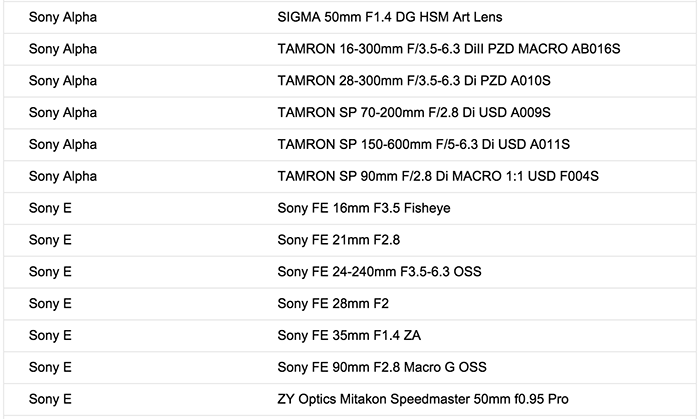
Adobe launched the new Camera RAW 8.8 you can download for Windows (Click here) or Mac (Click here). It adds Lens Profiles support on all new FE lenses and more:
All new FE lens preorder links:
In USA at:
Zeiss 35mm f/1.4 FE at Amazon, Adorama, BHphoto, FocusCamera, Sony US.
Sony 90mm f/2.8 FE at Amazon, Adorama, BHphoto, FocusCamera, Sony US.
Sony 24-240mm FE at Amazon, Adorama, BHphoto, FocusCamera, Sony US.
Sony 28mm f/2.0 FE at Amazon, Adorama, BHphoto, FocusCamera, Sony US.
Sony Fisheye Conversion Lens for FE 28mm F/2 at Amazon, Adorama, BHphoto.
Sony Ultra-Wide Conversion Lens for FE 28mm F/2 at Amazon, Adorama, BHphoto.
Sony Fisheye Converter for E 16mm F/2.8 and E 20mm F/2.8 at Amazon, Adorama, BHphoto.
Sony Ultra-Wide Converter for E 16mm F2.8 and E 20mm F2.8 at Amazon, Adorama, BHphoto.
In Europe at:
Zeiss 35mm f/1.4 FE at Sony Germany, UK, FR, IT, ES, NL, BE, AT, CH, SE, FI, NO, PT.
Sony 90mm f/2.8 FE at Sony Germany, UK, FR, IT, ES, NL, BE, AT, CH, SE, FI, NO, PT.
Sony 24-240mm FE at Sony Germany, UK, FR, IT, ES, NL, BE, AT, CH, SE, FI, NO, PT.
Sony 28mm f/2.0 FE at Sony Germany, UK, FR, IT, ES, NL, BE, AT, CH, SE, FI, NO, PT.
Wide Angle converter at Sony Germany, UK, FR, IT, ES, NL, BE, AT, CH, SE, FI, NO, PT.
Fisheye converter at Sony Germany, UK, FR, IT, ES, NL, BE, AT, CH, SE, FI, NO, PT.
Wide angle converter for 16 and 20mm lenses at Sony DE, UK, FR, IT, ES, NL, BE, AT, CH, SE, FI, NO, PT.
Fisheye converter for 16 and 20mm lenses at Sony DE, UK, FR, IT, ES, NL, BE, AT, CH, SE, FI, NO, PT.
In Asia/Australia at:
Sony 24-240mm FE lens at Digitalrev, CameraPRO, Sony Australia.
Sony 28mm FE lens at Digitalrev, Sony Australia.
Sony 90mm FE lens at Digitalrev, Sony Australia.
Zeiss 35mm f/1.4 FE lens at Digitalrev, Sony Australia.
Wide angle converter for 16 and 20mm lenses at Digitalrev, Sony Australia.
Fisheye converter for 16 and 20mm lenses at Digitalrev, Sony Australia.
24 Responses
YOU ARE NEXT FAGGET. M43 and Sony users on their way to Canon
reeducation camp, not many will come back. Punishment is a$$rape with
the heredic lenses they used.Sony users will suffer more,M43 benefit
from puny lenses:). Nikon
users will be next. Last chance,repent and join Canon!
WORSHIP THE MIRROR
Got it.
FE 21 2.8
16 3.5. These are the profiles for using the wide angle and fisheye adapters on the 28/2.
You always do the same thing: your links are not for the Camera RAW but for DNG converter. The Camera Raw 8.8 links are here:
https://helpx.adobe.com/x-productkb/multi/camera-raw-plug-in-installer.html
Which to be fair is a god send for anyone with an older version of PhotoShop/Elements
The FE21mm F2.8 is a leak!! SR5! LOL!!!!
I’ll be waiting with my wallet!
LOL! It’s the converter just like the fisheye…
While we are at that: Did you noticed that Lightroom auto-applies lens correction to (at least what I can see) my A6000 raw photos? But the regular lens correction with a profile is not activated by default. You can activate it on top. And you can’t revert the first correction. You can see the first correction after importing, when the thumbnails get rendered.
I wonder what happens there, why and if the first correction is enough. I only have some quite straight primes for my A6000 and can’t really tell if activating lens correction too would be too much. My gut feeling says yes. I haven’t had time to test what happens in Lightroom if I disabled in-camera lens correction. And I wonder why this only happens to the A600 images and not to my A77 raws. Of course I don’t apply any default presets on load.
Anyone experiencing the same?
Ligtroom initially shows preview embedded in raw by camera, usually rendered with lens corrections and current jpeg profile. Then it renders new one from raw. This does not happen instantly and the change is visible when viewing photos. Are you sure you are not just seeing this?
Oops was meant as response to Boiz. Bad phone, bad.
Yes, sure. But I see the lens correction applied AFTER Lightroom has rendered the preview. What you mean would be the other way round. I never noticed such a heavy processing on my A77 images. And I think, when I enable lens correction via profile, it looks over the top – but I haven’t scientifically tested this to make it a profound statement.
weren’t the wide & fisheye converters supposed to maintain lens f/2 speed?
my guess is that physically is not possible (just like a teleconverter changes aperture.
The point is, all the publications so far claimed the lens speed with converters will be unchanged, and this was pointed out as an important feature.
I believe it’s possible with “widening” converter – definition of aperture is a relation of focal length to diameter of the lens in narrowest point (at the iris), so if widening adapter makes the focal length shorter, than aperture could be even increased. The wide & fisheye converters for APS-C 16mm/2.8 are claimed to not change the lens speed.
Interesting – the macro’s clearly doing the rounds… Hopefully we’ll start seeing samples!
Any news on the release date of LR6?
Unlike Sony, Adobe seem to know that Alpha and E are two different systems…
No, they don’t get it. It should say “Sony A”, not “Sony Alpha”. Even the first NEX-3/5 had Alpha logos on the camera body and as graphics in the display when powering off, so the Adobe guys are kinda stupid here.
There is not any new feature with the 8.8 version of camera raw, just a bunch of additional lenses and cameras supported. There is a complete stagnation in the development of Photoshop since the CC rental approach. They just don’t have the push to develop new versions to earn money now. And we the users are the ones who loose.
How would the profile with the Mitakon lens work without EXIF data on the aperture? Fixable issues like distortion are aperture-dependent.
Distortion is rather dependent on distance to subject. Maybe it just fixes chromatic aberrations.
Thanks for your answer, yes I got that wrong but many lens characteristics are aperture-dependent so I still wonder how well this would work
On another subject, mitakon seems like it will continue to introduce new lenses. I hope they can reverse-engineer the mount like sigma in order to transmit aperture and focal length data to the camera.
The lens profile for SEL24240 is not listed in the Lightroom lens correction section. I use Adobe CC and updated everything. Any ideas?