










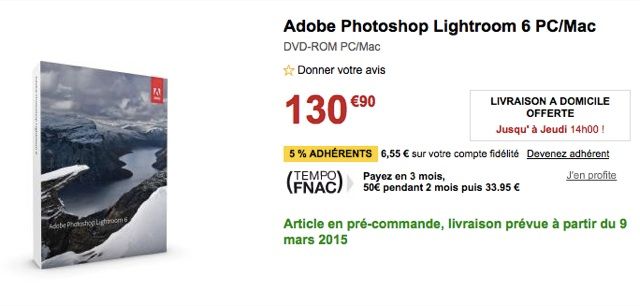
Our friend CanonWatch spotted the following leak:
According to the French site Fnac, Adobe Lightroom 6 will be available on the 9th of March!
The Google Translated version of the LR6 product description can be found at CanonWatch.
X-T1 BOOK AVAILABLE
Just released: Rico’s new X-T1 book. You can buy it also at AmazonUS, but just for Kindle and with DRM.
25 Responses
Any news on improved xtrans sensor raw processing in LR6?
Fingers crossed…
I’m kinda chosen Capture One, but I’m curious how Lightroom 6 will be. Though it has its subscription model, the ability to sync photos to a mobile service is great.
Yes, same as 5, no improvements, so in my opinion Adobe is not supporting Fuji users at all.
How do you know this Bart? I haven’t seen anything about Lightroom 6 and Adobe never say anything publicly about upcoming releases so just curious where you saw that info.
Have you tried the various tricks found on the internet re using the detail slider @ 100% forcing LR to use a different algorithm ?
I have. Doesn’t improve the situation for me. Irident is much better, but even that has issues with some textures and green foliage, etc. at this point for me X-Trans has no advantages over the latest Sony APS-C sensors and a lot of downsides.
Thanks
http://petebridgwood.com.gridhosted.co.uk/wp/2014/10/x-trans-sharpening/
I’ve already moved to a jpeg only workflow because the raw files are mushy, the colors are horrible, and it doesn’t sharpen well at all.
With jpeg the skintones are perfect. The images pop with detail without artifacts. And it forces me to make better decisions when taking the photo.
What editing program do you use?
Slightly sceptical that this would be the full release. There is usually a Beta or Release Candidate available a month or so in advance. Could that be what is being released on March 9? That would sort of fit the schedule that was being discussed elsewhere.
I too use C1Pro but needed LR (trial copy) recently when I had a problem, now resolved. So I may upgrade my LR 4
Capture One is working best for me. It is pretty close in price too. The only downside is that it uses more CPU than Lightroom, making big files process a little slower.
C1=$299 LR5=$79 Are we talking about the subscription rate? Or is there a way to get a serious discount on C1? I don’t do the subscription thing for my personal work.
Is Lightroom 6 a Fuji rumor, or is it that it is supporting X-trans Evolution out of the box?
Read this on another forum, but can;t recall any more which one. Said that there are no improvements for X-trans in LR6 but that Adobe is aware of users complaining.
I have same findings as James. I work in windows, no matter what xtrans tutorial I follow, SilkyPix raw resolves way more detail then LR to start with. Sharpening in LR for X-Trans is just a no go area, as you already lost detail by opening it in LR.
Thanks, you might be correct, but I’d be surprised if anyone who posted on a forum actually knew anything. If anyone has access to a beta then I suspect (but I do not know) that they will be under strict NDA until a public beta is released. This is what people like Jeff Schewe (who do know) have said in the past. On the other hand, forums are full of people who pretend they know things… For me, I find silkypix unusable so I “suffer” with LR. Fortunately I’m not a good enough photographer to notice!
There are numerous people on the internet who show the contrary. Did you ever try this one? http://petebridgwood.com.gridhosted.co.uk/wp/2014/10/x-trans-sharpening/
I agree. I don’t get it. I can pull more detail from LR raw conversions that I get from the camera JPEGS that everyone praises so much. I’m sure there are some differences between raw converters, but I think this is blown way out of proportion.
He ‘knows’ this because it’s Adobe, they just don’t care for the (Fuji) niche, when that’s not where the money is.
Haha, I went the other way for the same reasons. Raw + modified film simulation profile (contrast, saturation, highlights) work better for me. NR -2 is not enough, Fuji needs an OFF option for those who don’t appreciate waxy skins at high iso. Otherwise I’d use JPEGs, but now I got my preset right for the film simulation modes I’m using, so it’s one click or I can apply during import. No problems with sharpness or mushiness 🙂 I use latest Lightroom.
same as Csaba….I have no problem at all with LR 5.7 with my raw files ( use X-T1, X100s and X-E1)
I created presets based on this article http://petebridgwood.com.gridhosted.co.uk/wp/2014/10/x-trans-sharpening/
It works like a charm.
Any improvements in X-Trans RAW processing will be “evolutionary” not “revolutionary.”
I really think it is a workflow issue. Not a sensor issue.