




Advertisement
SNAPCLOUDBack up every photoUnlimited RAW storage, 30 days freeTry freeSample ad
Advertisement
Advertisement

Best External SSD Recommended by Fujifilm + One Request to Fujifilm

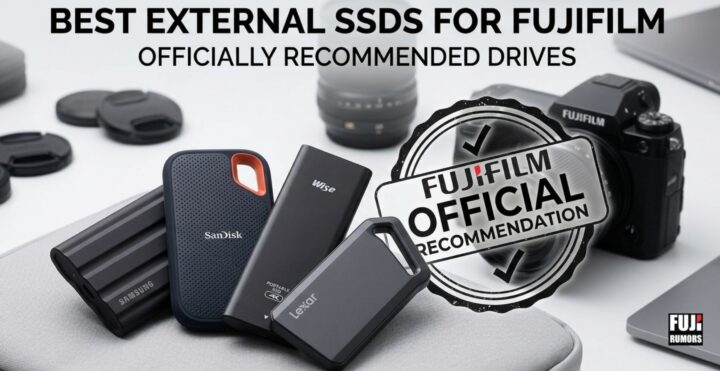
Some Fujifilm cameras can record stills and video directly onto an external SSD. The cameras are the Fujifilm GFX100II, GFX100SII, GFX100RF and GFX Eterna 55.

And Fujifilm has actually a list of external SSD’s that they recommend for that purpose.

Oh, and since we talk about… dear Fujifilm, how about a firmware update to allow also X series camera to record directly on external SSD?

✓ : Available    × : Not available
Brand Series Model Number Capacity ProRes / ProRes HQ H.264/H.265
8K*5/4K/FHD
Still Burst
8K*5 4K FHD
Exascend EXPLORER EXU2M6E01TP0C 1TB ✓ ✓ ✓ ✓ ✓✓*3
Exascend EXPLORER EXU2M6E02TP0C 2TB ✓ ✓ ✓ ✓ ✓✓*3
Exascend GECKO EXU2M6G01TP0C 1TB ✓ ✓ ✓ ✓ ✓✓*3
Exascend GECKO EXU2M6G02TP0C 2TB ✓ ✓ ✓ ✓ ✓✓*3
I-O DATA SSPA-USC SSPA-USC1K 1TB *2 ✓ ✓ ✓ ✓
Lexar Professional SL600 LSL600X001T-RNBNG 1TB ✓ ✓ ✓ ✓ ✓✓*3
Lexar Professional SL500 LSL500X001T-RNBNG 1TB ✓ ✓ ✓ ✓ ✓✓*3
Lexar Professional SL500 LSL500X002T-RNBNG 2TB ✓ ✓ ✓ ✓ ✓✓*3
Nextorage NX-P2SE NX-P2SE1TB 1TB *2 ✓ ✓ ✓ ✓
Nextorage NX-P2SE NX-P2SE2TB 2TB ✓ ✓ ✓ ✓ ✓✓*3
OWC ENVOY PRO ELEKTRON OWCENVPK01 1TB ✓ ✓ ✓ ✓ ✓✓*3
OWC ENVOY PRO ELEKTRON OWCENVPK02 2TB ✓ ✓ ✓ ✓ ✓✓*3
Samsung Portable SSD T5 MU-PA2T0B 2TB *2 ✓ ✓ ✓ ✓
Samsung Portable SSD T7 MU-PC2T0R / H / T 2TB *2 ✓ ✓ ✓ ✓
Samsung Portable SSD T7 Shield MU-PE1T0S / K / R 1TB ✓ ✓ ✓ ✓ ✓✓*3
Samsung Portable SSD T7 Shield MU-PE2T0S / K / R 2TB ✓ ✓ ✓ ✓ ✓✓*3
Samsung Portable SSD T9 MU-PG1T0B / MU-PK1T0G 1TB ✓ ✓ ✓ ✓ ✓✓*3
Samsung Portable SSD T9 MU-PG2T0B / MU-PK2T0G 2TB ✓ ✓ ✓ ✓ ✓✓*3
SanDisk Extreme Portable SDSSDE60-250G-G25 250GB × *2 ✓ ✓ ✓
SanDisk Extreme Portable SDSSDE60-500G-G25 500GB *2 ✓ ✓ ✓ ✓
SanDisk Extreme Portable V2 SDSSDE61-500G-G25 or G30 500GB *2 ✓ ✓ ✓ ✓
SanDisk Extreme Portable V2 SDSSDE61-1T00-G25 or G30 1TB ✓ ✓ ✓ ✓ ✓✓*3
SanDisk Extreme Pro Portable SDSSDE80-2T00-G25 2TB ✓ ✓ ✓ ✓ ✓✓*3
SanDisk Professional PRO-BLADE SSD Mag *4 SDPM1NS-001T-GBAND 1TB ✓ ✓ ✓ ✓ ✓✓*3
SanDisk Professional PRO-BLADE SSD Mag *4 SDPM1NS-002T-GBAND 2TB ✓ ✓ ✓ ✓ ✓✓*3
SUNEAST ULTIMATE PRO GOLD SEPS0001T2LG1F 1TB ✓ ✓ ✓ ✓ ✓✓*3
SUNEAST ULTIMATE PRO GOLD SEPS0002T2LG1F 2TB ✓ ✓ ✓ ✓ ✓✓*3
Wise Wise PTS-1024 1TB ✓ ✓ ✓ ✓ ✓
Wise Wise PTS-2048 2TB ✓ ✓ ✓ ✓ ✓

Recording Media Compatibility Chart for GFX100II, GFX100SII and GFX100RF (GFX Eterna 55 notes at the bottom of the article)
Operation confirmed External SSD
* Use the USB cable supplied with the external SSD or a “USB 3.2 Gen2” compatible USB cable to connect the camera.
* External SSD are not compatible with the X-H2S/X-H2.

*1 Model name could be different depending on the market.
*2 It DOES NOT WORK in ProResHQ mode.
*3 It makes shooting time longer for burst photos to use CFexpress cards marked “✔✔” comparing with the cards marked “✔” even if the both cards are same sizes.
*4 “PRO-BLADE TRANSPORT” is required for use.
*5 GFX100 II is supported; GFX100S II, GFX100RF are not supported.

・Use external SSD up to 2TB compatible with USB Type-C.
・Use an external SSD with a logical sector size of 512 Byte (For details, see the product specifications of the external SSD)
・Use external SSD adopting the UASP.

GFX Eterna 55 — differences from the list above

  • The following external SSDs are not validated for the GFX Eterna 55 (though compatible with the other GFX cameras mentioned above): I-O DATA SSPA-USC, Samsung Portable SSD T5, SanDisk Extreme Portable (250GB & 500GB), SanDisk Extreme Portable V2 500GB, Wise PTS-1024/PTS-2048
  • SUNEAST ULTIMATE PRO GOLD (1TB & 2TB): 8K ProRes/ProRes HQ recording is downgraded — it works in standard ProRes but not in ProRes HQ mode on the GFX Eterna 55
  • All other listed SSDs carry over with full compatibility unchanged
Share this story
Community

Join the discussion

Leave a Reply

Your email address will not be published. Required fields are marked *

Search

Search
Advertisement
SNAPCLOUDBack up everyphotoTry freeSample ad

Subscribe to Our Newsletter

*Please also check your spam folder if you don't get the confirmation mail. And mark the mail as "non-spam" to see the future newsletter.

Advertisement
PHOTOGEARUp to 30%off camerasSee dealsSample ad
Advertisement
PHOTOGEARUp to30% offcamerasSee dealsSample ad
Advertisement
GRIPLINEPro camerastraps &bagsDiscoverSample ad