










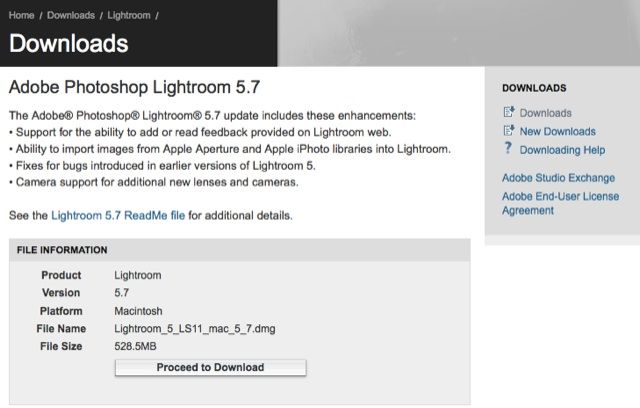
Right in time: The Fujifilm X100T is shipping (and in stock at BHphoto, BestBuy, AmazonUS and Pictureline) as well as the graphite Fujifilm X-T1 (in stock at BHphoto and Adorama), and Adobe released today version 5.7 or Lightroom and DNG converter 8.7, adding support for those cameras, as well as for the Fujifilm X30.
It also adds the classic chrome preset, but not for older X-series cameras.
Download Lightroom 5.7 for Windows (Click here) and Mac (Click here).
Download Camera RAW 8.7 for Windows (Click here) and Mac (Click here).
18 Responses
Nice – Classic Chrome is now among the presets!
Good to know.
No Classic Chrome for my Classic X100 though. =(
Doesn’t seem to be available for my X-E1 either. I guess it will be restricted to the new cameras and X-T1 post firmware update.
Yeah, i didn’t even get Pro Neg. 🙁
They probably add it once Fuji has released the firmware update with classic Chrome for the older models – maybe end of this year…
Has anybody figured out a way to patch the files to make them show up for older models? Or at least found in which folder the profiles are located? Last time I checked, I only found the Canon/Nikon profiles.
I don’t know how different the cameras are, but I would imagine that for something like the X-E1, it might be possible to use the profiles made for the later models without too much of a color shift.
I might be wrong but I think X-E1 and X-T1 sensors are the same. So the color profile for classic Chrome should be exactly the same for X-E1. In camera Raw to jpeg process might have change with X-T1 but raw files should be identical.
Like you I hope someone will find a way to apply this new color profile to “older” camera (xe1, xe2,…)
On OS X, inside the Lightroom .app-Bundle under /Contents/Resources/Camera Profiles/Camera/, there are folders for pretty much all manufacturers (Canon, Leica, Nikon, Olympus, Pentax, Sony) for which there are dedicated camera profiles. Fujifilm is conspicuously absent.
The same for the ACR profiles directory – /Library/Application Support/Adobe/Camera Raw/CameraProfiles/ does not contain any Fujifilm profiles (the Adobe Standard ones for Fujifilm cameras are there under /CameraProfiles/Adobe Standard/.
I wonder if this indicates that the Fuji film simulation modes require actual code and cannot be represented by the hue shift model Adobe is using for these .dcp files? That would also imply that Fujifilm likely gave Adobe access to the actual algorithm or source code behind these. But that’s pure speculation.
I just installed 5.7 and tried the Classic Chrome on my X-T1 files. I find it too contrasty on normal files. Colour very pale. In my opinion not worth the effort. It will come for older cameras anyway with the next FW update.
I doubt they will bring it to the X100 for instance. That one didn’t even get ProNeg.
All ACR camera presets for Fuji tend to be too contrasty with too dark blacks. I suspect that is because ACR “lies” about the zero point of its sliders in all recent versions. If you set the contrast slider to zero for example, it will still apply an increase in contrast (I think the equivalent of what used to be a value of 30, but I’m not sure).
So if you apply these Fuji camera presets, you may have to do some counterbalancing that counteract the defaults that Adobe created with their Adobe Standard profile in mind. With most of the Fuji presets, the first slider I reach for is the blackpoint one.
Also keep in mind that the Fuji film simulations tend to look better in print than they do on screen, so you might want to have a few test images printed professionally before dismissing it. Admittedly, Classic Chrome definitely seems to be a matter of taste with the rather strong magenta -> cyan shift, but I guess there might be a few interesting applications for it. I’d rather have the option than not.
Ideally, I’d like all camera profiles to be available for all cameras in a raw converter to make it quick and easy to match images shot with a Nikon camera to a Fuji set to Classic Chrome and have consistent images from a shoot. Right now the only way to do this is with the ColorChecker workflow, and that results with 100% authentic colors, which is undesirable for everything except catalog shots. Unfortunately these days all Adobe is doing is collecting revenue and doesn’t seem to be investing much into Lightroom, especially since with Aperture the only real all-round workflow competitor went away, so I don’t have high hopes that this is ever going to happen.
rename camera type in the exif to XT-1
Would be nice if someone could post a few comparison between the filter and the actual in-camera JPEG version. 🙂
Quests from Adobe as usual. DNG links but no alone ACR links. It would be nice to have more links here:
http://helpx.adobe.com/x-productkb/multi/camera-raw-plug-in-installer.html
DNG links ?
ACR for Photoshop updates automatically (with permission), it did so when i booted this morning. And Lightroom notified me as well (link included), but the process was manual.
We should all put a comment here to improve X-Trans RAW support: http://blogs.adobe.com/lightroomjournal/2014/11/lightroom-5-7-now-available.html
Sorry, but no that really isn’t the place to show your dissatisfaction to Adobe. Any comments need to go on the feedback forums – a fuji specific post has already been made by someone and with enough people it WILL get answered by Adobe. It just needs people go go here: http://feedback.photoshop.com/photoshop_family/topics/fuji_x_trans_support and click the +1 button in the original post to “meet too” the problem which raises the issue to the top so that it get’s attention from Adobe.
That classic chrome preset does work for black X-T1…
you can rename the camera type in the exif data, you can get that classic chrome on all X-Trans files. Remeber to re-read meta data from file if you already imported. Works and looks very good on my X100S