










Fujifilm has now launched the new Instax Link Wide Printer 2 with USB-C connection, along with the new little sexy Instax Pal 2.
As a happy owner of the original Instax Wide Printer, the only reason to eventually upgrade to the MKII version would be the USB-C port.
Press Release
Fujifilm Launches Smartphone Printer “instax Link WIDE 2™”
Mix More Memories into One Large instax™ Print
Featuring the New “Photo Mixer™” Function for Easy Creation of Scrapbook-Like instax™ Prints
TOKYO, September 15, 2026 – FUJIFILM Corporation announces the launch of the instax™ smartphone printer “instax Link WIDE 2™” (“Link WIDE 2”), which enables users to print images stored on their smartphones and will be available on October 9, 2026, in Japan.
The Link WIDE 2 is a WIDE format smartphone printer that produces instax™ prints twice the size of mini-format prints. Following the globally successful instax Link WIDE™, known for its ability to produce large and vivid instax™ prints of group photos and landscapes, the Link WIDE 2 features enhanced design and upgraded functionality.
The dedicated app*1 now features the new “Photo Mixer™” function, which automatically creates and suggests collage designs by combining multiple images. Users can easily create scrapbook-like instax™ prints using their favorite photos of places, people, and memorable moments stored on their smartphones. Making full use of the large WIDE format print area, the function allows users to bring together highlights from trips, events, and other special occasions that could not previously fit into a single print, creating a memorable keepsake that captures the highlights of an entire experience in a single print.
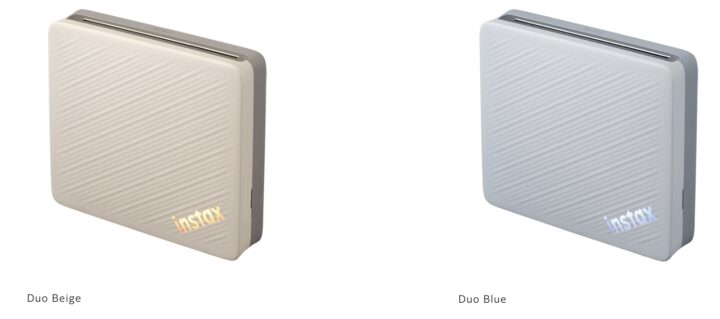
The new body design features a two-tone color scheme that combines a soft light color with a sophisticated dark color. Available in two color options, “Duo Beige” and “Duo Blue,” the printer can be displayed with either the light-colored side or the dark-colored side facing outward, allowing users to change the appearance of the printer to match their mood or room décor.
Fujifilm will continue to expand the world of the instax™ instant photo system by proposing new ways to enjoy photography through instax™ prints.
- *1 A free app for Android and iOS devices. It is available for download from Google Play for Android devices and from App Store for iOS devices. Android and Google Play are trademarks or registered trademarks of Google Inc. iPhone and App Store are trademarks of Apple Inc. The iPhone trademark is used in Japan under license from Aiphone Co., Ltd. The iOS trademark is used under license from Cisco in the United States and other countries.
1. Product Name, Release Date, Price
| Product Name | Release Date in Japan | Price |
|---|---|---|
| Smartphone Printer “instax Link WIDE 2™” | October 9, 2026 | Open |
(1) Smartphone Printer “instax Link WIDE 2™” (Available in 2 colors)
2. Main Features
(1) New “Photo Mixer™” Function Creates Scrapbook-like Collages with Ease
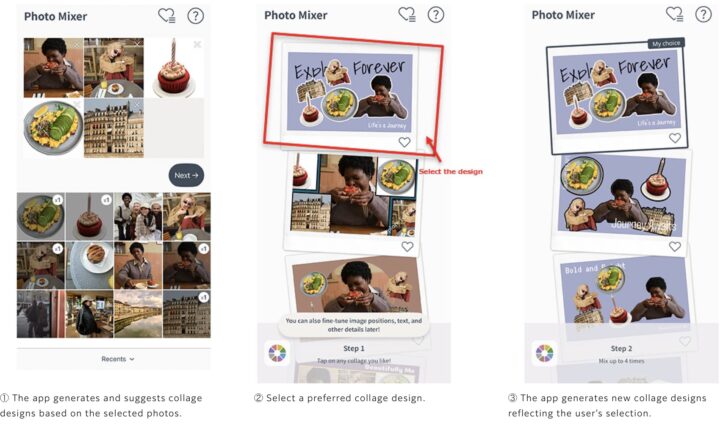
The new “Photo Mixer™” function automatically combines favorite scenes, people, and items from multiple images to create scrapbook-like collages. The app generates and suggests multiple collage options based on images selected by the user. Once a preferred collage is chosen, the app automatically adjusts image size, angle, layout, text placement, and font style to refine the design, creating a collage tailored to the user’s preferences.
Suggested collages can also be edited before printing. In addition to adjusting the size and placement of photos, users can add text and stamps to further customize the design, creating a one-of-a-kind collage tailored to their preferences.
In addition, the app features a cutout function powered by image analysis technology. The function automatically extracts people and objects from photos, allowing users to incorporate highlights of memorable moments into collages. By incorporating cutout images, users can create scrapbook-like collages that emphasize favorite people and objects, resulting in more dynamic and personalized instax™prints.
(2) WIDE Format for Versatile Photographic Expression
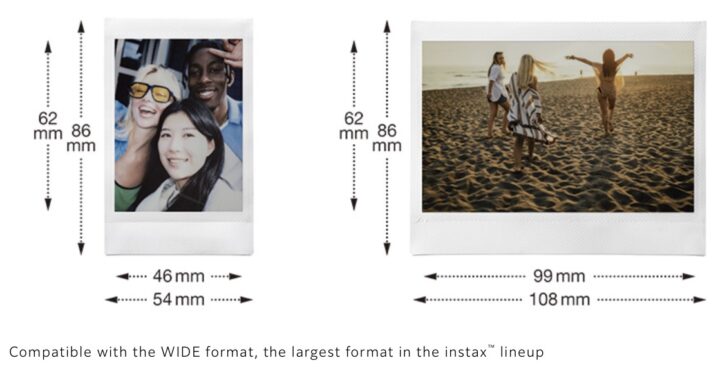
The WIDE format, which is twice the size of the mini format, offers versatile photographic expression, making it ideal for group shots, landscapes, and other scenes that benefit from a larger print area. (Film size: 86 mm × 108 mm)
(3) Stylish Body Design that Blends Naturally into Interior Spaces
The Link WIDE 2 features a two-tone body design that combines a soft light color with a sophisticated dark color. Available in two color options, “Duo Beige” and “Duo Blue,” the new design blends naturally into living spaces and can be displayed elegantly on its own without requiring an additional stand.
The instax™ logo positioned at the lower right of the body features soft illumination inspired by indirect lighting, adding a subtle accent to interior spaces. During printing, the logo gently glows with a gradient of pale pink and blue, creating a sense of excitement and anticipation as instax™ prints come to life

(4) Seamless Connectivity with Multiple Devices for Easy Printing
In addition to smartphones, tablets, and PCs, the Link WIDE 2 can also connect with Fujifilm’s X Series digital cameras and the palm-sized digital camera “instax Pal 2™”. The expanded connectivity allows users to print a wider variety of content in the instax™ format, including digital artwork and game screenshots stored on a PC, as well as photos captured with cameras.
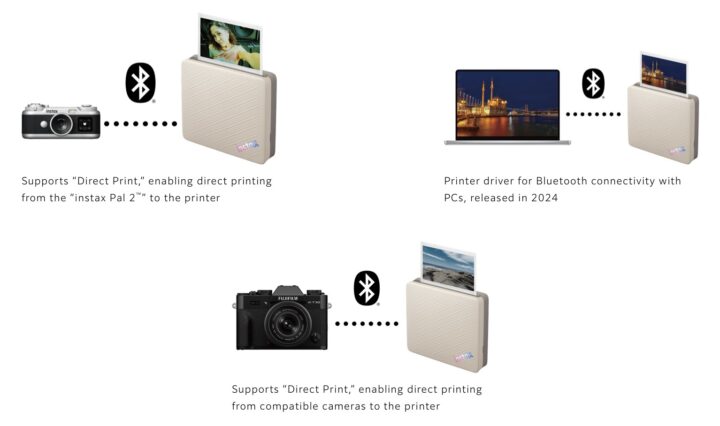
Compared to the instax Link WIDE™, the Link WIDE 2 features faster Bluetooth®*2 communication, reducing image transfer time for a quicker and more seamless printing experience.
In addition, when connecting with a Google Pixel device, the Link WIDE 2 supports Google Fast Pair Service*3, which simplifies the initial setup process between the printer and the dedicated app. When the printer is powered on, setup notifications for both the printer and app are automatically displayed on the smartphone*4, allowing users to connect easily by following the on-screen instructions.
- *2 The Bluetooth® word mark and logo are registered trademarks owned by Bluetooth SIG, Inc. and FUJIFILM Corporation uses these marks under license.
- *3 Google Fast Pair Service is part of the Nearby Platform and enables fast, low-power device pairing using Bluetooth Classic or Bluetooth Low Energy (BLE). The service is available when Location History is enabled. Not compatible with iOS devices.
- *4 The printer and app setup notification will not be displayed if the initial setup between the dedicated app and the smartphone printer has already been completed.
3. Promotion of “instax Link WIDE 2™”
The Link WIDE 2™ not only allows users to print images stored on their smartphones as instax™ prints, but also features the new “Photo Mixer™” function, which brings multiple memories together into one large instax™ print. Users can enjoy instax™ prints in a variety of ways, such as displaying them on a shelf or preserving travel memories in a postcard-like format. The promotional tagline,“get more in the mix,” expresses the appeal of bringing multiple memories together in a single instax™ print and revisiting those moments all at once. The tagline will be used online, on social media and at stores to communicate the appeal of the Link WIDE 2™ to as many people as possible.

The Fujinon XF 400mm f/4.5 is now in stock at BHphoto here and probably also at other stores (and your local store).
Pre-Orders
- USA: BHphoto / Amazon / Adorama / Moment / BestBuy / Nuzira / Focuscamera
- CAN: AmazonCA / Camera Canada
- UK: WexPhotoVideoUK / AmazonUK / ParkCameraUK / Clifton Cameras UK
- GER: AmazonDE / CalumetDE / FotoErhardt / Fotokoch
- EUR: AmazonFR / AmazonIT / AmazonES / AmazonNL / PCH Store / Liva BE

The Fujifilm X-T6 should have already been out since about 10 days, but the last minute delay means we will have to wait a bit longer for it.
How long?
Well, that’s a question I don’t have the answer to… and at this point I am not even sure if Fujifilm has set a firm and solid date yet.
But it is coming, hence no wonder we got a $200 rebate on the Fujifilm X-T5 with XF16-50mm bundle.
But the Fujifilm X-T6 is not the only piece of gear that got delayed. There is also the successor to this lens here coming along with it, so I hope there will be soon also a nice deal on it. But so far, you still have to pay full price for the Fujinon XF50-140mmF2.8. However, I’d not be surprised if in a not too distant future we will see a huge rebate on it.
A couple of weeks ago we reported about how you can transfer an unlimited amount of recipes on your Fujifilm camera.
In super short: create how many backups of your camera on your phone using the official Fujifilm X App and name those backups after the recipes you’ve stored. Then you can restore the backups anytime based on which set of recipes you want on your C1-C7 slots – full video guide here.
The advantages of this method:
- free
- via official Fujifilm app
- works wirelessly, which allows for easy recipe change on the field
Yes, there are third party Apps, including now also Fuji X Weekly, who can transfer recipes to the camera. But I for the purpose of transferring recipes I still prefer the X App because third parties have some downsides:
The Downsides
- you have to pay
- you need a cable to transfer the recipes
- third party apps are non official Fujifilm Apps, hence, if something goes wrong and breaks your camera’s software, Fujiflm won’t fix your camera free of charge
Is This the Solution?
But now a new App is out that promises to fix at least one of these three issues: the need for a cable.
The new Huginn film recipe app allows for wireless recipe transfers on your camera.
The problem with Huginn Recipe App:
Sounds good so far, but let’s talk downsides and doubts.
- you need to pay to be able to push recipes wirelessly to your camera
- you need to pair this app to the camera, I guess this will disconnect the official X App and will require to make the whole pairing registration again if you want to use the X App again
My doubts… and conclusions:
As so often with Recipe Apps, I am skeptical about this one, too.
Why?
Well, for example, it looks like you can’t filter recipes by camera model (not even in the Pro version) — an instant dealbreaker for me.
So, if you have a camera that lacks certain film simulations or features like Grain, Color Chrome Effect, etc., you won’t be able to list only the recipes that are relevant to your camera.
This is a major oversight, and it makes me believe that they simply took the latest Fujifilm camera, checked which settings are available on it, and thought that these settings would apply to all Fujifilm cameras.
I didn’t try it, but I wonder what happens to your camera if you set up a recipe that includes the Color Chrome FX Effect and try to push it to an older Fujifilm camera that doesn’t have this setting at all. Will it break your camera software?
Also, at no point does the app tell you which camera a certain recipe can be applied to, which is something that, for example, Fuji X Weekly does, because they know that not all recipes work on all Fujifilm cameras.
Last but not least: the company reached out to me offering a free Pro version (which I didn’t accept, of course), and in their email they wrote to me that even the Fujifilm X App needs a cable to transfer recipes. Which is wrong, as we have shown at the top of this article.
So why report about it?
Honestly, I did not intend to publish anything about this, given my doubts. But the App has now been featured on PetaPixel, and since it will now definitely get more popular, I feel like I need to give you my perspective on this App.
The last time PetaPixel reported about a recipe App, it was a horrible App that I tested myself, with completely wrong and nonsensical settings all over the place. At the time, I decided to ignore the App, but I should have warned my readers that PetaPixel is not aware of what they are advertising.
This time, I decided to quickly tell you what I think about it. And if you want to get a more in-depth look at the whole recipe App business, check out this article.
The Hope
Will Huginn get better?
I hope so. But it needs to look at all Fujifilm cameras ever released, look at what film simulation and IQ features each camera has, and let me filter the recipes by camera model. And when creating a recipe, it should allow me to insert my camera model first, grey out the settings and film simulation that are not available on that model, and only then let me insert my recipe.
My Solution
I have settled on this solution: use the official Fujifilm X App for wireless transfer of recipes, using the method we explained here, and use the Fuji X Weekly App to browse recipe ideas.
But if you want to give it a try, you can get the Huginn App here.
Disclaimers:
Huginn offered me a free Pro version. I did not accept this offer. I know I talk good about Fuji X Weekly, but also they don’t pay me anything. I just know for a fact that he is a true Fujifilm lover and as such I trust what he creates with his App.
App Description

The first app to send custom film recipes to a Fujifilm camera wirelessly. One recipe or all seven, even with the camera switched off in your bag, so tomorrow’s looks are loaded before you take it out. Writing a whole palette in a single pass, with no cable, is a first too. Plug in over USB-C any time you prefer it.The look first, the settings underneath
A recipe is a feeling, not a table of numbers. Sample photographs lead every card. Film simulation, white balance shift, tone curve, color, grain and clarity are all there when you want to tune, and tucked away when you just want to shoot.Start a recipe from anything
Write one from scratch. Read one out of your own Fuji JPEG, straight from the settings baked into the file. Scan a recipe off a page or a screenshot with the camera. Or paste a code someone sent you and Huginn rebuilds it exactly.Film palettes
Group seven recipes into a palette for a shoot, then load all seven slots at once, wirelessly.Drive the camera from your phone
Over Bluetooth, with no cable: ISO, aperture, exposure compensation, and the drive mode. Change the whole recipe on the body from where you are standing, not just the base simulation. Fujifilm’s own app only switches between stills and video. Huginn gives you the full set of drive modes, plus a self timer and an intervalometer it does not offer at all.Back up your camera, wirelessly
Save and restore the whole camera, or a single custom slot on its own. Per-slot is a first: everywhere else, backup is all or nothing. Rebuild one look you overwrote without disturbing the other six.
Virtual bracketing
Other apps can render a frame through one recipe. Huginn sends it through your entire library in a single pass, so you see one frame in every look you own and keep the one that was always right. No Fujifilm body can do that by itself. The renders are real, made by the same sensor and processor that made the file, never approximated in software.
Your camera is the render engine
Connect over USB-C and Huginn runs a RAW file back through your camera’s own processor, at full resolution. See the look before you commit to it, and keep the one that was always right.
Choose the look, then send it to your Fujifilm wirelessly.
Huginn is a curated film simulation library that lives one tap from your camera. Browse a portfolio of real looks, tune your own, and send any recipe straight to your camera’s C1 to C7 custom slots without a cable. No menus. No numbers typed by hand. Nothing plugged in.
The first app to send custom film recipes to a Fujifilm camera wirelessly. One recipe or all seven, even with the camera switched off in your bag, so tomorrow’s looks are loaded before you take it out. Writing a whole palette in a single pass, with no cable, is a first too. Plug in over USB-C any time you prefer it.The look first, the settings underneath
A recipe is a feeling, not a table of numbers. Sample photographs lead every card. Film simulation, white balance shift, tone curve, color, grain and clarity are all there when you want to tune, and tucked away when you just want to shoot.Start a recipe from anything
Write one from scratch. Read one out of your own Fuji JPEG, straight from the settings baked into the file. Scan a recipe off a page or a screenshot with the camera. Or paste a code someone sent you and Huginn rebuilds it exactly.Film palettes
Group seven recipes into a palette for a shoot, then load all seven slots at once, wirelessly.Drive the camera from your phone
Over Bluetooth, with no cable: ISO, aperture, exposure compensation, and the drive mode. Change the whole recipe on the body from where you are standing, not just the base simulation. Fujifilm’s own app only switches between stills and video. Huginn gives you the full set of drive modes, plus a self timer and an intervalometer it does not offer at all.Back up your camera, wirelessly
Save and restore the whole camera, or a single custom slot on its own. Per-slot is a first: everywhere else, backup is all or nothing. Rebuild one look you overwrote without disturbing the other six.
Virtual bracketing
Other apps can render a frame through one recipe. Huginn sends it through your entire library in a single pass, so you see one frame in every look you own and keep the one that was always right. No Fujifilm body can do that by itself. The renders are real, made by the same sensor and processor that made the file, never approximated in software.
Your camera is the render engine
Connect over USB-C and Huginn runs a RAW file back through your camera’s own processor, at full resolution. See the look before you commit to it, and keep the one that was always right.
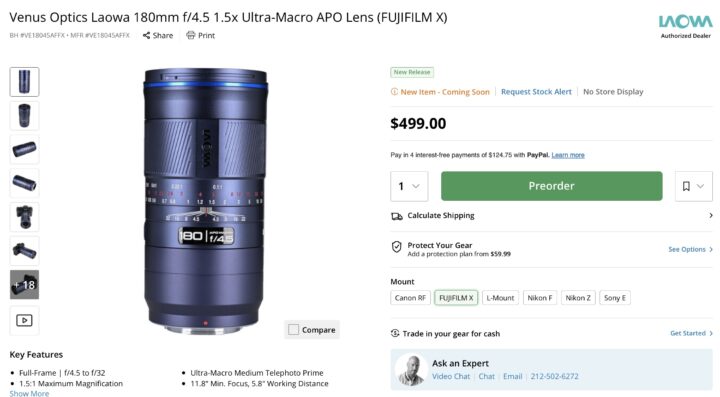
The Laowa AF 180mm f/4.5 for Fujifilm X mount is now available for preorder at BHphoto here, Amazon here, Adorama here and Venus Lens here.
This is Laowa’s first autofocus lens for the Fujifilm X Mount system.
The Laowa AF 180mm f/4.5 Apo Macro 1.5x has been available for other mounts already, and it’s great to see it coming also for X mount.
- Laowa AF 180mm f/4.5 1.5X Ultra Macro APO
BHphoto / Amazon / Adorama / Venus Lens
Press Release
Anhui, China, September 10, 2026 – Laowa is expanding its 180mm f/4.5 1.5X Ultra Macro APO lineup with a new Fujifilm X-mount and Nikon F-mount version. Previously launched in other mounts (Sony E / Nikon Z / Canon EF / Canon RF / L-mount), the lens now brings its versatile and ultra-compact tele-macro performance to Fujifilm photographers and marks Laowa’s first autofocus lens for the Fuji X system.
With few telephoto macro options available for Fujifilm X photographers, this compact lens offers a new choice for macro and portrait shooters. Its 180mm focal length delivers a 270mm full-frame-equivalent field of view on Fujifilm APS-C cameras, providing reach for close-up subjects, portraits, and distant scenes.
The lens offers up to 1.5x magnification, a 30cm (11.8 in.) minimum focusing distance allows photographers to capture fine detail while keeping a comfortable distance from the subject. Its APO optical design delivers sharp images and minimal chromatic aberration.
Despite its telephoto reach and ultra-macro capability, the lens remains remarkably compact and lightweight, measuring Ø67.6 × 134.7mm (2.66 × 5.30 in.) and weighing just 526.2g (1.24 lb) on the Fujifilm X-mount version. Autofocus is available from 1.5m to infinity, while AF assistance is available below 1.5m for focus stacking.
Key Features
- Laowa’s first autofocus lens for the Fujifilm X-mount system.
- Compact and lightweight design for macro, telephoto, portrait, wildlife, and travel photography.
- 180mm focal length, providing a 270mm full-frame-equivalent field of view on Fujifilm APS-C cameras.
- 1.5× ultra-macro magnification for highly detailed close-up images.
- Minimum focusing distance of 30cm (11.8 in.) and a minimum working distance of 14.7cm (5.8 in.).
- Autofocus from 1.5m to infinity, with limited autofocus assistance for macro stacking.
- APO optical design with 12 elements in 9 groups for high sharpness and reduced chromatic aberration.
Specification
| Name | 180mm f/4.5 1.5X Ultra-Macro APO |
| Format | Full Frame |
| Focal Length | 180mm |
| Aperture Range | AF: F4.5 – 22 MF: F4.5 – 32 |
| Angle of View | 13.7° |
| Lens Structure | 12 elements in 9 groups |
| Aperture Blades | 9 |
| Min. Focusing Distance | 300mm |
| Min. Working Distance | 147.6mm |
| Max. Magnification | 1.5X |
| Focusing System | AF* & MF |
| Filter Thread | Ø62mm |
| Front Diameter | Ø67.6mm |
| Dimensions | Canon EF: Ø67.6mm×88.4mm Sony E: Ø67.6mm×134.4mm Fuji X: Ø67.6mm×134.7mm |
| Weight | Canon EF: 484g (1.07 lb) Sony E: 521.6g (1.15 lb) Fujifilm X: 526.2g (1.16 lb) |
| Mounts | AF*: Sony E / Nikon Z / Canon EF / Fuji X MF: Canon RF / L-Mount / Nikon F |
| Price | USD 499 |
* Auto Focus only starts from 1.5m to infinity, while AF assistance is available below 1.5m for focus stacking.
- Laowa AF 180mm f/4.5 1.5X Ultra Macro APO
BHphoto / Amazon / Adorama / Venus Lens