







Hi,
I have released a new free application that could interest SonyAlphaRumors readers, as many of them may use alt lenses on A7 series.
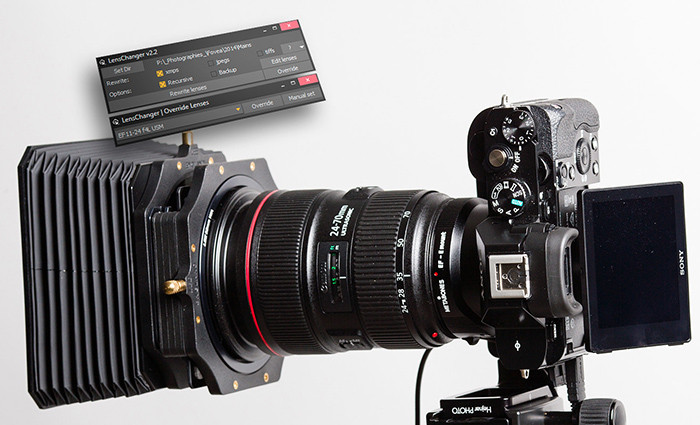
A lot of alternative bodies, adapters, lenses etc don’t report lenses right, if any. LensChanger is an application that allow you to change lenses registered into xmp files (sidecar files for Raws), jpeg files, and tiff files through exif metadatas.
LensChanger as been designed as a standalone, lightweight, portable and very easy to use application. It can thus work with whatever software using xmp sidecar files for raws, like LightRoom, ApertureOne, etc… So, you can keep it on an USB drive and run it with a few clicks to get all your files with correct lenses.
you can use ‘Rewrite’ after having set a list of lenses to change to and a folder to work on. This allow you to have LensChanger to automatically rewrite some lenses into custom defined lenses, if your adapter or bodie doesn’t report lens you need.
Or you can directly manually select a few files (or entire folder) and directly override a custom lens into. For raws file, it will create an xmp file with lens data if none exist. So once you import them into Lightroom for example, the lens will be good ! Of course, is an xmp file is ever created by a raw editing software, all your datas (tags, rating, develop settings etc) will still be there!
All informations and downloads, both for Windows x64 and Mac OSX, are here:
http://www.nicolasgenette.com/blog/lenschanger-application/
This application is written by a photographer who needed it, and who decided to release it for everyone, for free.
Cheers!
Nicolas Genette,
13 Responses
Admin – The link is broken. Has your site on the front of it.
I wish this were an iPhone app instead. I would select the lens I’ve chosen from the app and it would record the time I mounted the lens at. Later it would sync the lens data with the raw files according to the date and time I chose.
Even faster, I would put some QR codes inside my lenscaps and shoot it with the iPhone app.
Sony should cover this, but differently. You could put a custom list on the memory card with lens names and data. Then one could choose in the menu which one is mounted, like with the focal length menu on the A7II for manual lenses, but this time you could directly choose the lens name. The EXIFs would then get the lens data while shooting. No iPhone or additional software needed.
Sony should also let us load custom camera settings from SD card. VG and/or FS series already have this feature.
It’d be very useful since I could use a different card with different camera settings for studio settings and street shooting style. I could also use a rental camera or someone else’s camera with my own settings.
How about putting QR codes inside your lenscaps and shooting them WITH YOUR CAMERA!
Then you just have to let an application analyze the photos for QR codes when you import them to your computer and write the XMP files for those photos inbetween.
The iPhone would just be an unnecessary step.
But the idea with the lens cap is pretty neat. I wish I had done that when I used an adapted lens.
Merci monsieur Genette! Je suis sûr que cette application sera utile à beaucoup de photographes.
Hey, I wanted to let everyone know, the Windows binary also works with Wine, for those of you who use Linux!
Thanks! I’ll give it a spin.
BTW, there is another app that works as a Lightroom plugin (donation-ware):
http://www.essl.de/wp/software/lenstagger-lightroom-plugin/
I’m not affiliated with the author, but I’ve used the app for the last couple years with no problems at all.
By the way: the posted link for this app is broken, the right one is:
http://www.nicolasgenette.com/blog/lenschanger-application/
As of now, I’ve used LensTagger for the purpose of adding lens information to adapted third party lenses on A7r. It’s integrated with Lightroom and once profiles are set up I just import pictures and edit the DNG info from the software.
LensTagger is great!
I have about a dozen manual and adapted manual lenses that i regularly use. LensTagger allowed me to create a lens profile for each. I tend to swap lenses quite a bit, so it’s very easy using it inside Lightroom, because switching lens profiles is a snap.
It’s nice to see an app like LensChanger, but reading the description of how it works sounds like real drudgery and could see making mistakes often.
Great stuff! Thank you, Nicolas
Does this app work only with Lighroom or also with DxO Optics Pro? Sounds really promising and useful, would take out the problem of noting down which lenses I’m using.
Also, does it work with RAW files from A mount cameras or just E mount?
Thanks for your help!