









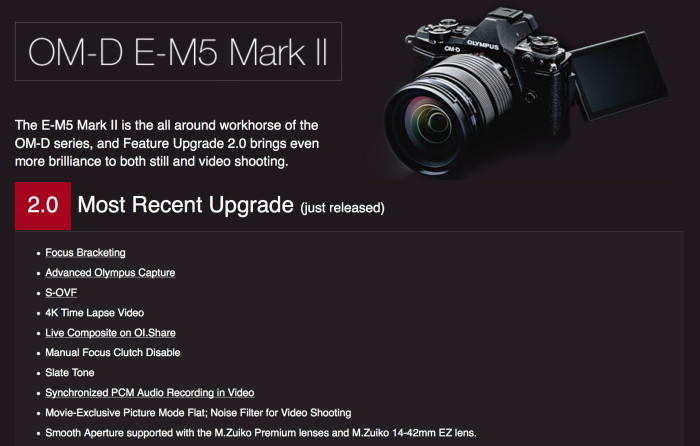
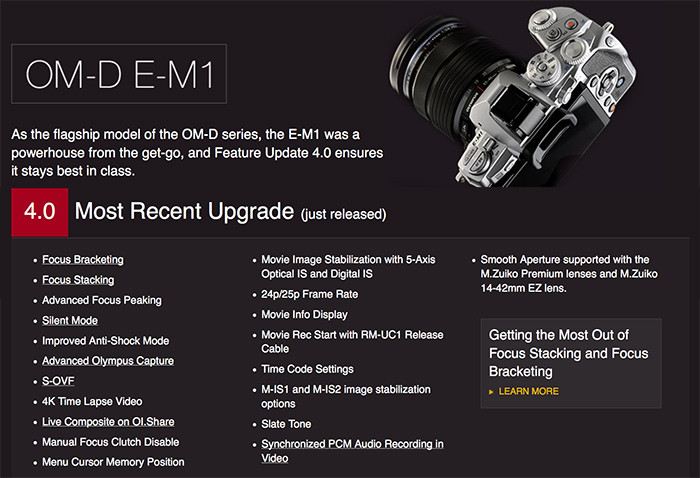
Dear E-M1 and E-M5II camera owners! This is a very good morning for you 🙂 Just open your Olympus Digital Camera Updater to download and install the just released massive firmware update! Full info and video about the new features can be read at GetOlympus (Click here to read all details) .
Please comment this post with your findings if you tried the new features!
Here are first tests:
In german: Pen-and-tell.blogspot.de
How to do a Firmware Update on your Olympus Camera (Jamie MacDonald on Youtube).
98 Responses
Does anyone know how to upgrade via SD card? Lost my cable and forgot to replace it 🙁
Yes if no one else posts it I will post later
Would much appreciate it, thank you
Here is the binary download link:
http://dl01.olympus-imaging.com/OLYMPUS_MASTER/FIRMWARES/0001/1090/OLY_E_109_4003_0000_0000.BIN
The instructions are on this page:
http://www.43rumors.com/new-e-m1-3-0-firmware-gets-released/
thank you! I was wondering, the method seems to be for the 3.0 firmware, is the file name the same for the 4.0 as it was for the previous version?
According to http://lightsnowdev.com/Olympus/OMD/OMD-EM1.html it’s the same.
Worked like a charm, thank you sir 🙂
Do you also have the download link for the EM5II Update?
Sorry no, I only worked out the file name of the E-M1 firmware by modifying the URL in that article
Well updates went smooth. E M1 & E M5MkII & 3 lenses. Only disappointment is that all settings on both cameras were wiped. Have to spend another 1+ hours re-programing everything again. Some of the settings are so convoluted, i’m sure I won’t remember how to achieve everything I had before.
About the erasing settings, for future reference this is what i do: film with my smartphone while i go through all menus (5 min.), i upgrade the firmware and then play the video to see previous configuration, pausing as needed. (10 more minutes).
great idea…
Nice idea, at least better than nothing or writing all. But it’s almost the same method to film your finger on a chart showing you the way to drive instead of using a GPS. 😉
Why doesn’t Olympus finally give us the possibility to store the settings to a memory card? A simple *.xml file would do it. After restore we could be told which settings couldn’t be reimported because of some changes, if any…
Guys, this is the first time I connect my em5II to my Macbook. Its running on El Capitan.
When I hit the Next button in the main window of the installing program, the following occurs;
Translated; Fault during communication with camera (0XFFFFFFFFC) Checked everything multiple times, but maybe I’m missing something.. Advise?
you dont have the latest version of olympus firmware updater. The older versions dont do well with el capitan. Try installing the latest version.
That was it! Thanks
So where did you find that? The download from Olympus.com (.co.uk is, as usual, not showing anything useful) has only the old version and says that an update is due on Nov 30.
You can find it here: http://www.olympus.co.jp/en/support/imsg/digicamera/download/software/camera/cameradl.cfm
Thank you for this!
Thanks – got it and all well 🙂
Does this update erase all previous customization?
Yes
Yes
Happy with this new firmware everything works fine. Only setting wiped
Is there a list which lenses also changed their firmware?
As far as I know it is the 14 – 42mm EZ, the 60mm Macro and the 2 Pro lenses, 12 – 40mm and 40 – 150mm.
Yes, my 12-40mm was updated but not the 8mm fisheye.
You’ll find them here. http://www.olympus.co.jp/en/support/imsg/digicamera/download/software/firm/e1/
Thank you
Thanks, I saw the 17/1.8 as it was attached to my camera. Now I don’t have to go guessing for my other Olympus lenses.
Great upgrade, love the new movie mode info layout. M-IS1 looks very promising and efficient but quite a crop with it .Unfortunately no kind of “flat profile” available.Silent shutter is silent as expected. Looks like the road for the E-M1 MarkII is the right one.
I hope you didn’t use that almost flat battery to do the FW update!
Nope, that was almost freshly charged before the FW upgrade. Few test and re-configuration brought it that low :/
Phew! 😉
The flat profile is available, and has been from the start.
Use still Mode, press and hold Fn2 (Multi-function binded to it) and scroll rear dial to Shadow/Highlights mode. Press Fn2 again and adjust your wanted flatness via rear/front dials.
Now switch from still mode to movie mode. You are welcome, the flat profile is kept until you go back to still mode and reset it.
Great upgrade, good job Olympus. Now for a wish list for the next one 🙂 So, as well as the 8 shot high rez option could you add a 4 shot true colour mode, as per Pentax.
Too bad that the 5 axis image stabilization isn’t precise enough on the E-M1.
Is it not? I didn’t know that. Something for the E-M1 II then hopefully.
It’s very much the same hardware as the E-M5, which was replaced in the E-M5 Mk II and the new image stabilization hardware was quite a prominent upgrade.
Thanks for your reply. So do you know if the IS in the E-M5 II would be precise enough for a 4 shot true colour mode?
Is it precise enough? Yes. Is it quick enough? Who knows? I’d think that it probably is. It would be good to see a comparison of speed between the E-M5 Mk II and the Pentax K-3 Mk II in their respective functionality.
Thanks. That would be a good test to make. What I would like is better data rather than more data, hence 4 shots true colour rather than 8 shot high rez for the sake of it. If it has the speed to do this in as many situations as possible, then great. One day we may get handheld performance, but I’d take true colour for tripod work (product work or landscapes) for now or next cams.
Eliminating color artifacts would be a great improvement.
Huh?
It works wonders as is, and now w/ fw v4.0 improved even further.
What’s not to like?
Did you not read the comment to which I replied?
The E-M1’s image stabilization is not precise enough for the high resolution composite.
You up-rated your own comment?
Yes, I read the comment, but I misunderstood yours, as I thought you meant the E-M1 IBIS was not good enough in general, which it is. Whether it’s good enough also for highres no one can tell, because it has never been tried, as the camera doesn’t offer that feature…
Yes, I up-rated my comment by mistake, as I accidentally clicked on the vote-up icon. But then I also down-rated it afterwards ;).
I have no problem with the 5-axis for my video purposes, but when i upgraded the firmware the first change I made was to turn off the digital IS for video. Everytime I stopped moving the camera, the framing would move by itself in an eerily similar fashion to that old Windows 95 logo bouncing off the walls screensaver.
Rubbish to @Altai
I wouldn’t mind focus bracketing and 4k time lapse video for E-M5, the rest they can keep.
if only the video bitrate was decent….
52mbps H.264, and even 77Mbps in All-I is not decent?
Lack of full-sensor readout in video seems to be a bigger problem.
Was wondering, where did you find this info? I’m looking through the camera menus, but can’t see any info on the codes.
dpreview.
Too bad Olympus didn’t release any FW upgrade for E-M10 since november 2014… Entry level probably means “don’t expect too many FW updates…”
Perhaps if you’re only prepared to pay for the entry level camera you shouldn’t expect the same features to be added as the more expensive cameras.
Sure, marketing strategy is up to Olympus, I know that.
Don’t take me wrong, I like my E-M10 and am very happy with it. I’m also happy to see that Olympus provides FW upgrades for E-M1 and E-M5MkII.
I don’t know if E-M10 hardware is able to get all those updates… It’s probably very close to E-M1 (CPU engine)… Some feature here could help Olympus sale more lenses who knows? (ie: focus bracketing).
Smooth aperture… What is that?
Not jumping abruptly by 1/3 EV. Maybe even sets itself between 1/3EV values when on auto.
A feature I really, really want to use for video but as yet cannot figure out how to engage even though I’ve upgraded the firmware on my E-M1 and 25mm f1.8…
I think the smooth aperture only works on 4 lenses. 14-42mm EZ, 60mm Macro, 12-40mm Pro & 40-150mm Pro
Oh wow they finally fixed the 17mm 1.8 manual focus clutch! It now also works correctly on the GM1.
Very nice 🙂
Uch :/, sorry, false “alarm”. I was confused. It has always worked fine on the GM1. But NOT on the OM-Ds! (the clutch can’t activate focus peaking). And even with the latest FW for cam and lens, the clutch does not work with peaking on the 17mm 1.8 :/
Too bad. Got excited to fast :/
I updated my EM5-II today and happened to have my 17mm on the camera at the time. There is a firmware update for that lens. I haven’t tried it yet.
I know, but that’s my point: it does not fix the problem that the clutch can’t activate the focus peaking.
Funny, it works on the Pany GM1, but not on the Olympus body.
Olympus support confirmed that to me once, but I hoped they will fix it. They did not :/
Interesting. I looked for the enhanced focus peaking with the 8mm f/1.8 fisheye and got nothing.
Excellent! This is really a major improvement of an already great camera (speaking of the E-M1 here, and not meaning to say the E-M5II wasn’t). Downloading Adobe’s DNG converter at this moment, to enable Raw output in Helicon Focus Pro.
Too bad, though, that Auto-ISO still cannot be customized (and there still is no exposure compensation for M + Auto-ISO). Moreover, the new silent shutter mode has completely different Auto-ISO characteristics which result in significantly slower shutter speeds, which isn’t configurable either:
With the 60mm f/2.8 Macro, for example, using the mechanical shutter, Auto-ISO starts upping the ISO when the shutter speed is about to become slower than 1/80s, whereas in silent-shutter mode shutter speed will get as slow as 1/15s.
You could say it’s nice that there are two different fastest shutter speeds now instead of just one, but why do they have to be linked to the choice of mechanical/electronic shutter modes?
Thanks for the heads up on this one. Guess it means I need to switch to shutter priority or manual whenever I need silent mode.
With e-shutter much longer shutter speeds can be handheld compared to with mechanical shutter.
Is there a trick to shooting in 24p / 25p? The new menu on my EM-1 only has 30p as an option. Checked the list of new features at the end of the updated manual and it also only reflects 30p as an option. Any help figuring this out is appreciated… hope they didn’t pull this feature or that it’s lens-specific for some reason.
In Movie mode, open the Quality menu, press INFO and select 24/25/30fps.
ps. Bonus, you have ISO 6400 available instead just ISO 3200!
Thank you… much appreciated!
https://i.imgur.com/GFR6dNn.jpg
Has anyone found where the anti shock adjustment is? I remember there used to be a function to set 0 sec delay to prevent shutter shock, can’t find it in the menu so far.
It’s not in the cog wheel settings, it’s in shooting menue 2
Yup, found it in the end) Thanks
I am having issues wit IS after upgrading- not consistent as it was- even in silent mode? Has anyone noticed this? Everything else seems fine
Here is one other apparently. https://www.mu-43.com/threads/e-m1-firmware-4-0-issues.81584/#post-835631
Yes, me too 🙁
Here you can download the binary file to flash the update without a Windows PC or Mac:
EM1: http://lightsnowdev.com/Olympus/OMD/OMD-EM1.html
EM5 Mark II: http://lightsnowdev.com/Olympus/OMD/OMD-EM5-II.html
I can get 1/16000 ~ 1/8000 shutter speed, when I set in the silent-shutter mode.
The PDF manual for v.4 has been released and it has update histories (and the detailed description), so I can get the over-view of v.4.
Fw v4 didn’t fix my Cam at all.
Looks like Mint on eBay.
Considering I landed on it in a motorcycle wipeout. I’m pretty happy it still works.
I would be peaved – you would think that Olympus would bring out firmware that would look after issues like that.
Does anyone know where is the Flat picture mode for EM5 Mark II?
I looked everywhere and I cannot find under the menu. Is it call Mute?
Any idea why they included everything EXCEPT the movie picture modes on the E-m1? seems like an odd omission.
Focus stacking seems only work on Olympus lens, it dose not work on Panasonic lens for me.
It only works with the Olympus Pro lenses and the 60/2.8 macro, which is understandable.
Does anyone have the link to the new E-M5 II manual?
Here it is http://www.olympus.co.jp/en/support/imsg/digicamera/download/manual/omd/omd_em5m2_ver2_e.pdf
Updated my camera. There was an update for the 25mm f/1.8 as well. Beware that it resets all custom settings.
I upgraded my E-M1 to firmware 4… how can I reduce the size of the focus point now? (The focus point as it appears in the EVF…)
Is it different than before? I have it set to small
Now the SOVF has caused some serious issues- it appears that when I turn it off now I cannot see the exposure adjust in the EVF or LCD Screen. It sometimes corrects when I shut off the camera. Has anyone experienced this as well? This is now two issues I have found..I would be shocked if anyone does not have this porblem
Not quite sure what you mean. Are you saying the exposure meter doesn’t show + or – exposure compensation where it’s normally displayed on the bottom of the screen?
Ok, so I confirmed that the S-OVF stays on all the time and cannot be disabled in Manual Mode. Go ahead and see if anyone is having the same issue in Manual Mode- Again I can switch the S-OVF on and off fine in Aperture Mode and in Shutter Priority as well- just not in Manual Mode! Even in live view mode on the LCD I cannot see the exposure change when adding or subtracting the exposure in Manual Mode!!
same issue for me, really frustrating! i sent my em1 in to get real dial repaired and i guess they updated the firmware and now live view is useless in M mode. its supposed to allow you to select SOVF OFF but when you select it, it does not actually turn it off.
I tried re-creating your issue. SOVF on only effects the live view within the vf, my rear screen still shows exposure changes with shutter/aperture/iso adjustments.. basically it works on my m1. It seems like there must have been an issue with your update to v4. can you reinstall with the olympus camera updater? alternatively try formatting your sd card after you’ve uploaded all your images to your computer. I do this every time I finish loading my images to prevent potential image-file-corruption. It may be possible theres still some update data on your card that is causing this negative reaction.. GL and I hope this works.