









Instructables explaines you how to build a Lego Dolly spending $10 only. And as you can see from the image on top he used it for his E-Pm1. All you need to build it is that stuff:
Stepper Motor Driver ($1.19) [shoplink 48052 ebay]http://www.ebay.com/itm/161304707166?_trksid=p2059…[/shoplink]
Arduino Nano V3.0 ($4.76) [shoplink 48053 ebay]http://www.ebay.com/itm/171337374773?_trksid=p2059…[/shoplink]
JoyStick ($2.09) [shoplink 48054 ebay]http://www.ebay.com/itm/200955114766?_trksid=p2059…[/shoplink]
Remote Switch for Olympus ($2.48) [shoplink 48055 ebay]http://www.ebay.com/itm/300839084245?_trksid=p2059…[/shoplink]
5V DC Relay ($1.00) [shoplink 48056 ebay]http://www.ebay.com/itm/Mini-5V-DC-Coil-Power-Rela…[/shoplink]
Cable for Arduino ($1.48) [shoplink 48057 ebay]http://www.ebay.com/itm/40-root-For-a-row-of-Dupon…[/shoplink]
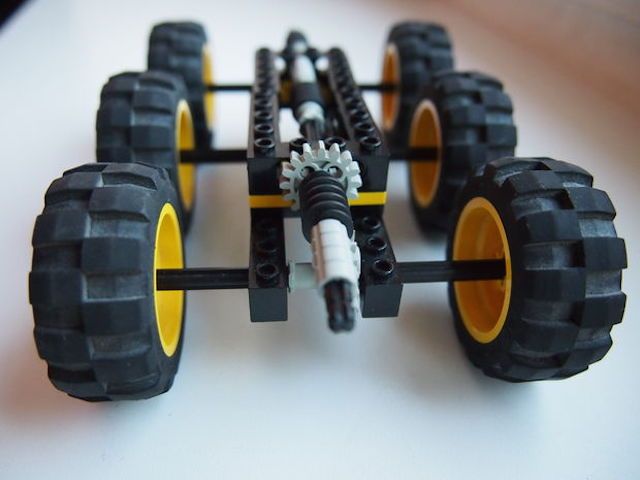
This is the how-to text from Instructables:
I cut the Remote Switch and I soldered Jack 3.5 connectors for use with the Arduino and the remote switch.
The relay I soldered wires to be connected to Arduino. Everything we connect to each other: arduino -> Relay -> jack -> jack connector for Olympus -> and my camera.
Next, I added Stepper Motor Driver to Arduino. To him I joined a stepper motor, and, 5V adapter or battery pack.
Another thing I want to connect the joystick. He will control the speed of the wheels, and frame rate. The rate will be adjusted by tilting the X-axis and Y-axis and after pressing the button, the value will be deducted.
I uploaded code via Arduino program. The program includes both shoot camera and rotating the stepper motor.
More pics:


found via PetaPixel.
19 Responses
This is cool!
Is there a gh3/gh4 version ?
You just by more bricks and make it bigger.
That was a joke, Pappy.
Yet you took the response seriously!!!!!
is there a Lincoln Log version?
I’m waiting for the “full frame” version built with Duplo.
u got something wrong, u buy lego with the excuse “ur son” but u’ll play…oh sorry, build 4 ur own! 😀
So, where can I buy a “son”? I seem to have forgotten to procreate. 🙂
No problem. You need to buy some Legos for when nephews / nieces / neighbors’ kids drop by. It’s bound to happen eventually. If not, it’s better to be prepared “just in case.” And you’ll want to play with the stuff just so you know it’s all in working condition…
ebay..cheap
very cool….too bad the prices here are prob a bit higher. But very useable tip !
Can I make something like this but with huge wheels so I can get shots higher off the ground? :p
I’m sure that some girls play with Lego, too!
Mine still does…
Worst rumor ever!
This is cool!
So like, you can control the camera and the dolly at the same time. Is this correct?
Great idea and some very good comments and responses.