









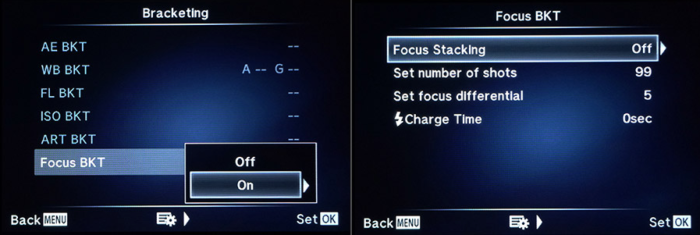
43rumors reader Dmitry Novak is the first having posted a full review of the new firmwares 4.0 and 2.0 for E-M1 and E-M5 Mark II. It’s available in Russian at Dmitry-novak.livejournal.com (google translation here). And new Movie Mode ‘Flat’ and Noise Filter settings comparison on E-M5 Mark II with upcoming firmware 2.0: https://youtu.be/kRpmD-wpOSA
He is reading us so feel free to ask him anything in our comment system!
53 Responses
Whilst I am doubtful about whether this facility will have been created in this firmware update, I would love to know if the focus bracketing feature could be combined with the high resolution sensor shift feature in the E-M5 mkII. I’m aware that there would be a greater delay between each shot, but I can’t think of any technical obstacle to implementing this. Even if it is not possible with this firmware update I think it would be advantageous for Olympus to feature it in a further firmware upgrade.
Focus bracketing with the high resolution sensor shift would be a killer feature as regards cataloguing high resolution images, with full depth, for scientific and natural history purposes. I think Olympus could sell quite a lot of cameras just for this purpose. In camera focus bracketing is such a useful feature for this, and focus stacking has become much more popular and widespread. Being that it would probably involve no more than writing a few lines of software, it could be a very cost effective way for Olympus to promote it’s equipment and sell more cameras. I realise the application is quite specialist, but I don’t see any technical obstacle to it, and as far as I can see, it could probably be implemented with little effort and cost. This is because both the focus bracketing and high resolution features will already be there, and it would simply be a matter of combining them. That’s only if it isn’t possible already.
I’d love to have to, although its easy to imagine most computers choking on the PP.
I understand what you mean. However, I would have thought that most people interested in this would have a computer with the horespower to handle it. It’s only the stack which would take a reasonable bit of computer power, as the end result will be a single file.
If you look at the specifications for Zerene Stacker, one of the most used stacking software packages, it says the depth of the stack in really unlimited, and some of their clients stack 200mp images from Hassleblads (presumably using high resolution sensor shift). They say most modern computers and laptops will comfortably manage 36mp files.
it’s all down to how the software is written
if the stacking is solved on a small zone of the image at a time, and only the corresponding zone of one other image at a time is compared, not a lot needs to be kept in memory. If furthermore the resulting pixels are dumped little by little in a file on disk – there would be no real limit to the size of the images this could be done with.
But if two or several complete images are kept in memory to solve the stacking, one could easily run into memory limitations. This could potentially be faster though. A smart design would do this in a hybrid fashion, adapting to the current situation (amount and size of source files, available hardware resources…)
I find your request for focus stacking combined with high resolution mode very valid, especially for solving it either ‘in camera’ or directly through an Olympus software, so one wouldn’t have to worry about the logistics of all this, or figure out a workflow with other software that doesn’t really know how the source files are made.
And while it is a niche application – it should appeal to the scientists and engineers at Olympus to tackle this.
I think most reasonably powerful modern computers should have enough processing power and memory to deal with the stacking. Although in camera it would obviously be more difficult.
I think if Olympus could combine the focus stacking and high res pixel shift together it would be an extremely attractive package. Whilst an automated focusing rail, such as the Cognisys Stackshot, and a high resolution camera like Canon 5Ds R, or even a Hassleblad with pixel shift high resolution, can produce automated high resolution focus stacking (or really bracketing), the set up is large, expensive, and it shifts the camera and not the focus. Some claim the best results tend to be by shifting the focus.
A lightweight, affordable set-up, which could easily do this in the field would have great appeal. Especially as it would be in a weather-sealed package.
No, these modes are incompatible. I think it would be possible to make it somehow and I’ve sent already a suggestion to Oly engineers with complete workflow, but… But probably they have to leave some innovations for further development )
And btw to implement the feature they have to completely rework the camera menu, finally )
Thanks for the response, and thanks for suggesting it to Olympus. I think it would be in Olympus’ interests. I’m sure a lot of science departments and museums would be interested. If you are going to set up a database of focus stacked images of specimens, you would want them to be future proof, at least for a while. In other words, higher resolution files would negate the need to do it again in the near future when most cameras will be higher resolution.
Nice.
Too bad, though, that focus bracketing does not seem to work with Four Thirds lenses, while an Olympus DSLR could already do that in 2006: the E-330.
Ceterum censeo: Auto-ISO customization and exposure compensation in M + Auto-ISO mode need to be added…
Agree, it would really be nice. But is there any camera out there with exposure compensation in M mode and auto ISO?
Yes, I know there are such cameras, while I can’t name one by memory right now. It’s a feature dpreview has an eye on for some time now, and new cameras in the semi-pro and pro range which don’t have it keep getting criticized for it, which I think is a good thing.
2 questions.
1. Is the flat profile more flat or effective than just playing with the highlights and shadows with the custom curve? Because I ready get a flatish profile with that, is it better?
2. The smooth aperture, is it available for the 25m 1.8. I’m not sure if it covers these basic primes…though I’m guessing it does cause I think they are classed as premium.
thanks in advance.
Smooth aperture means to you what?
If you mean does the aperture change the ratio bpby stepless way, yes. If by does it have a round aperture blades, no.
The curve gives E-M1 the same effect and it works very well.
Could you tell me the settings your using to get the flat curve please?
well obviously apart from turning contrast down…..you have a basic curve function and obviously you bring up the shadows and pull down highlights. max +7/-7 respectively…..but you can do it less.
OK Thanks. I will do some experimenting this weekend.
why boast a firmware setting that can already be done easily? I think you just accidentally answered my question cause if the curve tool is already on EM1 then the flat profile must be more then it cause this flat profile is only available on em5 mkii. It would be weird if they left it out of em1….for no good reason.
why would I think a firmware has some affect on changing the physical shape of aperture blades? lol, too funny.
1. At least it is about 1-1.5 stops more effective than Custom mode with Contrast set to -2. I didn’t play with curves, but the profile definitely gives more ‘space’ in black point and the top highlights, as I remember, curves cannot access these areas of tonal range.
Yeah I got the same with extreme curves though a misled back one has been ok for me so far though I’m working in Black and white where you want some contrast….but yeah will try and test the flat profile and hopefully it does something better that just curves.
edit ‘dialed back’
2. Yep, 25 1.8 is smoooooth ) This lens is positioned within Premium category.
Is the Targeting Pad AF available for the RM-1???
Sorry, I meant EM-1
No, different hardware
It’s available for the EM-10. If they can do it for the EM-10, I don’t think it would be impossible to apply it to the EM-1 via firmware hence my question.
I gave you an answer – stop speculating. It is NOT possible due to different hardware in the touch-technology
Thanks for your answer. Say, do you have any information that says the hardware is not supported? Do share. Otherwise stop speculating too.
First hand information from one of the heads of engineering on a course I had a couple of weeks back. They would love to have it themself cause it is an awesome feature – but not possible due to different touchscreens
Ok, thanks for the reply. It would have been great to have on the EM-1. It’s something I prefer using on my GX7 compared to that “joyless stick” on my EM-1 (and every other camera with an AF joystick). Oh well, I guess that’s that. Thanks again for confirming.
No.
There is no mention to the SCP customization, adding and removing options. Is it possible to do that?
It was at the very bottom of his (translated review) but it looks like it’s only applicable to tethered shooting.
Under “New Features Olympus Capture 11”
It will also be possible to edit the Super Control Panel on the camera so that it (when shooting through the application) show only the features you need.
Olympus Capture 1.1 is unavailable till firmware release, so I hadn’t tested it yet.
Smooth aperture available for the 12-50mm lens?
No, only mentioned lenses: all M.Zuiko Premium and Pro, plus M.Zuiko 14-42mm EZ
WHEN can we download it?????? My E-M1 and E-M5 Mark II are on the edge of their seats …waiting………… LOL!.
And then you’ll have to reconfigure all your settings again ))
Btw I’ve made a suggestion to Olympus engineers to make an option to save custom camera configuration to external file or via Desktop app.
Oh no Dmitry…WHY does Olympus do this?!?!
These cameras are so…so…hard to re-customize to all the subtle ways in which we have set them up. It’s GREAT that they are soooo customizable….but, it will takes me hours to get both my cameras back to where they were…AAAAAARRRRRGGGGGHHHHHHH! LOL!
Thanks for the warning.
Hope things will change soon – I put as much pressure as I could to the Oly people )
Thanks!!!
How do you pressure the Japanese? Lol!
It’s a long chain ) My feedback and suggestions goes to the European office, what’s happening next I don’t know, but it works eventually )
I know that last two years Olympus is paying much more attention to testers feedback (they give more cameras for tests and even pre-release firmwares).
I clicked to the Russian translation. My computer informed me that the page came to me through a dubious server that apparently had interposed itself into the serving of the web page. I pulled the power on my system but when I came back up I had messages that I should turn on my Norton security. Apparently this was turned off. There’s no apparent damage, but that’s only what’s apparent. Don’t click on the link to the Russian translation.
I did…Mac here….no problems.
The dubious server that interposed itself is probably translate.google.com…
Everything “Russia” is dubious by US standards these days again…
What I would like to have is a “max aperture mode” with zooms :
https://www.mu-43.com/threads/81084/#post-826556
(and focus bracketing/stacking on pannies)
In A mode if you set the aperture to its maximum opening the zoom will maintain the maximum aperture opening for a certain FL when zooming.
No it doesn’t
It does when zooming in yes (going to short FL to long FL), but going back the other way, zooming out, it will stay at the max aperture of the zoom at the long end.
You are right. It’s a workaround rather than a feature.
You have to set max aperture when you are at wide FL.
there are a few things like this that could be fixed by fw like this.
Lowest shutter speed is also a workaround rather than a transparent setting.
I would like to see good light highest ISO and bad light highest ISO.
High ISO in bright conditions looks way better than same ISO in dark interiors…
Time to buy an EM-1 me thinks!
Can you change the exposure setting with the dials whilst recording? It is one of the stupidest limitations of the em5 mark11. If they can’t get it right they can’t be taken serously!
Hi Dmitry, thanks for the article, it sounds like there are some really useful new features.
Does it allow you to show the histogram and horizon simultaneously while shooting, as on the E-M5 II?