










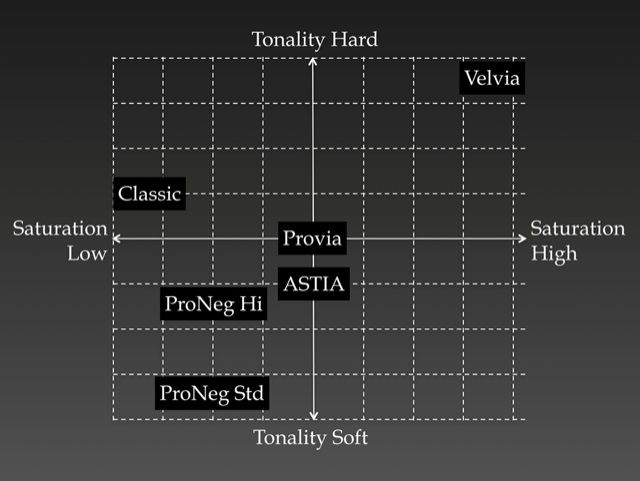
FujifilmXworld just launched the first episode about the popular Fujfilm’s Film Simulations. It’s just an introduction and shows the graph you can see above. They say that “starting with the next episode, we will explain each “world” in depth.”
“It is our belief that “the photos should never look unnatural even though one can easily see that they are composed with the color of Velvia or ASTIA.
FUJIFILM’s color reproduction designers prioritize the live action. They take photos of scenery that should not be taken in Velvia. They take photos upon customizing the setting that one would never think of. They would print these out and evaluate. People who evaluate are not the people who took the photos. In order for a fair evaluation, they would need the neutral eye for the job and they do that for every test.
This is the process of creating the world of color that are unique, but yet never fail.”
Of course, the film simulation are also part of Rico’s X-T1 book… he goes through each of them and also gives you some useful information and tips. So if you don’t want to wait for each episode, get all you have to know about the film simulations right now from Rico’s X-T1 book here.
Fujifilm’s film simulations (and overall the JPEG’s) can sometimes deliver such pleasing results, that they are not always easy to match in post processing… not for nothing Fuji’s film simulation/JPEG’s are highly appreciated amongst photographers.
Rico also recommends to shoot RAW+JPEG and you can read why in his latest book
36 Responses
P.S.: I shoot RAW+JPEG 😉 … I guess in about 80% of the cases, I just keep the JPEG, in 20% I keep a processed RAW version. Pretty happy with the JPEG’s 😉
Same here!
Maybe it’s because I shoot highlights and shadows at -2, but Astia is noticeably more saturated than Provia
I shoot RAW, in Lightoom I applied Velvia profile and and adjust shadow recovery 50, and that’s it.
There must be some kind of rule that we have to hear about Rico’s books on every post. 😉
I consider the chapter about Fuji’s film simulation in Rico’s book very interesting. I also changed some settings (especially in Velvia) because of his tips. I really think you’ll understand them better after reading his book.
btw… in 2015 I wrote 136 articles. I guess about 10 of them mention Rico’s book (7%). That should be tolerable 😉
RAW
I ticked Raw+Jpeg. Technically, I always shoot in Raw, but usually convert to Jpeg in the camera.
I shoot RAW+JPEG, mainly because of the quirk that you get higher review magnification that way. In perhaps 5% of images, I prefer the look of Pro Neg High, otherwise I just process the RAW. If I want film simulations then Raw Therapee has far more and varied options than are available elsewhere.
I’ve always shot only in RAW, but this year have switched to RAW+JPG – but only for the purposes of a daily B&W blog. To my surprise, in B&W the JPG is so good, I rarely have much (if any) post-camera editing to do. And that’s a great bonus.
I just don’t agree that Provia is in the middle of this graph regarding color & contrast. Everybody knows that in color profiling of a camera you’ll always get close to Adobe’s own RGB settings (though I experienced in color profiling, the Fuji sensor is a difficult beast to come to real stable results as I’m suffering from a green cast in some trials I did perform myself – Adobe’s own standard setting is in any case better and more neutral). Provia is already quite a bit more saturated, having more contrast en different shadow/highlight settings – it’s in no way neutral as f.i. Nikon has with its “Neutral” setting (but precisely this kind of exaggeration is what many praise – I like to have control of colors & saturation myself). Using JPG – as I read from many – is really decreasing the detail level in a very measurable way, I’m not having this ‘waw’ feeling about the Fuji OOC jpgs as many claim to have. Jpgs hare only 8bit vs 14 bit RAWs. Just go RAW if you want to see (each) camera’s true performance !
At the moment I use JPEG (mostly ASTIA), but only because Aftershot Pro’s RAW converter (on Linux) is not yet good enough. Normally, with my Nikon’s, I only shoot RAW.
RAW. Sometimes in the past I have shot both RAW and JPGs, but if I want to use a photo I always start from the RAW so I decided not to waste space on the JPG.
“It is our belief that “the photos should never look unnatural”.
Unfortunatly, Fuji has much to improve with colours – I found Fuji X perform the worst in landscape. Greens look very unnatural in X-E2/X-T1, most of the time artificially, red is clipping very fast, and magneta cast push all the images. It looks good for events and for people (if you want them to have “sugary” or “sweety”) but in good only lighting. In artificial or mixed lighting X-Trans start to show its issues with ugly magneta cast pushed. I do not also find “Fuji colours” interesting for people’s reportage when you care about realism because Fuji colours are embellished (that’s why many like Fuji colours) and work well for fashion or “sweety” family shooting, not for true people in true life. And the last – Fuji softens the images on all iso rnage, it destroys details. So Fuji colours and images are still far to look natural. I think it’s because of X-Trans II that are in newer cameras, because older cams (X-Pro1, X-E1, X-A1) renders colours much more natural and better.
+1. This is 100% true. What’s the sense of having a ‘classic chrome’ setting if there’s not even a true ‘neutral’ one? But Fuji did exactly the same in the Film era. Their standpoint was based on the fact that people liked to have more colored remembrances. Btw as I wrote, I tried to perform some color profiling with the X-T1 because I wasn’t 100% satisfied either – but there is indeed something very weird in the management of the greens. I’ve got the feeling that the X-trans II is having different IQ settings – quite a bit more than press & blogs want you to believe – unfortunately, it’s really not improving the IQ.
Out of curiosity have you used any other fujis? Eg xpro, xe1, x100 etc?
X100, X-Pro1. Both sold in favor of the ‘so much better’ X-T1. It is from a FW & overall use perspective but somehow the X-trans II feels less natural and more ‘digital’ to me…I got a bit stuck in the same issues George mentioned. I find btw color management one of the most difficult topics in digital systems, not only cameras, but also displays, printers, plotters, scanners & all related software. After being a very early adopter of digital photography it was btw Fuji that made me a few years ago aware of something that I never had realized before: there is a huge difference between all RAW convertors on the market & their according output/reproduction settings & quality, not only for the X-series, but for ANY camera brand. Again a reason not to hop from one workflow to another, as a lot of people seem to do.
Interesting thanks for your response. I currently have a x100, and I’m really hoping that the up and coming x-t10 has the bayer sensor of the x-x-a2 as that’ll slot into my work flow. Otherwise I might wait to see what the x-pro2 brings to the table with the xtrans 3. Cheers
My big hope too, because I found X-A1 colours the best not only in Fuji X line cams but compared to all other mirrorless on the market. I shot mainly reportages with people and tried X-E1 and X-E2, but I sold them both – first because of weak AF in dim and low light, second one because of unnatural colours that look more digital than others offer, and surelly worse than compared to X-E1/X-Pro1. I am affraid Fuji will not put Bayer filter on its top cams, like X-E3, X-Pro2 or X-T2 because they invested too much into X-Trans and in marketing to prise current X-Trans sensor. If they will bring a Bayer to any of above mentioned cams, I will come back to Fuji. I do not need a cam rendering a “sweety” colours with softening the images to look them “more sugary”, but a cam with neutral colours and full of detalils.
The question is a bit ‘what is the right color setting’? Take any camera system and it has its particular flavor and to certain extend this must be a quite subjective issue. I don’t like the so much hyped Leica color but others sell an arm and a leg for it. Canon isn’t fully my taste either but the other of this world seems to be using Canon. I don’t think that Fuji is particularly bad, but notice a difference between X-trans I and II . In a profiled way using Adobe’s own camera calibration settings (the 2012 process, Adobe standard, Fuji is in my eyes not far off what I would call a ‘Nikon F’ Standard setting look, which is a little bit less greenish, a tad more neutral to my feeling. When selecting the Adobe emulations made for Fuji’s very own film settings, none of them appeals to me. And when I develop my own camera calibration (using X-rite color cards & software) I get a green cast. in the case of Nikon, it almost matches for 100% the Adobe standard setting. Of course this is all a bit subjective, but I liked the initial X-trans setting a bit more (combined many pictures almost seamlessly with Nikon) the new one is somewhat harsher in my eyes. But I didn’t perform a true one to one comparison, notice that also others make more or less the same conclusion.
Note that “natural” is quite subjective. The kodachrome colours were often described has having this natural tranquility for instance. Natural does not necessarily mean objectively accurate. Our perception of colours is coloured by emotions, so something that feels natural to me might feel weird to someone else.
I’m saying this because I love Classic Chrome, it feels natural to me. I’m actually attracted to places that have a natural rusty look, late afternoon sunlight colours. I’ve been shooting in CC in the last 3 months, and it suits my usual subjects really well.
If you’re looking for technical accuracy, than probably Fuji is not for you, though a somewhat toned down Provia is very similar to what I see from my Nikon NEFs in LR. and Nikon has the most accurate colours compared to Canon and Sony at least. I kinda liked that, it’s a really good base. I’m not a big fan of overprocessing, but I did some subtle split toning (at a very low 3-6% saturation). In retrospect, the way I was pushing pixels around the red and blue channels turned out to be somewhat similar to what’s happening in CC 😉
That reminds me of what I still miss: Classic Chrome for the X100S would really be nice. Maybe on one day or another, when Fuji sold enough Ts….
Raf+jpeg here, for as long as there’s no option to turn off that “Image Intelligence” (AKA “Waxy Skintones”) in camera.
+100
Why won’t Fuji treat us as adults? Just give us an OFF option like other pro oriented camera companies do. Let us decide if and how we want to handle noise please!
Raw+Jpeg and I’ll use the jpeg when it’s perfect or I’ll work the raw if I need to. Besides, you need the jpeg anyway if you want 100% post capture preview on the camera.
Yup, I noticed that bug. Surprises me how few people even consider it a problem. I mean come on Fuji! Forcing us to shoot RAW+JPEG just so we can zoom in to check focus/iq? I also don’t understand the reasons for this. If we can get RAW+JPEG fine without problems, it’s surely not a performance issue. It shouldn’t take more juice to generate full sized previews. Is it a limitation of the RAF format? Is this reported as a bug somewhere? Is there a way to give Fuji feedback on this without having to be Zack or David?
Fully agree, this should be considered a bug. Such nonsense.
I guess if you were Zack or David you wouldn’t be allowed to talk about that (at least not publicly). Seems to me that the two only criticise minor things. Neither has written anything about any of the major problems with Fuji cameras (like terrible waxy skin).
I’m working on something to give Fuji some good feedback right now. Don’t have much time momentarily but I hope I can get that running beginning of April. If a lot of people chime in it could actually get Fuji’s attention…
Yah, I mentioned the waxy skin in another post, the result of their NR algorithm (or Image Intelligence) that can’t be turned off for JPEGs. I don’t see problems with the raw files though, they look normal.
Yeah, it only affects JPEGs. But I consider that a serious problem even though it could easily be corrected by Fuji.
Agreed. I was actually thinking of creating a list of quirks that Fuji should fix, and it’s really doable in a firmware update.
1) Allow NR-OFF option (that turns off their image intelligence crap or whatever they are doing)
2) Fix embedded JPEGs, so we are not forced to use workarounds..
3)???
There are other stuff in my mind (rear curtain sync, a host of other things) but not sure if these are hardware dependent. I’m sure those 2 above would be trivial though…
I totally agree. But I think it is a limitation of the RAF format. The whole work flow thing is screwy.
Ditto and I would probably be shooting Jpeg more often if I could have that on my X100S.
I started with JPEG only. Switched to RAW after a running into that lovely waxy skin effect in low light, thanks to Fuji’s mandatory noise reduction (at NR-2). Love the in-camera JPEGs, but I shoot a lot in low light (music photographer). I wish Fuji treated it’s customers as adults and would allow me to do noise reduction if and in the way I want to.
Lightroom’s film simulation modes are all over the place, but with some tweaks they are serviceable. So let’s go RAW only. Except that with RAWs, you won’t get full sized JPEG previews. First, I thought this was a bug, I even googled it. Turns out, most Fuji users think this is normal, others don’t mind shooting RAW + JPEG as a workaround. So I settled with RAW + JPEG N.
These are bugs in my book – Fuji should allow an NR OFF for those who don’t believe in a one-algorithm-fits-all solution (just like most other camera companies do). And we shouldn’t be forced to shoot RAW+JPEG just so we can zoom in and check IQ/Focus. It’s even more surprising how most people accept this as normal.
http://www.fujix-forum.com/index.php/topic/34850-x100t-display-bug-1920×1280-resolution-shown-in-camera-in-raw-mode/#entry364480
Don’t agree with ASTIA on the graph at all. The tonality is kind of hard (definitely harder than Provia), especially in the shadows, and the saturation isn’t in the middle either – especially the orange and blue tones are very saturated.
Also, RAW+JPEG
Astia definitely has more saturation and contrast than Provia. Don’t know who the hell came up with that graph.
As for my uses, my X100S lives in JPG, E2 and T1 are strictly RAW.
What works for me is to shoot RAW only and convert my keepers in-cam to jpeg using Fuji RAW processing. Lots of freedom this way.
Don’t see anyone else ever suggesting this…