










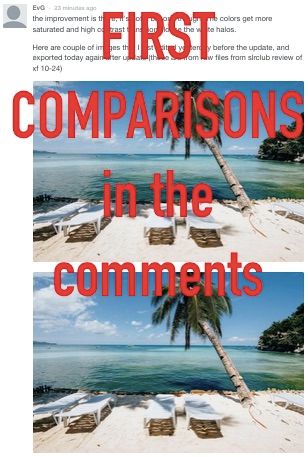
By FR-reader EvG (Files in the Comments): “The improvement is there, it’s not a big one though. The colors get more saturated and high contrast transitions loose the white halos. Here are couple of images that I just edited yesterday before the update, and exported today again after update (those are from raw files from slrclub review of xf 10-24)“
_ _ _
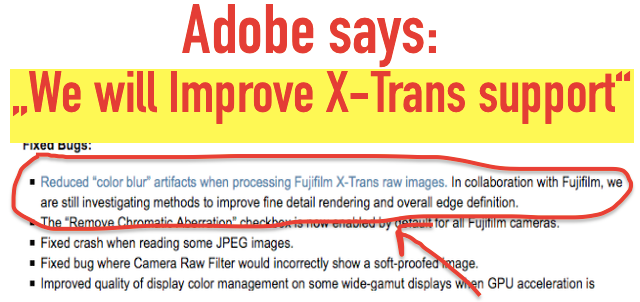
For the first time, there is an official statement of Adobe to what belongs their X-Trans demosaicing:
“We have reduced “color blur” artifacts when processing Fujifilm X-Trans raw images. In collaboration with Fujifilm, we are still investigating methods to improve fine detail rendering and overall edge definition.”
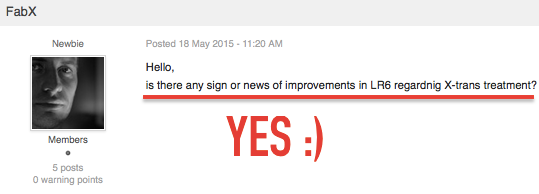
So we have already one improvement, and more will come. I guess we now also have the answer to the question FXF Member FabX, who asked: “is there any sign or news of improvements in LR6 regardnig X-trans treatment?” Yes, finally 🙂 .
Adobe also updated PhotoShop CC, Lightroom CC and Lightroom 6.1 with new features (but not for LR6 – no new features for the standalone version), and adds support for the Fujifilm X-T10.
Check out the lightroomjournal (CameraRaw 9.1 / Lightroomm CC and 6.1)
stay tuned,
 Fuji X Forum, Facebook, Google+, RSS-feed and Twitter
105 Responses
Very good news!!!!!!!
was this answer given for the latest update or is this part of the original lr 6 release?
Interesting – Adobe must see some merit for investing time and money into better X-trans processing, good news for Fuji and X photographers.
Or Fuji is paying them…
Hooray! I’ve tried Photo Ninja for best details but I didn’t like the overall performance. LR is still my favorite RAW converter.
wow..i must be dreaming
damn, adobe must want my money. no way i was going to upgrade to 6 but now…
I find it interesting that the problem they addressed does not seem to be the problem most people are complaining about. And, Patrick, your quote is a little more optimistic than what they actually said. Still good news though.
Yep. That “Halo around blue” bugfix just gave me a WTF moment of the day.
oh, maybe I was driven by my enthusiasm 😉 … but at the end that’s the meaning of what Adobe said:
“We are working with Fujifilm to improve X-Trans support (detail rendering)… We already improved the “color blur” artifacts.”
ergo: we improved and we will further improve X-Trans demosaicing
Patrick can you clarify “no new features anymore for the standalone version” ?
What is Lightroom 6.1 then ?
thx
“Bug fixes, Tethered capture, new camera and lens support updates are available in both Lightroom 6 and Lightroom CC.”
New Features Like the Dehaze Feature just for LR CC
It should be mentioned that those new features will be available in the next major release though (i.e. Lightroom 7) if there will be one, it’s just that CC subscribers get that version feature by feature as they become available, whereas perpetual licensees get them in bulk in the form of paid updates when all of them are ready. Though ironically Adobe has recently moved to doing bulk updates for CC as well because they realized that they don’t get enough marketing buzz otherwise. Sigh.
I suppose Adobe don’t really emphasize the part about the features becoming available in a possible next major release since as a publicly traded company, they can’t talk freely about upcoming products, and it would also mean that management would not be able to decide on a complete move to CC with no more perpetual licensing options if they wanted to do so since any implicit LR7 announcement would have be legally binding.
So now it’s compulsory to have my files on the cloud to be able to work with them? Nice try, Adobe, bless your heart. Time to convert to C1.
What do you mean Trenton? CC only uses cloud to check in once a month or so! I’ve updated to LR CC and my files are still on my hard drive …
Every “cloud” software is a huge security and privacy vulnerability. My workstations are always air gapped, they just never go online.
I kind of share your concern but you can actually turn the internet off and still use it. Its not like EA games where you have to have a constant internet connection. The software is on the computer so it’s not really cloud based (which I hate!).
Enjoy living in 2005 for ever then… Like it or not all things are going to online versions. I agree there are downsides, but there also are benefits
I assume you don’t use a web browser then? Wondering how you manage to read or post here.
I assume you have only one Internet-capable device for the entire household?
Adobe CC is really no more of a risk than having your credit card details on file with any other company (you can use PayPal to pay if you trust them which puts up another barrier). But your files are not online unless you want them to be so I don’t understand all the FUD.
Hummm- All updates manually via USB drive, backups manually carried off premises, posting your photos via USB to another computer that is Internet connected, etc. All that to protect your photo workstation? Enjoy
Well, better switch back to paper & enlarger then:
http://www.scientificamerican.com/article/computers-can-be-hacked-using-high-frequency-sound/
http://thehackernews.com/2015/03/hacking-air-gapped-computer.html
All of these “hacks” work only on computers that already have some sort of malware running. I can add an RF signature reading, sound patterning etc to your list… But that’s missing the point. So far this discussion looks pretty much like this:
Me: “The best way to avoid STDs is an abstinence. Second best way – practicing safe sex.”
Others: “Screw that, you can get STDs in a public pool, ha ha ha!”
In short: whatever.
I switched after 5.7 didn’t deliver any updates I hoped for.
At first it was hard (other workflow), but once you are good with C1 you don’t get how many can live with the limited potential of LR.
I mean layer adjustments, color correction etc are so much easier and better on C1. And that’s just the start
I’m trialling C1 but am surprised that some of the lens correction functions aren’t supported for Fuji lenses. That is a negative that is almost never talked about in terms of C1. I love the white balance and skin toning features.
Is this true – no time to look into it, but sounds strange… Adobe doesn’t even sell CC here, encouraging piracy instead.
That is most certainly not true. I have a 80’000 RAW database in LR6 Creative Cloud. The Cloud is only in the name. You don’t upload anything and don’t even need internet. The Cloud part is only for checking if you have a valid license, every 30 days
Yes, that is not true. I think Trenton has got confused.
You don’t have to upload, but the cloud engine is present, hence the name. And all of the security vulnerabilities that are usually associated with the cloud storage.
Besides, you’re oddly comfortable with voluntarily checking in every X days…
Even if you use the cloud storage, the Raw files remain on the Mac/PC, it’s just a jpeg preview that’s stored in the ‘cloud’. I’m not sure why the license check should worry anybody who has a license TBH with you.
Here’s a good article about clouds, in more or less layman’s terms: http://www.infoq.com/articles/ieee-cloud-computing-vulnerabilities
And speaking of why the regular ausweis check bothers me… Well, guess I just hate roadblocks.
this is no way is related to Adobe CC 😀 Please stop misinforming people.
Sounds like I’m trying to sell the idea of an air gap to a WiFi junkie. I should stop indeed.
Why are you using cloud based Disqus to post comments? Are you not afraid somebody will steal your identity? Oh, sure, you probably have random generated passwords, one time generated virtual machine workspace and are surfing over TOR. No worries then.
You’re either an idiot or a troll, perhaps both.
Sometimes I read your posts Trenton and I think “this guy’s smart and f**k**g funny. Maybe he should use his considerable wit for something other than dissiminating misinformation and insulting people”.
FUD …
Where do you even get this crap? You don’t move your files anywhere… nor is the program in the cloud, it is installed on your computer. Never have I seen a more misunderstood name for a product. The only thing cloud based is the fact that the program phones home once a month to ensure it is valid to prevent piracy. SMH such conspiracy theories.
See my post above.
Okay Adobe, it was nice while it lasted. I’m switching now. Good thing I have waited to upgrade to LR6.
I’m gonna go find someone who treats me as a customer, not as a wallet. No way I’m going with CC.
Um. I have LR6 and I just went into help… Searched for ‘update’. And then cliched on update. Wallah! Improvements.
You get updates for new cameras like the X-T10 but you don’t get the new features (like dehaze) until LR 7 is (maybe) released…
You do get the improved X-Trans processing though, which is what this post is about. I don’t really think they are treating you like a wallet either because If Adobe were still running under the pre-CC paradigm, the dehaze feature would be developed now but would not be available until LR7 is released in a year a half’s time. So it’s good for CC (although they pay extra cash and must have an internet connection) but also good for standalone purchasers because when they eventually get ‘dehaze’ it will be beta tested by millions of CC users (a better beta situation than the past). It might even speed up iteration of new features in standalone LR
because they have to please people that are paying monthly to be
members. The only way this logic doesn’t work is if Adobe stops selling LR as a standalone product.
You’re right, I didn’t see that the standalone customers also get the processing improvements for Fuji files.
And yes, eventually standalone buyers will get the new features as well. That’s not what I’m criticizing because I understand that Adobe cannot roll out all the same features for the standalone buyers because else there will not be anything upgraded once they release LR7.
What I’m criticizing is twofold:
a) Releasing new features 2 months after introducing a new version of LR is kind of sneaky. It really sounds like Adobe could have had these features ready for LR6.0 but decided to release them now to push people into the CC program.
b) Subscription software is something I will never do. I buy software the way it is and from that point on it doesn’t cost the maker a thing (except bug fixes which are the software equivalent of warranty). It’s like paying monthly to use my kitchen table – not gonna happen. Monthly payments are for things that produce continued expenses for the manufacturer/owner.
Also subscription software will make Adobe even more lazy than they already are. With paid upgrades you need to convince your customers to pay by offering new/better features for the price. If the features don’t convince you to shell out 80$ you can skip one release. With subscription software you pay just to use.
And don’t forget, subscription software has no used value. If I decided to switch to C1 now (considering it) I could still sell my LR license. Subscription software makes switching even more expensive, which is exactly what Adobe wants.
I’ll bet my behind that once 90 or so % are on CC Adobe will stop releasing standalone versions.
I agree with (a) completely; just makes good business sense for them.
Regarding (b) I don’t think it will make them more lazy rather I think they will have to do more to keep people on the subscription service as long as the standalone version exists as an alternative. I fear they will discontinue the standalone version like you. But then I remember that they would stand to lose a lot of customers because (1) Many people don’t want CC and (2) Piracy would go through the roof if they discontinued the standalone version (considering the difficulty of Internet access in countries other than Australia, USA, Japan, Weatern Europe etc).
CC 2015.1 is out now. I just updated.
the improvement is there, it’s not a big one though. The colors get more saturated and high contrast transitions loose the white halos.
Here are couple of images that I just edited yesterday before the update, and exported today again after update (those are from raw files from slrclub review of xf 10-24)
https://www.dropbox.com/s/ddkpgpf951n2294/20140307-001-2.JPG?dl=0
https://www.dropbox.com/s/fa3ma5i8djbtrtb/20140307-001-3.JPG?dl=0
https://www.dropbox.com/s/q76xbjt4c2izuz7/20140308-001.JPG?dl=0
https://www.dropbox.com/s/47owkku99b7pas8/20140308-001-2.JPG?dl=0
https://www.dropbox.com/s/d5dn30dyxntu10a/20140325-001.JPG?dl=0
https://www.dropbox.com/s/e5qygb9qwfyiiuv/20140325-001-2.JPG?dl=0
notice the improvement in the leafs
I think I’ll stick with Aperture.
I had thought about jumping the fence, but I rather like my current workflow.
I did the switch about a month ago. I hated it at first, but after a few days I got used to it and overall prefer it to Aperture now. The main downsides I have found is the concept of having different modules for library/develop etc. which seems odd, and I also find the spot adjustments a bit more clunky. These are more than offset by the ability to edit on my iPad (I use this for sorting out keepers from weddings) and other features like the gradient filter which is very handy. No way I would go back to Aperture now TBH.
Thanks for your comment. It always helps to hear from someone in the same boat. Do you use LR CC or 6? I hate the idea of subscription software. I still can’t come to terms with it.
I went with CC because I wanted the mobile version as well (which requires CC). I actually think the CC version is pretty good value for what you get (from a pro point of view anyway), and I like to keep my software up to date. The software I use for previewing albums to clients costs more than my CC subscription per year which puts it in perspective.
Yes the greens are richer and overall image a little warmer. Improvement to my eyes.
I presume it updates automatically, I can’t see a way to get it to update manually :/
I actually logged out of creative cloud and logged back in. It then said there were updates
I love Iridient, but going through it for fine detail is annoying when 90% of my workflow is through Lightroom. Hopefully Adobe improves it to the point where I only need Iridient for emergencies 😉
C1Pro does a nearly perfect job out of the box, and after adjusting to its workflow, I have found it much better. Interesting fact, even my old NEF files look better in C1 than LR.
I do love C1Pro, but i’ve never found a decent workflow with the way LR databases the files. And having to use both together is a massive chore. If there was only a way to have C1Pro use the same kind of filing system…
I have some LR presets that I enjoy using. Are there good presets for film simulation for C1Pro or is it possible to take LR’s presets to C1Pro?
There is this http://captureonestyles.com/ or if you prefer the Fuji profiles, download the profiles this guy created http://www.dpreview.com/forums/post/52259495
Thanks!
Capture One Pro 8.3 emulate your chosen in-camera Fujifilm Simulation Mode……e.g Shoot RAW only, pick your film simulation of choice….Capture One Pro 8.3 will emulate this setting upon imported RAW files. You need to use CO Pro 8.3 for importing though..
Nice because I shoot Fuji.
Out of curiosity where were those beach photos from? Looks nice…
How do people find Fuji colours in Lightroom? I understand that a lot of the buzz is around their brilliant film simulations. So how do the colours compare when shooting raw?
Never noticed a difference in colour rendering, assuming you select the same film simulation/colour profile, white balance and appropriate saturation. When I was looking to hijack a Classic Chrome profile to hack into the X100S, I found the profile carried by the X100T and the profile used in Lightroom are identical; it looks like either Fuji made the profile for Adobe or Adobe just copy&pasted it. I didn’t check any of the other profiles, but I see no reason to believe the other Lightroom profiles aren’t copied directly from Fuji, too. As far as colour goes, they are exactly the same. When my X-T10 gets in in a couple of days the first thing I’ll be doing is shooting a colour test chart, so I could do some examples then.
What I do notice is Fuji apply a more drastic tone curve than the default linear one that Adobe software starts with, so to get the camera to match that you need to set shadow and highlight to -1. If you don’t do that then the Lightroom images will seem slightly washed-out compared to the camera’s .jpgs and that can make the colour look a little off, especially if you’re shooting high contrast/high saturation subjects.
The X-E1 and X100 have a more neutral tone curve so you can leave those at 0 and everything matches what Lightroom will give you in both contrast and colour, give or take a very slight difference for some extremely saturated/contrast subjects.
Awesome thanks for your detailed response! I look forward to seeing your xt10 colour example if you get a chance. Cheers!
Just spend some time with the tuning and you would get there. You might find it easier to use capture one, or simply get silkypix to convert .RAF to tiff for further processing.
I’m giving silkypix a go at the moment. Have you used it before? I can’t even figure out how to reduce the highlights… Have you worked with tiff files? Do they contain much leeway compared to raw files (one reducing highlights if needed). Cheers
To butt in: .tiff (or .tif) files and raw files are essentially the same thing. A raw file is a .tiff with additional EXIF data, additional metadata and an embedded .jpg preview. The actual image you work on is the same. The proper name for the raw standard is ‘TIFF/EP’.
The only time you might notice a difference between a raw file and a .tiff is if you save the file as a .tiff with one program and then open the raw file in another. Opening a raw file in silkypix and saving it as a .tiff, then opening the same raw in Lightroom, will give you two very slightly different images. Assuming you open and save all your files with the same program, though, .tiff and raw will look the same.
not quite correct
raw is more a “digital negative” containing (typically) a larger native color space and potentially greater bit depth as well as completely adjustable white balance, fine details, etc. it also allows editing w/o affecting the original information, in other words raw image data remains intact
tiff is more a “photograph” made from the negative
it contains as many details and dynamic range as you allowed to
TIFF is not an image compression, but a container format, like ZIP. A TIFF file inside may contain fax, JPEG, uncompressed, lossless compressed, camera RAW, B&W, grayscale, RGB, YCbCr, CMYK, Lab. It may be color managed or device-specific, 1-bit, 2-bit, 3-bit, 4-bit, 6-bit, 8-bit, 12-bit, 16-bit, everything you can imagine and beyond. Even EXIF metadata are really TIFF files, so you could say that most JPEGs have a TIFF inside (EXIF). And many TIFFs have a JPEG inside. RAW files use the TIFF container format as well, but they contain very different types of data.
Only software experts need to know this. It’s very confusing to call a RAW a TIFF, just because they share the same internal file format.
In the photography world, when we say TIFF, we usually contrast that against JPEG (8-bit + lossy) or RAW (requires demosaicing / development). In this context TIFF simply means already developed (so white balance is set), but lossless (no artifacts), and potentially 16-bit (lots of tonal information).
Yes, but also, no. You are correct in that not every TIFF file is a raw photo file, and that the TIFF file format can be used for other things, but every raw contains a TIFF, or to be more precise, a raw file is a TIFF/EP digital image format standard, aka ISO 12234-2. More importantly, perhaps, is that a .tiff or .tif image file is the imaging standard which you see when you open a raw file. Again, not every TIFF is a .tiff/.tif, but every .tiff/.tif is a TIFF.
So, calling a TIFF a raw would be wrong (which seems to be what you think I did?), but saying a raw image (e.g. .RAF, .CR2) is providing you the same photo as a .tiff file is right. (Again, assuming you’re using the same software, saving at appropriate quality, etc.) The upshot is that whether you’re working from a raw file format or a .tiff file generated from a raw, you’re not going to be able to recover any additional highlight or shadow detail. The only thing raw does give you more control over is the white balance.
I currently do the tuning in Capture One. Later converted to TIFF and put it in lightroom for final touch and JPEG conversion. It is quite troublesome but results are pleasing. I suppose you could use Silkypix as a TIFF converter and let Adobe software do the rest.
highlight recovery in Silkypix is virtually non-existent (you’re supposed to use the Dynamic Range controller) which is one reason why I don’t use it. LR also produces nicer colours with the film simulations imo though the basic demosaicing with SP is OK.
actually in ACR you have the fujifilm film simulation, and they are quite accurate really similar to in camera colors
Lightroom 6 is the most disappointing lightroom version I’ve ever seen. It is very slow and full of bugs. I lost my money. I won’t buy lightroom again.
Agreed. I can’t believe how little reaction there is to this. I’m constantly amazed how slow it is (and I’m on new iMac 4Ghz i7 with 32GB RAM and 4MB video card. If VSCO would have a C1 version, I’d probably move over.
on my system is a lot faster exporting files..
Amazing news…
Maybe Adobe shouldn’t investigate with Fujifilm, but with Brian and Jim. 🙂
There’s definitely a difference with the blue color-blur.
Here are two cropped shots where you can see the improvements.
Ah, another LR update. That’s all fine and dandy, but where’s my TETHERED SHOOTING PLUGIN???
Can you share the link to the full images on your dropbox?
Can only see the compressed previews here.
Are the Fuji X improvements automatically applied on Lightroom files by default or does the user need to take some sort of action?
From my experience, the improvements were automatically applied.
I do Agree, there is a subtle but visible improvement. if you are interested ‘ve uploaded 4 jpeg at this link http://www.riccimarco.com/varie/LR2015_1.zip , developed in LR 5.5 and CC 2015.1 with same develop and export settings.look at the “blue image, you can feel a more fine details on the wall, ad around the colors between the hand and the wall, even the bottom part of the old woman as a blue dominance (more realistic, considered the blue wall) not visible in LR 5.5 . is a first step i am happy with 🙂 green image with grass is more saturated
Wow, I can see improvement in every color not only in blue. Take a look at fur of cats, or old lady’s face. I was really disappointed when Adobe launched LR6 without any changes to X-Trans processing. Todays update is much more important to me than face recognition function.
Yes, there is a little but noticable improvement in fine detail and less color blur (or watercolor effets) for shure picture look a little bit dharper at same settings… We are not at te same level as photoninja, but actually i am ok with this quality, hoping to see more improvement in next future!
Oh yeah, there really is an improvement in detail rendering. Very noticeable in the texture of the wall and the door. You can also see it in the other picture, in the patch of dirt in the upper right for example.
Now I’ll have to go check my own pictures for improvements. 🙂
There seems to be no change in the watercolor effect / smearing though. I can’t really compare now, as I updated before I could do comparisons, but to me it seems as much as it was before.
An easy solution – Fuji should provide its own bare-bones raw converter. It is shocking that they haven’t done so already.
I doubt Adobe will ever get it right, as I didn’t even like how they converted my Canon files.
I agree, but hope for a Linux version too, IF they ever get to provide a bare-bones raw converter.
To be honest I hope they don’t do that. It would be a lot of work for what must be a lot less than 1% of the target audience. Sorry for those few Linux users but it wouldn’t be worth the resources. Just use a virtual machine.
Really I still hope for the camera manufacturers to create custom software for the whole workflow. That’s how you can really produce terrific integration and usability. Sadly they all (except Phase One) suck at software so it will never happen.
Actually, as much as it is a pain, Sigma’s editing software is essential for the conversion of their files and does a great job ~ it is just very slow.
Right, but it isn’t a solution for the whole workflow is it? I haven’t heard of anyone using is exclusively. And – as you said – it’s slow. Doesn’t sound too tempting to be honest 😉
let’s also hope they don’t develop a Mac version, after all, why waste time and resources on developing something that’s only used by less than 10% 😉
Absolutely:
http://digital-photography-school.com/mac-vs-pc-for-photo-post-production-poll-results/
Try again 😉
Hi,
As far as I am concerned, I can’t see any improvement in such tiny compressed images. Is it possible to get much larger images, specially to be able to find improvement in the rendering of the foliage?
Personally I’m not going to be happy until it takes my snapshots and turns them into art.
I wish Adobe were able to do as good a job as Irridient… I’m not going to buy a mac just to use that software, but seeing the comparisons shows how much LR can still improve.
Yes, which is why I mentioned about saving a file as a .tiff vs opening a raw, and the additional data stored in a raw file format. The actual image itself, however, is identical. (Again, assuming you’re opening everything with the same software, editing and saving at the highest quality, etc.)
I wanted to try this last night but I could not seem to find a download link to update my stand alone version of Lightroom 6.0. If anyone has a link I would most appreciate it. I am hoping this was just my failure to find the link and not that these changes will be limited to the CC version.
The answer from another thread: From Lightroom – help/updates – and it worked.
Why there’s no one talking about the fact that there are “no new features for the standalone version”. Are you all subscribers to that stupid cloud? The v6 was already a big disappointment. Now with this piece of news, Adobe should never expect to see my money again. What a low move. Disrespectful.
Seriously, how long do they need to ‘still investigate’? They have huge resources and the manufacturer’s cooperation for over three years now. Iridient is what, one guy with no help, and he’s kicked their butts into space? Just get it sorted already.