










tz Santos (website)
Hi Patrick!
A months ago i bough a keychain that i improvised to be a camera strap, last week, i decided to buy the lanyard version of the strap, is the same but longer… today i saw through facebook that the company developed a real camera strap from the same concept.
here is my improvised one.

and here is the one they created.
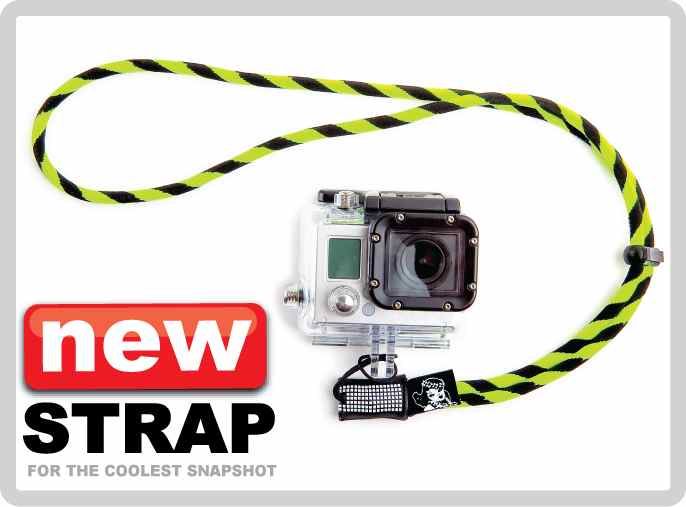
It costs only 10€ and i can assure by my improvised one that is is great!
heres the link to the online store and facebook page.
https://www.facebook.com/pages/Original-Lanyards/171714706197728 / www.originallanyards.com
Have a great week!!
[Patrick: and what camera strap do you use?]
tz Santos (website)
_ _ _
Paul
Hi Patrick
Love the site, and all the great info you put up !
Here’s some X Pro 1 musings, info, and pictures to illustrate – feel free to use any or all of it…
Fuji’s X Pro 1 – some thoughts from a Professional user.
Much has been written about this great camera, which has many foibles, but Fuji’s firmware upgrades seem to be sorting them out gradually.
I love it’s style, weight, low light capabilities, very quiet shutter, image quality etc. but from my personal perspective as a professional photographer I wouldn’t be able to stop using my Canon SLR’s, as there’s too many situations where the Fuji wouldn’t cope – but it’s a perfect compliment to the Canons, and goes everywhere with me.
Here’s a few specifics I’d love to see amended with future Firmware upgrades.
– Flash firing in continuous shooting mode – that’d be a useful function, and there’s times you don’t mind if it doesn’t fire, as there’s then the option of available light too.
– File numbering and playback in continuous shooting mode – I’m baffled as to why the file number prefix changes from DSCF in single shot, to SOO for pictures shot in continuous mode – which then appear at the end of the image set when downloaded and viewed on screen.
Also, in playback, on the camera, the sequence of continuous photo’s appears in a small sub window, and to view the burst, you have to use the down arrow to look at the pictures !
– Pictures can’t be deleted in playback mode when either the + or – zoom buttons have been pressed – you have to return the image back to it’s original size first.
– Autofocus in low light still isn’t great, even after the latest Firmware upgrade. I was at a gig in a dimly lit pub and it often failed – that said, I was then at a festival shooting under stage lighting and it produced superb results !!
– In OVF mode with the 55-200 lens, the view finder only shows framelines up to about half the lens’s focal length – not an issue in EVF though !
– Following on from previous posts regarding batteries – always carry a spare – they do die SUDDENLY !
There’s some hardware ‘issues’ that’d be great to see sorted
– No built in eyepiece correction – I had to buy screw in Diopter correction lens – my Canon G9 has it, as does a forty year old Russian FED 4 rangefinder !!
– The battery charger shows a green light whilst charging, which goes out when fully charged – why not have red or orange when charging, followed by green when fully charged ??
And here’s some practical notes about grips, cases, and lens adaptors, that I’ve bought to go with the camera.
Grip – via Ebay
[shoplink 15967 ebay]Metal Quick Release Plate Camera Handle Fuji X-PRO1 Tripod Ballhead[/shoplink] £48.00 via ebay UK
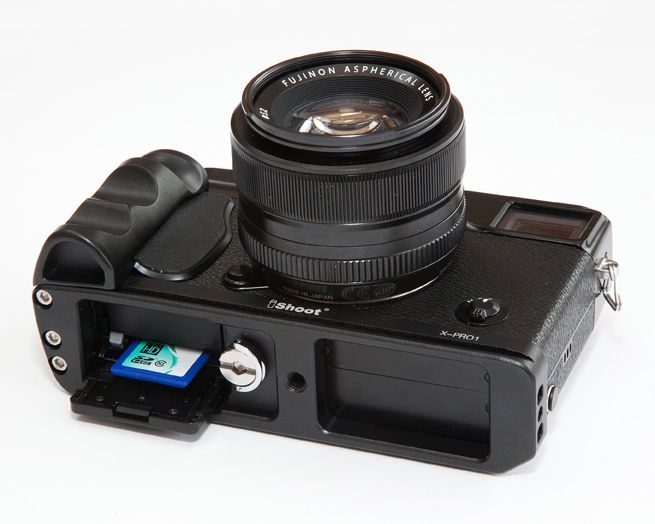
To my mind it’s better designed, and more useful for larger hands like mine – I bought a Fuji grip, and took it back, as for me, it was too small !!
You can also access the battery and memory card without removing the grip from camera – unlike Fuji’s version, and there’s also a tripod screw under lens axis too, as per Fuji’s own version.
It’s also designed for mounting to AS interface ball heads on tripods, and comes with a piece on the side for upright mounting – which is removable.
[shoplink 15968 ebay]Canon FD lens to X Pro adaptor[/shoplink] – £24.00 via ebay UK
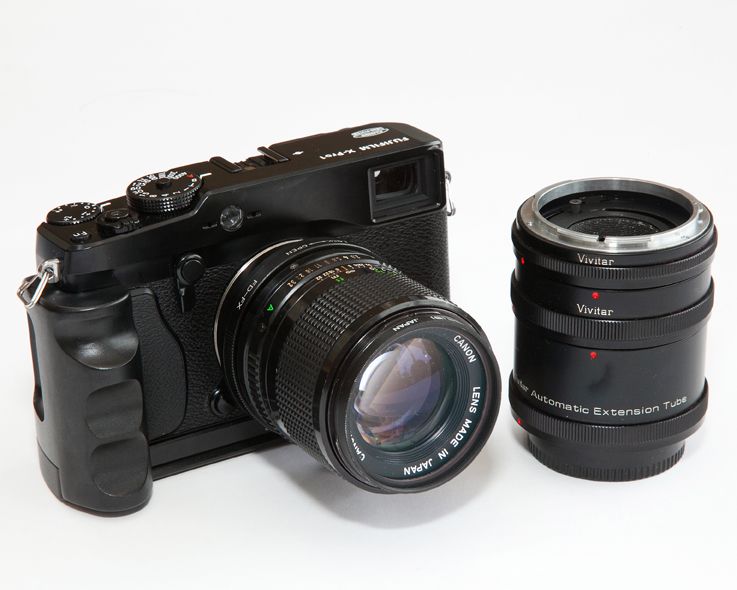
I bought this to use my 30yr old [shoplink 15969 ebay]Canon FD 100mm f2.8 lens[/shoplink], that now fits perfectly on the X Pro 1 with this well made adaptor, and has manual aperture control too, with a stop down control, so now have a 100mm manual focus lens, that with my set of extension tubes, also offers a macro facility too !
Camera case – £20.00 via Amazon UK
http://www.amazon.co.uk/Black-Leather-Fujifilm-X-Pro1-Camera/dp/B008GNM1Y6/ref=sr_1_7?ie=UTF8&qid=1372162143&sr=8-7&keywords=Fuji+x+pro+1+case
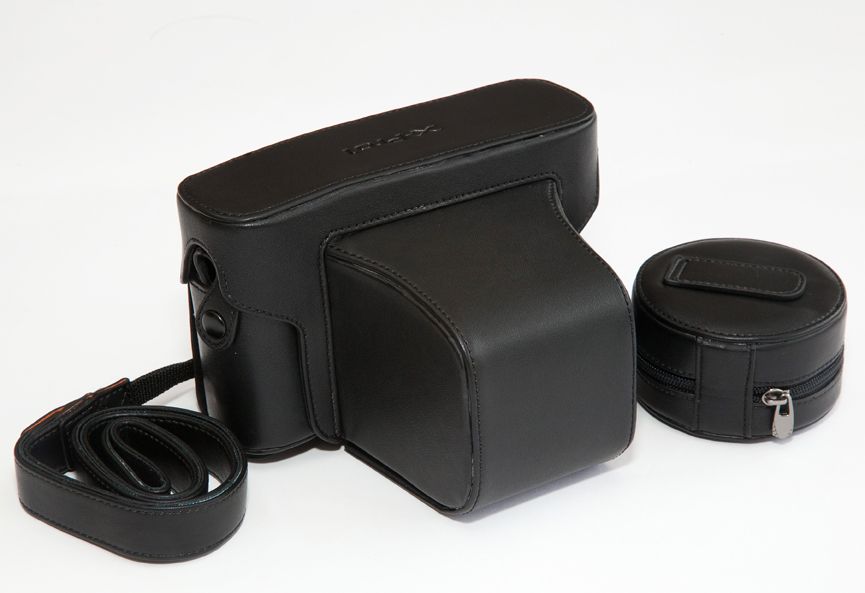
This is a copy of Fuji’s own [admin: the original Fujifilm X-PRO 1 Leather Case can be found [shoplink 15970]here at Amazon[/shoplink] or [shoplink 15970 ebay]here at eBay[/shoplink]], operates the same way, and comes complete with a strap and lenshood case.
As it’s a lot cheaper than Fuji’s own brand item, there’s not the worry about damage either.
I use the bottom half of the case for holidays – and the grip for day to day use.
www.sherwood.ie – check out my website !
http://paulsherwood.blogspot.com – For regular updates of my work.
Press, PR, Social, Corporate, Commercial, Conferences, Golf Days, Editorial, Weddings, Awards Ceremonies, Graduations, Interiors & Food Photography…and more…
Regards
Paul Sherwood
Photographer
Member
– Press Photographers Assoc. of Ireland
– National Union of Journalists
– Dun Laoghaire Chamber of Commerce
– British Irish Chamber of Commerce
– Irish Professional Photographers Assoc. (1996-2013)
Linked-In Paul Sherwood Photography
Facebook – Paul Sherwood Photography
Twitter – paulsherphoto
5 Responses
I agree on the grip. I have the iShoot grip for my X-E1 and it’s fantastic. Great grip and access to everything. Plus, I have used the ArcaSwiss style of tripod quick release for years, so having an integral L-bracket is wonderful for tripod shooting. I do take off the vertical plate if I’m shooting handheld for a day, though.
Any idea where to order the ishoot grip for the xe1 in Germany?
I’ve just removed my neck strap in favour of a wrist strap.
I find it much easier to reach into my bag and not fumble about with the neck strap getting looped around my camera.
Again, to avoid my wrist strap getting in the way of my controls; I decided too attach it to a Black Rapid Fasten R-3. This is a simple, stainless eyelet bolt that goes on your tripod mount. My wrist strap is a wonderfully welll made Ciesta
MANO series that has a more secure ring fitting rather than a cord one. I fix it to the R-3 by way of a little carabina fastener.
I find this assembly strong and easy to operate with.
(Sorry, could not attach to unfinished post)
People have so far never been able to figure out how to use my improvised fake leather strap, but I adjusted it until it perfectly fits around my small, ring and middle finger, leaving the index finger + thumb free to operate the buttons. A must have for all my present and future mirrorless cameras from now on.
Recipe: a piece of rope that fits through the right hand side strap lug, a piece of (fake, but next time I will use real) leather. Sew the leather around the rope, leave the rope free to move inside. Adjust the length of the rope to make it comfortably fit around the 3 non camera button operating fingers, not too tight, not too loose. Start the adjusting iterations with too much / too long. When the size is perfect, cut rope and leather to the right size. Attach to the right hand side strap lug. There you go, safe and cool.
Nothing better than this for mirrorless and compact, unless you want others to be able to handle your camera…