










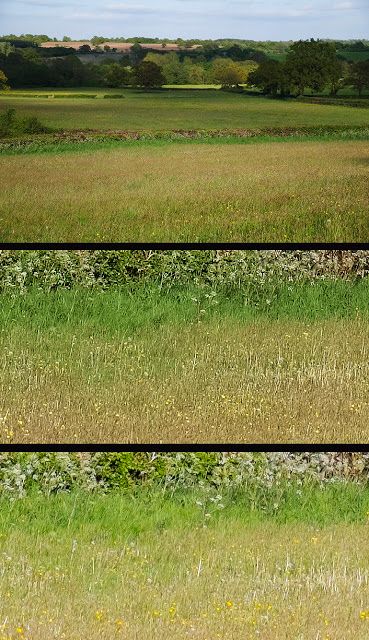
image courtesy: soundimpageplus (in the middle Iridient, at the bottom Photoshop)
1) Now also soundimageplus joined to the group of photographers who use Iridient to process their X-Trans RAF files (click here). [check also this FR-post here and vote the poll] Among the others he says that:
“You will clearly see how much more detail and sharpness there is in the Iridient Developer version, which is just from the X-E1 preset. The ACR file has sharpening added but still produces a softish ‘smeared’ result. The advantage of Iridient Developer over Aperture is that it is slightly sharper and still keeps the colour noise and moire under control. If you have a Fuji X camera and a MAC,, give it a try. I think you will be impressed.”
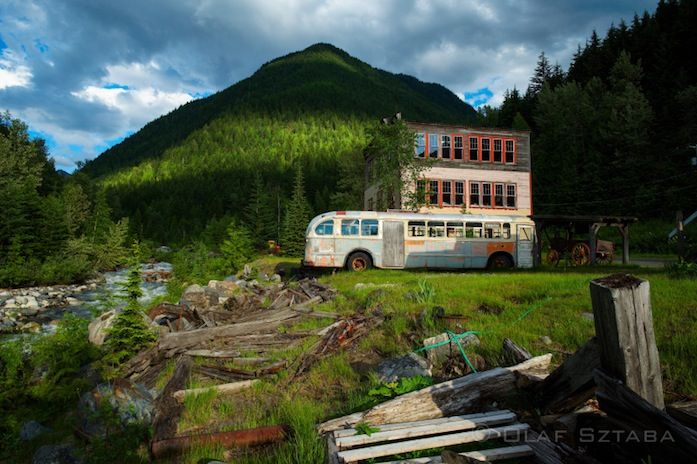
2) FR-readers Olaf and Kasia visited the Valley of The Ghosts with the X-PRO1 and X100S… don’t be scared, if you click here, you’ll just see some beautiful shots. All images were processed with Iridient 2.1 and LR: “Iridient Developer is new software, which supports the X-Trans files really well (the best demosaic so far?). We will share more about this in the upcoming posts.”
image courtesy: Olaf & Kasia
X-talk
– The Lens Wipe contacted me at the FR-facebook page and told me: “We did an interview with Kevin Mullins who uses the X-series cameras extensively in his wedding photography. Though it would be interesting for you guys. The Lens Wipe is on iTunes or just use this link.”
X-M1
X-M1 (body only or with 16-50mm) – USA: AmazonUS / BHphoto / Adorama / DigitalRev / Pictureline EUROPE: DigitalRev / WexUK / PCHstore / AmazonITA
XF 27mm – USA: AmazonUS / BHphoto / Adorama / DigitalRev / Pictureline EUROPE: DigitalRev / WexUK / PCHstore / AmazonITA XC 16-50: WexUK / PCHstore
– Ahead of their full review ephotozine published some samples shot taken with the X-M1 using the 16-50 lens here and the 27mm lens here.
– A 2 minute X-M1 preview video at the digital camera world here.
X100S
[shopcountry 12883]
– X100S and infrared at digitalrelish here. “With the release of the X100S and its enhanced high ISO performance offering the possibility of going tripod-less whilst using an IR filter, I set off for a week away in the English countryside. I wasn’t disappointed with the results from the camera. The combination of a higher resolution 16MP X-Trans sensor for more detail, the improved high ISO performance for less noise […]”
– Matti Sulanto was on the streets of London with his X100S and XF1. The text is in Finnish, but the images are universal… see them here.
X20
[shopcountry 12884]
image courtesy: eyalg
– eyalg posted his well made X20 review here: “Autofocus in most conditions and situations is very fast. Instantaneous almost. Even in low light, the X20 manages to lock focus better than I expected, even when taking into account that it’s a high-end compact. In macro mode, AF is generally to slow to catch an insect without effort. I had to make several attempts to shoot a bee or a spider up close. […] Battery life is surprisingly better than advertised. I was able to take about 600 shots before having to charge the battery – that’s more than twice the official number.”
– Read thephoblographer‘s review of the X20 here: “The Fujifilm X20 is a great choice for the discerning street photographer and photojournalist. Despite its diminutive size, it packs a punch that shows itself in post. With a beautiful design and powerful innards, the X20 will get you the images you need. Just remember to get your mind out of manual focusing with this, but if you find that you absolutely have to, a tripod would be a good thing to have on hand.”
– X20 or X100S: “As you can see, the X20 and X100s are very different cameras, even though they share many similarities when it comes to design and technology such as the X-Trans Sensor. The diverse lens system and a different sensor size are the key elements that separate these two cameras from each other. It goes without saying that the X100s has been designed with professional photographers in mind, while the X20 is aimed more at the amateur/enthusiast who wants upgrade from a simple point-and-shoot.” Read it all here at mirrorlessons.
– karimhaddad posted his thoughts about the X20 (or “X-junior“) here. The conclusion: “Even though I didn’t really need it, I’m still happy I bought this fun camera. It’s portable, although not small enough to fit in your pockets – unless you have some really big pockets. For you ladies, it’s small enough to fit in some of those purses you use. Most importantly, it takes some very nice pictures and gives the photographer many options to choose from. There may be some similar sized cameras that take better pictures, but I haven’t used them. I’ve played around with the X20 enough to know that it’s a great piece of kit. In many ways, the X-junior is my new walkaround.”
image courtesy: karimhaddad
lenses
– admiringlight tested the 12mm Zeiss Touit lens. The eternal question, Zeiss 12 or Fuji 14? And it’s again the Fuji! Read the whole review here.
– the German digitalcamera.de tested the new Zeiss Touit lenses. Read it here (translated version).
– Fuji 55-200 mm on a 720nm IR converted X Pro 1 at markhilliardatelier here: “As you can see as you get to f/11 we start to develop a small hot spot, but nothing that cannot be fixed. Above f/11 the lens becomes unusable at the wide end.”
– Hand on the 55-200 at mirrorlessons here: “In short, the 55-200mm is a very nice lens but I would never buy it. If you, however, feel it is the kind of lens that could meet your needs, you can check out additional photos below and the first article I wrote about his lens.”
– A car race and the 55-200. See the results here at nicolaslambert in French (translated version). From the verdict: “Is it possible to take pictures of sports with its new Fuji telephoto? Yes, but …I think that to make a bet at the correct point, one must understand how the work of AF Fuji and therefore target areas with a contrast. For example, in this case here, a sticker with the lettering, the number … ”
FinePix HS50EXR
[shopcountry 14383]
Fujifilm FinePix HS50EXR review at photographyblog. “As Fujifilm make a big play of in their marketing, the HS50EXR really is an all-in-one camera that will cope with virtually everything that you can throw at it, from macro photography to extreme close-ups of sports and nature. It also successfully mimicks the handling of a typical DSLR camera, with the obvious advantage of not having to carry several big, heavy and expensive lenses to achieve anywhere near the focal range that the HS50EXR offers out-of-the-box.“
8 Responses
does anyone knows if Iridient will ever be available for PC users?
Étienne,
Did you get an answer about Iridient for PC. There are a lot of us that are not Apple fans or users. Regards, F William Baker Dallas, Texas
here is the answer I got from Brian, developer of iridient: “I have nothing at all against Windows, but it’s unlikely there will be a port of Iridient Developer to Windows. […] That said I have had discussions in the past and will likely have more in the future regarding opportunities for someone else do a Windows version, but so far nothing concrete has come to pass.“
In comparing Capture One to Iridient, I’m of the opinion from preliminary results that Capture One does a very good job too. I am having a tough time find a difference in the two. A plus is that Capture does a great job on my D800 RAW files too and Iridient can’t touch even ACR there. I still don’t know which I will buy…..I want to do more tests.
I’m surprised you aren’t seeing better results with your D800 in Iridient Developer. Iridient should be able to easily equal or outperform (in my obviously biased opinion, but this has been backed up by 3rd party reviews and feedback as well…) both Capture One and ACR with traditional Bayer filter cameras such as the D800 as well.
What differences are you seeing where you feel Iridient Developer does not match up well with your D800, color, noise, sharpness? All these adjustments can vary widely based on personal preferences, but you should be able to quickly make minor adjustments to each of these areas in Iridient Developer that allow you to fine tune the rendering to best suit your own personal tastes.
My sharpening methods (of which there are 4) have always been considered among the best out there in any image editor, my new noise reduction processing (just introduced in version 2.1) has taken a huge leap forward and I’m not aware of any RAW converter with more flexible color rendering options from ICC profiles to DNG color matrix values to DNG camera profiles (as used by recent versions of ACR/Lightroom) to fully user editable camera tone curves. With color rendering you can get a very similar color rendering to Capture One by sharing ICC profiles and tone curves between the programs and with ACR/Lightroom you can do the same by sharing DNG Camera Profiles and tone curves.
Anyway contact me by email and I’m sure we can get things sorted out with your D800 files.
Best regards,
Brian Griffith (author of Iridient Developer)
Iridient Digital
Brian,
Thanks for the offer. Ill be sure to get in touch because I expected better results with the Nikon too. I really like the results with the fuji.
There is a pretty big color difference between the 2. I prefer the color of ACR personally. I like punchy colors though. But which ever one is more true to life with color would be the one i would choose. ESPECIALLY if the sharpness differences wont show up on a A3+(largest i print) print.
But thats me personally. Now a days people dont really print. They look at the pics at 100%(I do this as well), and put them on face book or what ever their photo site is and thats about it.
Hey Ryan,
You can get a virtually identical color match between ACR/Lightroom and Iridient Developer. Under the Input Profile menu choose “DNG Matrix Color Default” and you should get a closer match to the Adobe color style, however this uses just the basic DNG color information as used by older versions of ACR/Lightroom and does not attempt to match the default camera tone curves which can vary between RAW processors.
To get a very close match in both color and contrast between Adobe and Iridient use DNG Camera Profiles (DCP extension files) which include camera tone curve information and upon which recent versions of Lightroom 4/5 (process version 2012 I think was when they made this switch…). In most cases these camera profiles will be located in the following folder on your system:
/Library/Application Support/Adobe/CameraRaw/CameraProfiles/
Custom DCP camera profiles can also be created with tools such as X-Rite’s ColorChecker Passport software and the Adobe DNG Profile Editor.
Use the same DNG Camera Profile (DCP) file that you have selected under the Camera Calibration section of ACR/Lightroom with Iridient Developer and you should have a virtually identical color match both in default color and contrast/brightness curves.
Iridient Developer can also give a nearly identical color match to most other RAW processors like Capture One that are based on ICC camera profiles by using common ICC profiles and tone curves.
Best regards,
Brian Griffith (author of Iridient Developer)
Iridient Digital