










image courtesy: thevisualexperience
The good news is, Fuji X-photographers now have various options to process their X-Trans files and get decent results out of it. The most popular options are Lightroom, Silkypix, Capture One and Aperture. But there are other software programs like Raw Photo Processor (based on DCRAW), AccuRaw… (check out this X-Pert Corner RAW-comparison post).
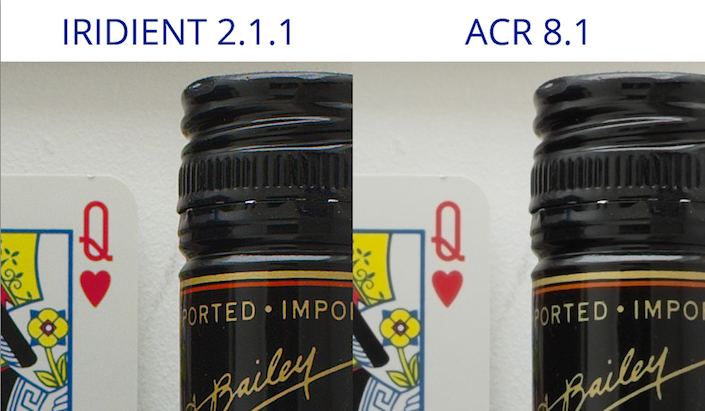
But in the last weeks I told you several times of Iridient Developer (Mac 0nly). This is an option which you should seriously consider to add to your workflow (try the demo version). Does the details extracted from the RAW by IRIDIENT really blow out ACR? Could this be the software that finally unlocked the full potential of the X-Trans sensor?
Now, I’d like to share with you the following articles. The first one at thevisualexperience analizes the way dpreview tests the image quality of the different cameras, while in the second post, “I’m a beliver”, Activatedfx talks of his conversion from LR4.4 to Iridient 2.1.1!
1) Why DPReview may be sometimes wrong
This is how dpreview tests the image quality of cameras (source thevisualexperience): a) Load RAW file into Adobe Camera RAW (Auto mode disabled) b) Set Sharpness to zero (all other settings default) c) Open file to Photoshop d) Apply a Unsharp mask: 100%, Radius 0.6, Threshold 0 d) Save as a TIFF (for cropping) and as a JPEG quality 11 for download
“DPReview paved the way for “scientific” comparison of camera performances, guiding passionate and professionals in understanding “what is worth to buy” and what is not. […] So ACR is the “meter” used to compare cameras for what concerns RAW. You can jump to the “Image Quality” of each review and use the tools to compare RAW performances.
But now that Iridient delivers such great results with the X-Trans files, thevisualexperience suggest to DPreview:
[…] please start taking into account different RAW processors or, at least, make some claim that the RAW results people are inspecting may be not representative of the REAL POTENTIAL a camera may have (since the meter you’re using is, somehow, not the best).”
2) I was a skeptic but now I’m a believer
And here there is another photographer that was blown away by the Iridient results and posted his comparison… at the great dpreview forum (check it here)!
“The Iridient image has more DR, richer colors, more detail in the sky, and a noticeably SHARPER image with no halos or artifacts. To my eye, it doesn’t look “sharpened” at all. In particular, look at the detail in the background of the road sign at 100%. The pattern is much more distinct in the Iridient image. And it’s not because of more contrast.”
Do you consider to swich or add Iridient to your workflow and you do not own a Mac? Apple just released the new MacBooks with an incredible battery life! [shoplink 14128]Check them here at your Amazon[/shoplink].
all the best
Patrick
[poll id=”16″]
40 Responses
I have been comparing Iridient side by side to Adobe after reading of it here on FR. I can totally agree its a better RAW converter, agreeing fully with what others are saying. For X-Trans files its excellent. But I also shoot a D800 and D700 and in comparing thoe files, Iridient is lacking and Adobe wins. To me this matters because I’d like to standardize on one RAW converter. I’m at the point now of deciding if the extra $75 and time to add Iridient to just the Fuji workflow is worth it.
Brian at Iridient has also been very helpful with support. I like the information and quick load times Iridient offers. Very very good software. If you are only a X-Trans user, its definitely a better way.
yeah, and imagine how things would be if Fuji had not bothered with the X-tran sensor and just dropped the AA filter like everyone else – answer, the same IQ with consistent post processing support from day 1, not day 500+ (since its still not consistent).
Christ, I hope Iridient aren’t paying you for this… because their website wont convert to sales.
Seriously. How can you be in the digital marketplace and have a website that looks like it was made 15 years ago.
Great read here!
I have been a LR user since Beta 1.0. However, I just purchased Aperture several weeks ago to handle the X-Tran files off my x-E1. Even though I LOOOOVE LR 4.4, use it with all my Nikon files- D800, D700, D300 and with my Panny LX-5, and will soon be going to 5.x once the bugs are worked out, I have to say Aperture pulls out so much more detail and color from the Fuji files.
I tried IRR, but found the interface terrible. I’ve also used Silkypix since I got the X-E1 in February of this year and actually like it. But that IRR, No way Jose.
I did the same, tried it and compared to LR4.4 and it’s very impressive. Iridient seems to be really more sharper and quicker than LR 4.4. As I have sold all my Nikons, I just need a RAW converter for my Fuji and it could be a great alternative. But for a daily workflow… not sure 🙁
I am new to X-E1, but experienced with LR and C1. The standard settings in LR concerning any camera is just crap. Using my own settings, the x-tans files comes out great in LR and slightly better in C1 (= with D800 files). However my main workflow remains LR (and Photoshop elements, Topaz, Helicon).
My take on comparison between cameras should always be after optimized post processing. A site like DPR should bring in differences between RAW converters as post processing is crucial no matter how excellent camera.
Could you please post your standard LR settings for X-trans? if they make them equal to D800 IQ you’ll be doing a big favor to us all. Thank you very much.
Sorry I did not express myself very well: I meant D800 files comes out a little better from C1 compared to from LR, same as for X-E1 files. D800 IQ? Resolution wise there is a huge difference D800 win by 36 – 16. That is of course only one aspect on IQ….
Looking at files the x-E1 files look very pleasing to me. Easy to post process as well, not least as BW. BW midtones look better than D800 I think.
Prints? Have not tried that much yet – still learning how the X-E1 behaves on paper.
Sharpness settings in LR? Start with 80, 0,5, 40, 10 and fine tune is my recipe.
IQ-wise, Iridient wins. Period. Service-wise, again- Brian is amazingly responsive and knows his baby. I will use a mix of RAW converters based on what other s/w I have opening within them (eg, I have Nik SilverEffex 2 and DXO opening in LR). Hell, i even use Plastic Bullet for fun.
But for critical work that I want to print on art paper, it’ll be Iridient. But I also understand people not wanting to add more $$$ and time to pre-existing workflows. And ACR/CaptureOne/Silkypix/et al. all do a great job. Horses for courses.
I think, as long as Iridient still gives noticeable color artifacts, it cannot be considered being better than ACR. Just look at the edge of the paper clips and the light reflection on the bottle cap.
This is annoying and frustrating. I downloaded Iridient and IQ is definitely better than LR5, images are sharper and take adjustments better also. Now I see where the softness and blandness of the images was coming from, I suspected the camera but looks like the developer is the one to blame. How can this be? How can a small enterprise like Iridient beat Adobe? Fuji must take very seriously the issues with X-trans processing or I guess many of us will jump off the boat, it just doesn’t make sense to be relearning workflows. The good news is that there is more life to x-trans files that first meets the eye, but please Fuji, be real, roll up your sleeves, empty your wallet and start getting things right with developers for good, x-trans is more than 1.5 years old and there is still no consistent processing! It makes no sense to try to go a different route if you are not prepared to do it.
Soon there will be a non X-trans camera from Fuji. It is said to be the lowest end model, but if it uses the same 16 MP sensor (only with Bayer color filter), people will see that it has the best IQ and easiest workflow, so hopefully all the upper models will soon also abandon the X-trans color filter array and start using the classic Bayer one.
I don’t know why Fuji doesn’t develop its on RAW software platform. They designed the X trans sensor, so surely they know how best to get squeeze out the best out of these RAW files? Charge us for it. I don’t mind paying if its a ton better.
Until Iridient fix its shortcomings with high ISO Xtrans files, I really don’t see any reason to use Iridient. I mean ISO 1250 isn’t even that high.
Look at the person’s eyes, and the face of the driver in the car. See what details I can get from LR 4.4 and what I can get out of IR 2.1.1.
See comparison here
http://www.flickr.com/photos/11372162@N02/sets/72157634461062371/
100% crop. Sorry if the crop aren’t exact. This is a quick test.
Shot Settings:
X-Pro1, 14mm. ISO 1250, F22, 1/125 sec. RAW.
LR Setting – Default. I literately pressed Reset under Development.
IR Setting – Camera Default X-Pro1
JPEG Settings:
No resize, 300 DPI, best quality.
for your viewing pleasure, I even uploaded a version where I raised the exposure on Iridient by 1 full stop, so, we get similar exposure levels with LR.
It’s a matter of personal taste, but do you remember black&white film? Different films produced different “looks” in the same developer. Some benefited from, say, Rodinal, while other emulsions “preferred” D76.
Same thing with the digital “negatives” – there’s no single “developer” that is equally good for all sensors. RPP is trying hard to be the one, but it stills sucks in ergonomics department (sorry Andrey)).
Oh, and it seems that being on Windows seriously limits your choice of RAW developers…
All raw processors have their pro’s and con’s. Each with a cadre of advocates promoting theirs as the best. Perhaps there is no best tool. I recently switched from LR to Aperture. I find the initial render in Aperture better. However, that’s not to say ACR is a weak converter. It simply gives you a different starting point.
I switched because of something that has nothing to do with the developing process. I plain could not stomach LR’s interface and Library functions. But I begrudgingly gave up LR’s superb editing ability when dealing with highlights or night shots.
Nice read but I think I’ll take a pass on yet another photo editing package.
Yet an other mac only converter… 🙁
The files processed with Adobe and X-Trans require a little higher sharpening than in some other converters, or with other files in Adobe….but I can get significantly better results with ACR than are shown in the crop above. I automatically have my X-Trans files import with sharpening set to 48 (amount) at 0.8 radius. This is too aggressive on most Bayer cameras, but perfect for my X-E1. Note this 100% crop, and compare to the above crops. This is in Lightroom 5.
http://www.jordansteele.com/2013/LR5_crop.jpg
Have been testing Iridient with X-Pro1 files, which happen to be ISO 400. Stunning difference in color accuracy from LR5. My greens are no longer yellow and my pinks are no longer purple. Happy. Will have to tweak the workflow but I think it’s worth the effort.
I just tested Iridient.
It’s better in term of color rendering, sharpness, and even “real contrast” than other softwares. But it also give some color abberation and fringing.
Question is, is it as good as we see the lenses weekness? Or is it a processing flaw?
To be honest, we have some great results with the other softwares. We already have all the tools to make great pictures. But I would be happy if we can do even more! In Fact the X systems are in a constant evolution.
Cheers.
Hi Patrick and other photogs here.
Thank you for reporting our considerations on DPreview workflow and on the meter they use for judging Raw IQ.
From our test color abberration and fringing can be solved in Iridient quite well.
We didn’t fixed it since we were following the same workflow with both SW.
Interesting, indeed, but please let us know how you do to get such a result with Iridient.
I did the very same test, and DID NOT get the same result at all.
The crop you show had a LOT of sharpening added : without any sharpening, you will not get this result.
I can send you my crops if you want, and you will see…
Actually I tested Iridient against Aperture, and here is my result : using Apple default RAW fine settings (sharpness 0.50/détail 0), the result in term of sharpness is exactly the same.
When using my custom default RAW fine settings (sharpness 0/detail 0,40), Aperture wins.
I feel sorry for the beleaguered folk of DPReview. Everyone is constantly hounding them to review cameras faster whilst simultaneously complaining when the review comes out that it doesn’t do justice because they haven’t tested the camera under every possible circumstance. All on a website that no one pays a dime for.
Not to mention that a while ago they dedicated a whole article to comparing different RAW converters for the X-trans and charting how Adobe had improved their demosaicing. Still not good enough, apparently.
I’d rather see a comparison between Iridient and Aperture for proper X-Trans rendering. Aperture also gets right the color and sharpness, that would be interesting to see rather than the weak LR files.
Please excuse me if I go off topic. I have LR5 and downloaded Iridient, I would also like to try Aperture but there is no trial version. Aperture 3 has been out for quite a while and 4 shouldn’t take much longer. Does any one know if upgrading to Aperture 4 will have any cost for Aperture 3 owners? Was this the case from version 2 to 3? I would buy the current version if I don’t have to pay for the next one, but I wouldn’t like to pay for it twice in a matter of months. Thank you.
Always good to have choice. More competition is better for us. I must give iridient and aperture a try. I have to say i find LR awkward
i have tested iridient on a few x-e1 files and compared to lr4.4 and indeed, the quality difference is quite visible: iridient recovers more detail and, more importantly, there are much less artefacts – lr conversion sometimes looks “posterized”, especially with skin tones, iridient produces nice smooth transitions and beautiful colours.
In the poll you should have written Aperture/iPhoto since a lot of people with Macs use iPhoto for photo editing. The Apple RAW converter is within OS X rather than in Aperture and works with many applications including Finder, QuickView, Preview, iPhoto, Aperture etc.
Only mac…yuk…
Srsly, when is this coming to Windows? x)
I need this asap!
Capture One Express does just as well with X-Trans files and is available on Windows now for $50.
Dpreview such a xxx [admin: be kind ;)] they locked that thread without any mod complement…
I don’t know which is making me more angry: That LR seems to be worse compared to other RAW converters and that although I absolutely love LR, they just don’t seem to get it right with X-Trans files – OR that all this comparing stuff and pixel peeping makes me feel like it would actually matter to how my photos affect the viewer.
In any case, it makes me ANGRY.
roar.
Is it only me who sees all kinds of artifacts in the Irident image? There are green and red borders all over the place, esp. at high contrast edges. For instance the coins on the label, or the bottom part of the bottle where it says ‘Gin’.
It’s not exactly surprising that an image that contains more artifacts creates an impression of superior sharpness. I prefer to add the artifacts at my own will using sharpness sliders.
I am amazed at FR linking to that nonsense thread on DPR. That somehow just underlines the notion that FR is like a cheap tabloid, jumping on sensationalist headlines and supporting self-promoting egos with shallow messages. In the same post FR presents an article that points out flaws in how DPR runs its tests, and then they present an article where someone has been turned into a ‘believer’ by comparing two raw processors using default values and found one to give ‘better’ results than another… Great reporting. Not!
Iridient is a good raw program…but imho it’s the QA is like raw silkypix free converter..or no?
I made a lot of test…the sharp seems…the same… I don’t know
in the link “websiste” i upload some samples made with Iridient….the samples without watermark are with silkypix or acr
Irident looks over sharpened with more contrast and deeper blacks, that’s all. A few tweaks in ACR would make them match.
HOWEVER, ACR/LR is far from the best RAW processor. It’s just the industry standard, which is why DPR uses it. Aperture (and the diminutive iphoto which uses the same engine, but with fewer settings) is a much much better RAW processor, at least for Nikon, Canon and Fuji files. I have to say though that with apparent Apple’s neglect of the product, I’m impressed that it still surpasses the competition in many areas, and really amazed that 18% of the polled readers still use it! That says something.
Curiosity, time and commitment will certain help us find our best personal software. My preference go to Aperture and iridient, with of course particular limitations for both.
Different problems, different solutions.
When it comes to artistic considerations, there’s no good or bad answer. I could consider some that Eggleston pictures lack sharpness or have too much grain, but i guess i’d miss the point.