






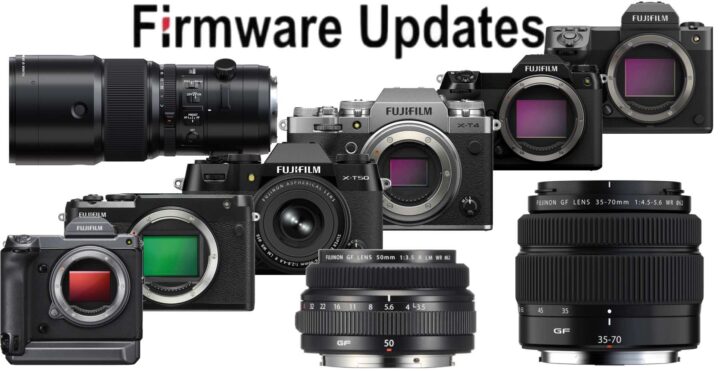
As you know, I am a happy owner of the Fujinon GF50mmF3.5.
Well, happy until a certain point.
Because as I wrote in a complaint post here, the firmware for the GF50mmF3.5 had been suspended and remained so for many months (now years).
I did moan about it here on FujiRumors, but nothing happened.
Nothing until today! 🙂
Because FINALLY Fujifilm has released a new firmware for the previously suspended GF50mmF3.5 as well as the GF35-70mm.
And not only that.
Also the GF500mmF5.6 as well as every single Fujifilm GFX camera got firmware updates.
In the X series world, we get firmware updates for the Fujifilm X-T4 and the Fujifilm X-T50.
ATTENTION: Please update first the GFX camera firmware (no lens attached) and only after that you should update the GF50mm or GF35-70mm firmware.
<Important Notice>
In the unlikely event that firmware update process for any of the above interchangeable lenses is interrupted and the message below appears, please claim “Repair Service Center” in your country to upgrade the firmware. You can read the full firmware instruction here.
Note-1:The followings are messages when the firmware update is interrupted (Messages vary depending on the model).
- Customers with GFX100 II/GFX100S II/GFX 50R/GFX 50S
“FIRMWARE UPDATE ERROR!! PLEASE CONTACT YOUR LOCAL FUJIFILM OFFICE” - Customers with GFX100S/GFX100/GFX 50S II
“FIRMWARE UPGRADE ERROR!! CONTACT A SERVICE CENTER
Note-2:Repair Service Center
Firmware Details
*** Cameras ***
Fujifilm X-T4 ver. 2.12 – download here
The firmware update Ver.2.12 from Ver.2.11 incorporates the following issues:
- The EVF display is sometimes distorted when attaching the XF50-140mmF2.8 R LM OIS WR and repeating the zooming operation.
- When the camera is turned on with the flash (EF-60/EF-X500) attached, the flash is not recognized or the flash does not fire.
Fujifilm X-T50 ver. X-T50 – download here
The firmware update Ver.1.01 from Ver.1.00 incorporates the following issues:
- When the shutter button is half-pressed at the same time as the “AF ILLUMINATOR” light metering operation, the camera freezes in rare cases.
- The camera freezes in rare cases while recording movie with an external monitor connected under the following conditions.
[Setting conditions]
・MOVIE MODE:4K 16:9/59.94P
・MEDIA REC SETTING:H.264/422 MOV
・IS MODE (MOVIE):IBIS/OIS+DIS
・HDMI OUTPUT SETTING:HDMI OUTPUT INFO DISPLAY ON - A minor bug.
Fujifilm GFX100II ver. 2.21 – download here
The firmware update Ver.2.21 from Ver.2.20 incorporates the following issues:
- When the GF50mm/GF35-70mm lens is attached to the camera body and the lens firmware is updated, in rare cases, “LENS ERROR” occurs during the firmware update and the lens stops moving. This revised firmware automatically quits the update to prevent the lens from malfunctioning when detecting the updating error.
Note-1:To enable the above fix, update the camera’s firmware to the latest version before updating the lens firmware.
Note-2:The firmware download for GF50mmF3.5 R LM WR and GF35-70mmF4.5-5.6 WR will be available after this firmware is released.
Note-3:For details, refer to the “FUJINON LENS GF50mmF3.5 R LM WR & GF35-70mmF4.5-5.6 WR firmware download resumption” - When the shutter button is half-pressed at the same time as the “AF ILLUMINATOR” light metering operation, the camera freezes in rare cases.
- The camera freezes in rare cases while recording movie with an external monitor connected under the following conditions.
[Setting conditions]
・MOVIE MODE:4K 16:9/59.94P
・MEDIA REC SETTING:H.264/422 MOV
・IS MODE (MOVIE):IBIS/OIS+DIS
・HDMI OUTPUT SETTING:HDMI OUTPUT INFO DISPLAY ON - Image stabilization does not work in rare cases when shooting movies with GF45-100mmF4 R LM OIS WR attached.
- A minor bug.
Fujifilm GFX100S II ver. 1.01 – download here
The firmware update Ver.1.01 from Ver.1.00 incorporates the following issues:
- When the GF50mm/GF35-70mm lens is attached to the camera body and the lens firmware is updated, in rare cases, “LENS ERROR” occurs during the firmware update and the lens stops moving. This revised firmware automatically quits the update to prevent the lens from malfunctioning when detecting the updating error.
Note-1:To enable the above fix, update the camera’s firmware to the latest version before updating the lens firmware.
Note-2:The firmware download for GF50mmF3.5 R LM WR and GF35-70mmF4.5-5.6 WR will be available after this firmware is released.
Note-3:For details, refer to the “FUJINON LENS GF50mmF3.5 R LM WR & GF35-70mmF4.5-5.6 WR firmware download resumption” - A firmware bug is fixed that the minor noise sometimes appears on the image depending on the subject when RAW images were processed by image processing software to emphasize image quality-related corrections.
- A firmware bug is fixed that the false coloration on the edges of text in rare cases when shooting the fine text, such as a text chart and enlarging this text for display.
- When the shutter button is half-pressed at the same time as the “AF ILLUMINATOR” light metering operation, the camera freezes in rare cases.
- Image stabilization does not work in rare cases when shooting movies with GF45-100mmF4 R LM OIS WR attached.
- A minor bug.
Fujifilm GFX100S ver. 2.12 – download here
The firmware update Ver.2.12 from Ver.2.11 incorporates the following issues:
- When the GF50mm/GF35-70mm lens is attached to the camera body and the lens firmware is updated, in rare cases, “LENS ERROR” occurs during the firmware update and the lens stops moving. This revised firmware automatically quits the update to prevent the lens from malfunctioning when detecting the updating error.
Note-1:To enable the above fix, update the camera’s firmware to the latest version before updating the lens firmware.
Note-2:The firmware download for GF50mmF3.5 R LM WR and GF35-70mmF4.5-5.6 WR will be available after this firmware is released.
Note-3:For details, refer to the “FUJINON LENS GF50mmF3.5 R LM WR & GF35-70mmF4.5-5.6 WR firmware download resumption” - A firmware bug is fixed that the area settings in some regions are not automatically updated when connecting the camera to the “FUJIFILM XApp” to synchronize time.
Note: FUJIFILM XApp, Ver.2.0.3, for iOS & Android are now available - Image stabilization does not work in rare cases when shooting movies with GF45-100mmF4 R LM OIS WR attached.
- A minor bug.
Fujifilm GFX50SII ver. 2.12 – download here
The firmware update Ver.2.12 from Ver.2.11 incorporates the following issues:
- When the GF50mm/GF35-70mm lens is attached to the camera body and the lens firmware is updated, in rare cases, “LENS ERROR” occurs during the firmware update and the lens stops moving. This revised firmware automatically quits the update to prevent the lens from malfunctioning when detecting the updating error.
Note-1:To enable the above fix, update the camera’s firmware to the latest version before updating the lens firmware.
Note-2:The firmware download for GF50mmF3.5 R LM WR and GF35-70mmF4.5-5.6 WR will be available after this firmware is released.
Note-3:For details, refer to the “FUJINON LENS GF50mmF3.5 R LM WR & GF35-70mmF4.5-5.6 WR firmware download resumption” - A firmware bug is fixed that the area settings in some regions are not automatically updated when connecting the camera to the “FUJIFILM XApp” to synchronize time.
Note: FUJIFILM XApp, Ver.2.0.3, for iOS & Android are now available - Image stabilization does not work in rare cases when shooting movies with GF45-100mmF4 R LM OIS WR attached.
- A minor bug.
Fujifilm GFX100 ver. 5.11 – download here
The firmware update Ver.5.11 from Ver.5.10 incorporates the following issues:
- When the GF50mm/GF35-70mm lens is attached to the camera body and the lens firmware is updated, in rare cases, “LENS ERROR” occurs during the firmware update and the lens stops moving. This revised firmware automatically quits the update to prevent the lens from malfunctioning when detecting the updating error.
Note-1:To enable the above fix, update the camera’s firmware to the latest version before updating the lens firmware.
Note-2:The firmware download for GF50mmF3.5 R LM WR and GF35-70mmF4.5-5.6 WR will be available after this firmware is released.
Note-3:For details, refer to the “FUJINON LENS GF50mmF3.5 R LM WR & GF35-70mmF4.5-5.6 WR firmware download resumption” - A firmware bug is fixed that the area settings in some regions are not automatically updated when connecting the camera to the “FUJIFILM XApp” to synchronize time.
Note: FUJIFILM XApp, Ver.2.0.3, for iOS & Android are now available - Image stabilization does not work in rare cases when shooting movies with GF45-100mmF4 R LM OIS WR attached.
- A minor bug.
Fujifilm GFX50S ver. 4.51 – download here
The firmware update Ver.4.51 from Ver.4.50 incorporates the following issue:
- When the GF50mm/GF35-70mm lens is attached to the camera body and the lens firmware is updated, in rare cases, “LENS ERROR” occurs during the firmware update and the lens stops moving. This revised firmware automatically quits the update to prevent the lens from malfunctioning when detecting the updating error.
Note-1:To enable the above fix, update the camera’s firmware to the latest version before updating the lens firmware.
Note-2:The firmware download for GF50mmF3.5 R LM WR and GF35-70mmF4.5-5.6 WR will be available after this firmware is released.
Note-3:For details, refer to the “FUJINON LENS GF50mmF3.5 R LM WR & GF35-70mmF4.5-5.6 WR firmware download resumption”
Fujifilm GFX50R ver. 3.11 – download here
The firmware update Ver.3.11 from Ver.3.10 incorporates the following issues:
- When the GF50mm/GF35-70mm lens is attached to the camera body and the lens firmware is updated, in rare cases, “LENS ERROR” occurs during the firmware update and the lens stops moving. This revised firmware automatically quits the update to prevent the lens from malfunctioning when detecting the updating error.
Note-1:To enable the above fix, update the camera’s firmware to the latest version before updating the lens firmware.
Note-2:The firmware download for GF50mmF3.5 R LM WR and GF35-70mmF4.5-5.6 WR will be available after this firmware is released.
Note-3:For details, refer to the “FUJINON LENS GF50mmF3.5 R LM WR & GF35-70mmF4.5-5.6 WR firmware download resumption” - A firmware bug is fixed that the area settings in some regions are not automatically updated when connecting the camera to the “FUJIFILM XApp” to synchronize time.
Note: FUJIFILM XApp, Ver.2.0.3, for iOS & Android are now available - A minor bug.
*** Lenses ***
Fujinon GF50mmF3.5 ver.1.10 – download here
The firmware update Ver.1.10 from Ver.1.00 incorporates the following issues:
Firmware download of the GF50mmF3.5 R LM WR (Ver. 1.10) resumed on July 9, 2024.
When upgrading, please update your camera body to the latest firmware and then perform the firmware upgrade for the interchangeable lenses.
- Aperture control parameters have been optimized to improve exposure tracking during movie taking.
- Focusing motor noise during movie taking has been reduced.
Fujinon GF35-70mmF4.5-5.6 ver. 1.10 – download here
The firmware update Ver.1.10 from Ver.1.00 incorporates the following issue:
The firmware download of GF35-70mmF4.5-5.6 WR (Ver. 1.10) resumed on July 9, 2024.
When upgrading, please update your camera body to the latest firmware and then perform the firmware upgrade for the interchangeable lenses.
- Aperture control parameters have been optimized to improve exposure tracking during movie taking.
Fujinon GF500mmF5.6 ver.1.01 – downalod here
The firmware update Ver.1.01 from Ver.1.00 incorporates the following issue:
- A minor bug.
