




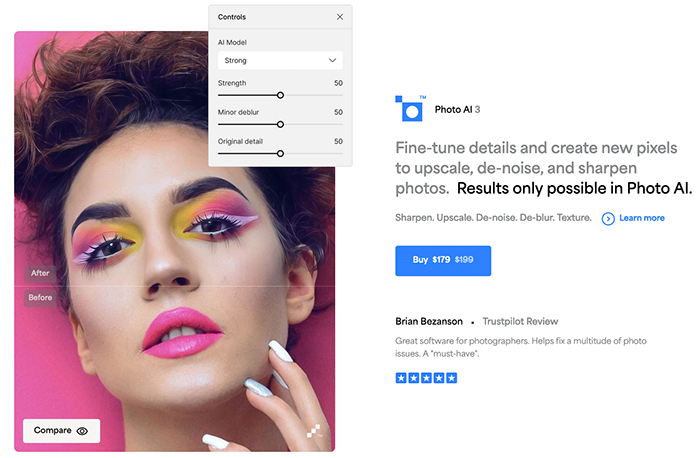
Topaz released the new new Photo Ai 3.1.0 update (Click here). This release of Photo AI includes:
- New Autopilot Suggestions. You can now take full control of Autopilot by opting in to provided suggestions. Autopilot will also now continue to suggest new enhancements to your image.
- Smart Preview Rendering. Ever noticed Photo AI rendering when it didn’t need to, such as when zooming in or when adjusting a slider? No more of that! By intelligently rendering the preview only when required, this version of Photo AI feels snappier than ever before.
- Huge Preview & Masking Optimizations. Optimizations under the hood make rendering, masking, and selection all much faster. You can now mask to your heart’s delight with performance that keeps up with your cursor. It’s so good that you’re going to want to try the Superpixel brush again.
- Major Preserve Text quality improvements. You’re now going to get better text recovery results than before when upscaling – now even rivaling Gigapixel’s Text & Shapes model.
- Major Face Recovery quality improvements. Dramatically improved results for face recovery when combined with other filters such as Adjust Lighting or Balance Color.
We put together a quick video overview as well to help you get the most out of these new features:
Want to dig in deeper? Here’s a full breakdown of what to look for in this latest release:
Introducing Autopilot suggestions
Autopilot will now suggest commonly used enhancements after analyzing your image, making it faster to access all the AI tools. Our vision is that in future versions of Photo AI, using suggestions will teach the Autopilot how you like to edit your photos.
Our suggestions will improve over time in future releases. For now – we’d love to hear your suggestions on how to further improve Autopilot. We have pre-loaded Autopilot Suggestions with a combination of enhancements and selections based on the most common edits used to export images in Photo AI.
Need to apply Autopilot to a large batch of images by before? No problem. We added this button to support batch processing when multiple images are selected in the filmstrip. It pairs well with the new Autopilot behavior to ensure batch processing is still easy and fast when needed.

Please note that as a part of this change, Autopilot will no longer auto-apply to your loaded images without your permission. Clicking “Apply Suggestions” will still apply the same filters as the previous version of Autopilot – but if you want it to still be auto-magic, then you can enable this by changing your preferences here:

Try it out, and let us know what you think!
Smart Preview Rendering
We are always looking for ways to make the application feel smarter and faster.
The Preview window is the primary screen where you see the rendered image (both before and after) in Photo AI. Particularly frustrating is the switch between the original and processed preview when panning or zooming. If the area is already processed, then no reprocessing should be needed, right?
With Smart Preview Rendering, the preview window is now updated to check if a pan or zoom is viewing an area that is already processed. If it’s processed, then the preview will update without reprocessing so you do not see the original image. If it’s not processed yet, then processing starts.
This means more time editing your beautiful images, and less time waiting.
Check out the difference here:
Before (zooming in twice, renders each time, flashes the original image)

After – beautiful, endless scrolling without interruptions

Wondering how to show the original image now? Well, aside from the view mode options, you can still toggle the original with this button here:

Extra pro tip – use the SPACEBAR hotkey to show the original at any time!
Preview & Masking Optimizations
We have overhauled the way that we render masking and selection in the preview window of Photo AI, and we are incredibly excited about the improvement this makes to the overall experience of the app.
You will now see a dramatically increased the usability and smoothness of brushing on images of all sizes. All enhancements that use selection benefit massively from this change.
Each of the brush modes (Basic, Superpixel, and Object Selection) should feel more enjoyable to use for fine tuning your selections. The Basic and Superpixel brush are most improved with these changes, and we have comparisons below.
Even when not performing masking or selection, you’re still going to notice the application is much faster than ever before.
Take a look at the difference:
Basic brush Before (left) & After (right)


And if you haven’t tried Superpixel before – you’re going to want to try it now!
Superpixel brush Before (left) & After (right)


Preserve Text Quality Improvements
You should now see dramatically improved results in this version of Photo AI when using the Preserve Text filter to recover text from images, especially for upscales.
The output quality should now be as good or better than prior versions of Photo AI, and it should even rival the results that you get from Gigapixel’s Text & Shapes model when upscaling.
See below for an example of the improved results:
3.0.4 (top) vs 3.1.0 (bottom) when preserve text is used with upscale


Face Recovery Quality Improvements
Just like with Preserve Text, we are also excited to share a major quality improvement to outputs with the Face Recovery filter applied, especially for images with other effects such as Adjust Lighting or Balance Color also applied.
You’re going to get far more consistent results, and we’re going to make Face Recovery even better in the future, so please stay tuned!
See below for an example of the improved results:
3.0.4 (top) vs 3.1.0 (bottom) output for face recovery + lighting/color


More to Come
With your help, Photo AI is getting better every single day behind the scenes. If you’re reading this and you’re not already in our Beta group, you should be! If you have an active Photo AI license, you are welcome to apply for Beta access here 63.
There’s so much more more coming to Photo AI, and we can’t wait to share with you everything else that we have been working on – including a smarter Autopilot, new AI models, and so much more.
If you can’t tell, we strongly believe in making Photo AI faster and smarter than ever before. This is just the beginning, and we won’t stop here.
We’ve also fixed a number of important issues with this release of Photo AI, as well as the previous patch releases. You can check out the full changelog below.
Cheers,
Dakota Wixom
Product Manager
Topaz Labs